Is There a Realtor.com API? How to Get Listing Data

Search for a Realtor.com API and you'll find plenty of pages that sound like the answer. There's a GitHub repo cataloguing "Realtor.com API" endpoints. There are CRM vendors with Realtor.com integration guides. There's even an official-looking setting inside Realtor.com's own dashboard labelled Add Lead Delivery API. So you sign up, wire it in, and discover it sends you buyer leads. Not listings. Never listings.
That's the confusing part of this question, and it's why most articles get it wrong in one direction or the other. Realtor.com absolutely has APIs. It just doesn't have the one you came for. Here's the precise version, plus the part almost nobody publishes: requests you can actually run.
The short answer
Realtor.com has official APIs, but none of them return property listings to developers. There is no public developer portal, no self-serve key, no sandbox where you request listing data. What exists instead is a set of partner-facing interfaces built for specific commercial workflows: getting leads into a CRM, and getting listings out to publishers.
So the honest answer to "is there a Realtor.com API?" is yes, and it's not for you, unless you happen to be a brokerage buying leads or a publisher licensing a syndication feed. Everyone else has six realistic options, and they differ enormously in cost, paperwork, and how often they page you at 2 AM. We'll walk all six. First, though, the two official APIs deserve a proper explanation, because knowing what they are saves you a week of chasing the wrong door.
What Realtor.com's official APIs actually do
Two things carry the "official" label, and they point in opposite directions.
Connections Plus lead delivery. This is a real, documented API, and it's the one that confuses people most because it lives inside the Realtor.com account UI (Settings → Lead Settings → Connections Plus → Add Lead Delivery API). It pushes buyer and seller leads into a supporting CRM in real time instead of dropping them in an inbox. Faster, structured, mappable into downstream systems. It is also, for a data-focused developer, completely beside the point: it moves people who enquired about a home, not the homes.
ListHub syndication. Move, Inc. acquired ListHub in 2010, which means the company behind Realtor.com also runs the largest listing syndication network in the US, pushing broker listings out to more than 150 publisher sites on behalf of roughly 600 MLSs and tens of thousands of brokerages. That is a listing data pipe. It's just pointed at publishers, under commercial licensing, with display rules attached: consumer display only, mandatory fields like price, address and broker name, and no continued use of a record once the listing goes off-market. If you want to build an analytics product on historical inventory, those terms are the whole problem.
There's a third route that isn't Realtor.com's at all but gets lumped in: going to the source. Realtor.com's listings come from MLS feeds, and MLSs expose data through the RESO Web API, a REST/OData standard with OAuth 2.0. Technically it's the cleanest option in this entire article. Practically, access requires a real estate license in the chain: most boards require the broker of record to sign the IDX or Web API display agreement and accept responsibility for how the data is shown. You cannot buy your way in with a credit card. If you're a licensed brokerage, start there and stop reading. If you're a developer with an idea, that signature is a wall.
Why the listings door stays closed
It helps to know who owns what. Realtor.com is operated by Move, Inc., which News Corp bought for $950 million in 2014, and the site runs under license from the National Association of Realtors. It started life in 1995 as the Realtor Information Network, a closed system for NAR members, before relaunching as a public site the following year.
Realtor.com doesn't own most of what it shows you. That's the structural fact everything else follows from. The listings arrive through MLS agreements and broker feeds, each carrying its own display rules about what can be shown, for how long, and with what attribution. By 2016 the site was displaying 97 percent of residential properties for sale in the US, reaching tens of millions of monthly visitors. You don't hand a free firehose of other people's licensed data to anonymous developers when every record in it came with contractual strings, and when the syndication arm of your own parent company sells access to that same data commercially.
This walkthrough gives a feel for what people end up doing with Realtor.com data once they get hold of it:

Your six real options in 2026
Every path to Realtor.com listing data trades money against engineering time against paperwork. The honest comparison:
| Option | Pricing | Setup effort | Where it hurts |
|---|---|---|---|
| Connections Plus lead API | Bundled with a Realtor.com advertising account | Hours | Delivers leads to a CRM. Returns no listing data at all. |
| MLS data via RESO Web API / IDX | Varies by MLS; setup plus recurring fees | Weeks, most of it paperwork | Needs a licensed broker of record to sign the display agreement. Display rules constrain the product you can build on top. |
| ListHub syndication feed | Commercial licensing, negotiated | Weeks | Built for publishers. Consumer-display only, and records can't be used once the listing goes off-market. |
| DIY scraper (headless browser + proxies) | "Free," plus proxies and your time | Days to build, forever to maintain | ScrapeOps rates Realtor.com 8.5/10 for scraping difficulty, with layered commercial bot management and a page structure that keeps moving. |
| Scraper marketplaces (Apify actors) | From about $0.80 per 1,000 results, plus a fixed start fee per run | Hours | You still own schemas, dedup, and monitoring. Actors break when the site shifts underneath them, and you're waiting on someone else to fix it. |
| Hosted REST endpoints (RealtyAPI) | Free tier, then subscriptions from $20/month | Minutes | Mirrors what Realtor.com shows publicly, so no owner records, no off-market history, no MLS-private fields. |
If you're seriously weighing building it yourself, we've written up the general trade-off in web scraping vs. using an API. Short version: scraping wins when the data has no API at any price and your volume is tiny. It loses the moment uptime matters, and Realtor.com is a particularly unforgiving place to learn that.
Is scraping Realtor.com legal?
The quiet question. The unsatisfying answer: scraping publicly visible pages is not automatically illegal in the US, but Realtor.com's terms of service prohibit it explicitly. The site's own robots.txt carries a legal notice stating that under those terms, scraping is unauthorized without express written permission from Move, Inc. That's a contractual restriction rather than a criminal one, which is a meaningful distinction to a lawyer and a thin comfort to an engineer.
We cover the landscape properly in is website scraping legal? and explain how we source data in is RealtyAPI legal? The practical read is the same as it was for every portal: the legal risk is ambiguous, the engineering pain is certain. Most teams don't abandon scraping because a lawyer called. They abandon it because the bot wall tightened on a Friday.
What RealtyAPI's Realtor.com endpoints cover
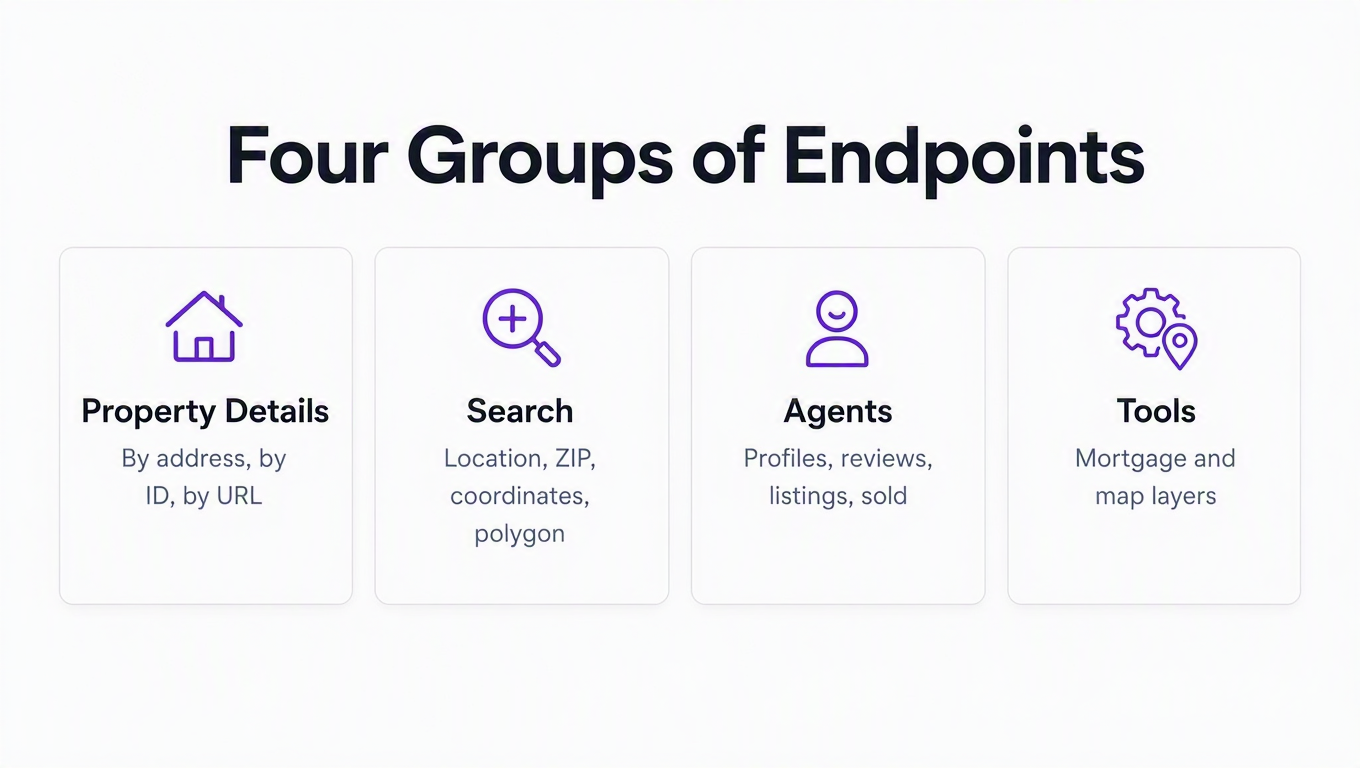
RealtyAPI runs hosted Realtor.com endpoints as part of its real estate data platform: you call a normal REST endpoint with an API key, and proxies, bot walls, and parser maintenance stop being your problem. Seventeen endpoints, grouped into four jobs:
| Group | Endpoints | What you get |
|---|---|---|
| Property details | /details/byid, /details/byaddress, /details/byurl |
The full record for one property, addressed however you happen to have it: an internal property_id, a street address, or a Realtor.com listing URL pasted straight from a browser. |
| Search | /search/bylocation, /search/byzip, /search/bycoordinates, /search/bypolygon, /search/byurl, /autocomplete |
Paginated listings by free-text place, ZIP, a lat/lon radius, an arbitrary drawn polygon, or a search URL. Autocomplete resolves messy user input into real places. |
| Agents | /agent/search, /agent/details, /agent/reviews, /agent/for_sale, /agent/for_rent, /agent/sold |
The "Find a Realtor" side of the site: agent profiles, ratings and written reviews, and each agent's active and closed inventory. |
| Tools | /mortgage, /mapLayer |
Monthly payment estimates with a per-component breakdown, and 19 map overlays including market hotness, days on market, schools, noise, flood, wildfire and heat. |
Auth is a single x-realtyapi-key header, responses are JSON, and most calls cost one credit. /details/byaddress costs two, because resolving a free-text address to a property means an extra lookup behind the scenes. If you already have the id, /details/byid is both cheaper and faster. Unlike some of the premium portals on the platform, Realtor.com is available on every plan, including the free tier's 250 requests a month, so you can size it up before paying anyone.
The filters that make it feel like Realtor.com
A generic national listing API gives you beds, baths, and price, then leaves you to post-filter everything else client-side. That's fine until you're paginating 40,000 results to find the 90 that matter. The search endpoints take the full filter set, and the range grammar is worth learning because it's the same on every one of them:
priceRange,bedsRange,bathsRange,sqftRange,lotSqftRange,yearBuiltRange: all usemin:andmax:, either alone or paired.bedsRange=min:3,max:3is an exact match, andbathsRangetakes decimals, so2.5means two full baths and a half.searchType:For_Sale,For_Rent, orSold, and it's multi-value.searchType=For_Sale,Soldin one call is how you get on-market inventory and sold comps together for a comparative market analysis.daysOnMarketMaxandpriceReducedDays: the two filters that matter most for deal-finding, because a listing that just cut its price is a different animal from one that's been sitting.foreclosure,pending,newConstruction,seniorCommunity: tri-state booleans. Passtrueto get only those,falseto exclude them, omit to include both.keywords,petsAllowed,openHouse,hasTour,hasPhotos: the long tail that keeps you from filtering in your own code.sortOrder: eleven values includingNewest,Price_Low_to_HighandOpen_House_Date. Sorting server-side matters when you only intend to read the first page.
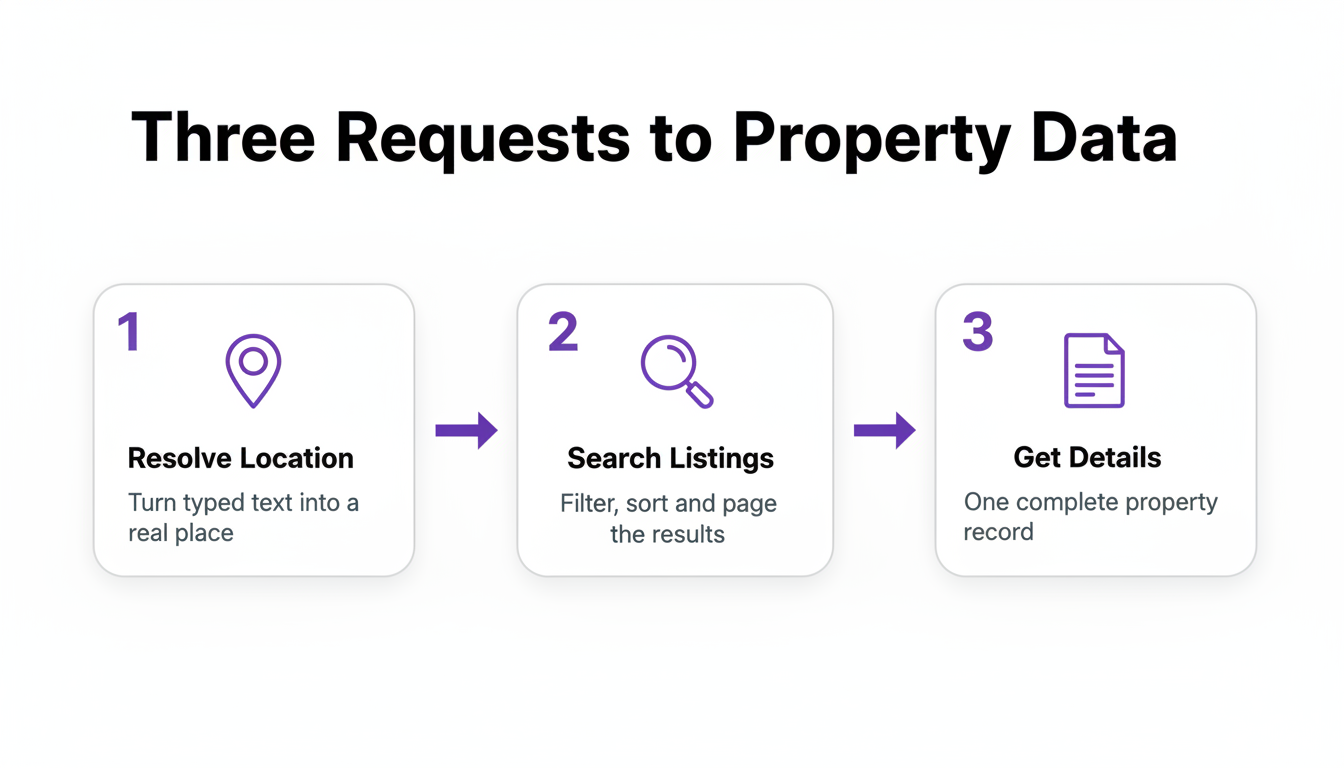
Quick-start: listings in three requests
Base URL: https://realtor.realtyapi.io. Auth: your key in the x-realtyapi-key header. The docs cover key setup in about two minutes.
1. Resolve the location
Users type "austin tx", "78758", and "Westlake" interchangeably. Autocomplete turns any of it into something structured, ranking suggestions across cities, ZIPs, neighborhoods, counties, addresses, schools, school districts, parks and streets, each with geo metadata like centroid, slug_id, geo_id and state_code:
curl "https://realtor.realtyapi.io/autocomplete?input=westlake+austin" \
  -H "x-realtyapi-key: YOUR_KEY"
You can skip this step if you already trust your input. Search takes free text directly.
2. Search listings
curl -G "https://realtor.realtyapi.io/search/bylocation" \
  -H "x-realtyapi-key: YOUR_KEY" \
  --data-urlencode "location=Westlake, Austin, TX" \
  --data-urlencode "searchType=For_Sale" \
  --data-urlencode "priceRange=min:500000,max:1500000" \
  --data-urlencode "bedsRange=min:3" \
  --data-urlencode "sortOrder=Newest" \
  --data-urlencode "resultCount=50"
Each result carries a property_id and listing_id, address, photos, price, beds, baths, square footage, status, days on market, listing date, and the listing-advertiser block. The response includes a nextPage boolean, so you page until it flips false. resultCount defaults to 50 and goes up to 200, and every page costs one credit, which means asking for 200 at a time is four times cheaper than asking for 50.
3. Pull full details
curl "https://realtor.realtyapi.io/details/byid?property_id=PROPERTY_ID" \
  -H "x-realtyapi-key: YOUR_KEY"
Already sitting on a Realtor.com URL instead? /details/byurl parses the _M segment out of a listing link and resolves it for you, which is the fastest way to go from "someone pasted this in Slack" to structured data.
A production-ish Python loop
Here's the same flow with pagination and the error handling you actually want, since any API fronting live web data will occasionally have a bad minute upstream:
import requests

BASE = "https://realtor.realtyapi.io"
HEADERS = {"x-realtyapi-key": "YOUR_KEY"}

def get(path, **params):
    r = requests.get(BASE + path, params=params, headers=HEADERS, timeout=60)
    r.raise_for_status()
    return r.json()

def search(location, **filters):
    page = 1
    while True:
        data = get("/search/bylocation", location=location,
                   page=page, resultCount=200, **filters)
        results = data.get("results") or data.get("listings") or []
        if not results:
            break
        for listing in results:
            yield listing
        if not data.get("nextPage"):
            break
        page += 1

recent_cuts = search(
    "Westlake, Austin, TX",
    searchType="For_Sale",
    priceRange="min:500000,max:1500000",
    priceReducedDays=7,
)

count = 0
for listing in recent_cuts:
    count += 1
    print(listing.get("property_id"))

print(f"{count} listings cut their price in the last week")
Read the exact response envelope off the docs or the playground before you hard-code a key path; the defensive or chain above is there so a shape change degrades into an empty page rather than a KeyError at 3 AM.
Two things worth copying from that loop even if you never use this API. Cap resultCount at the maximum rather than the default, because pagination is where metered APIs quietly get expensive. And break on an empty page as well as on nextPage, because trusting a single termination condition is how you write an infinite loop that bills you for it. Ask me how I know.
Beyond listings: agents, comps, and map layers
This is the part the "here's a Realtor.com scraper" articles skip entirely, and it's often what people actually needed.
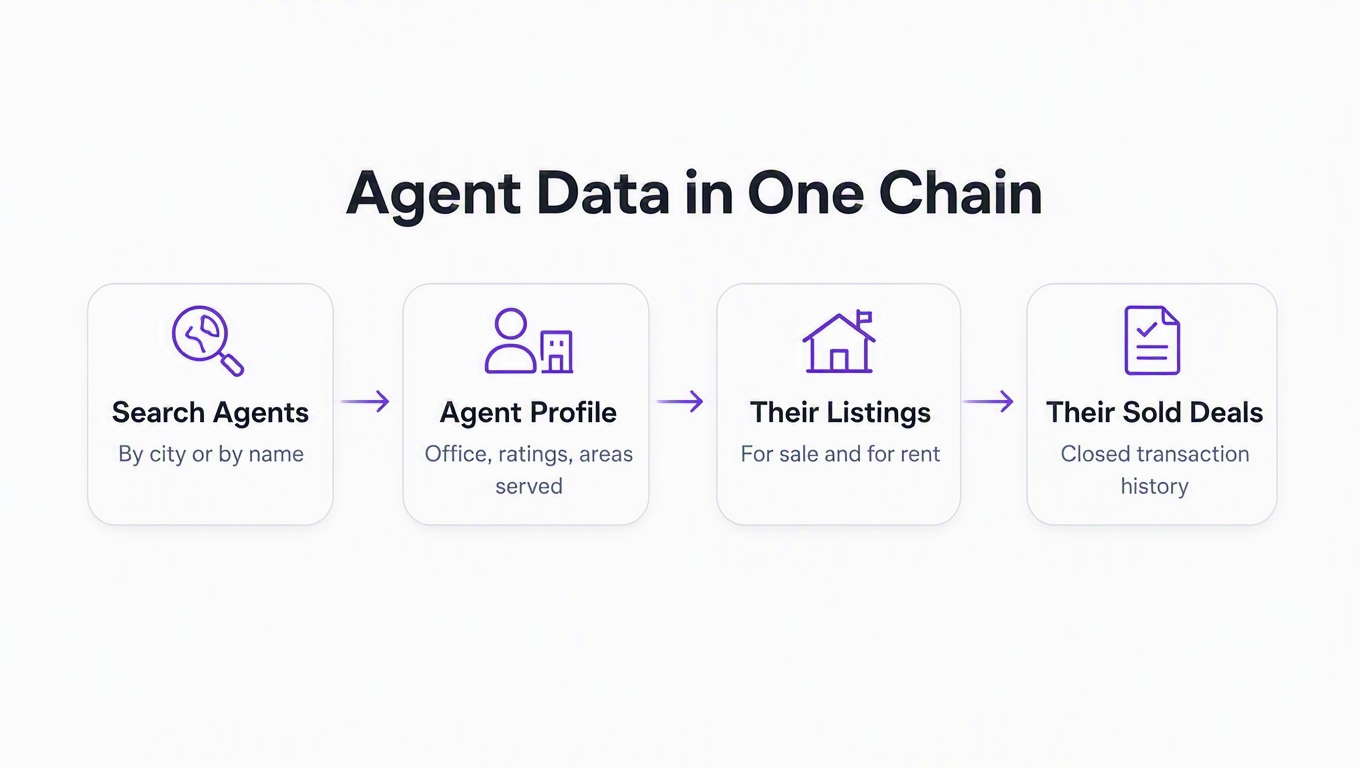
Agent data is a chain, not an endpoint. Every search result includes a listing-advertiser block containing a fulfillment_id, and that id is the key to six agent endpoints. /agent/search finds agents by city or by name and returns profiles with brokerage, ratings, review counts, listing stats, served areas, specializations and languages. /agent/details expands one into a full profile with bio, license number, designations and contact details. /agent/reviews returns the written reviews behind the star rating. And /agent/for_sale, /agent/for_rent and /agent/sold give you their inventory, including closed deals.
Chain those together and you have a genuine market-intelligence pipeline: find every agent working a ZIP, rank them by sold volume, and see exactly what they're moving. That's a prospecting product, a brokerage recruiting tool, or a competitive dashboard, and it never touches a listing search.
Sold comps come from the same search endpoints. Set searchType=Sold and sort by Most_Recently_Sold, and the search you already wrote becomes a comps query. Pair it with /mortgage, which returns loan amount, monthly payment, total payment and a breakdown across principal and interest, property tax, insurance, HOA and mortgage insurance, and you can price a property and its carrying cost in two calls.
Map layers are the underrated one. /mapLayer exposes 19 overlays for a region, including market hotness, days on market, sold price versus list price, housing forecast, schools, neighborhoods, noise, and the climate set: flood, wildfire, heat, wind and air. If you're building anything that scores a location rather than a building, that's the endpoint to look at first.
What you still can't get
Honesty section. These endpoints return what Realtor.com publishes publicly. They are not an MLS feed wearing a disguise, and there are three things they will never hand you.
No MLS-private fields: agent remarks, showing instructions, commission splits. Those never reach the public site, so they can't reach an API that mirrors it. No owner or off-market records: if you need who owns a parcel or what sold in 2019, that's county assessor and recorder data, a different category of product entirely. And no time machine. You get days on market and price-reduction windows on current listings, but if you want a multi-year price history you capture it yourself, on a schedule. The pagination loop above plus a cron job and a Postgres table gets you further than you'd think.
If your product needs coverage beyond one portal, that's what pairing sources is for. We took the same approach with whether Redfin has an API, StreetEasy's missing API, and getting Zillow data through an API. The broader listing-API comparison covers how the options stack up.
Key takeaways
- Realtor.com has official APIs, and none of them return listings. Connections Plus moves leads into a CRM; ListHub moves listings out to publishers. If you're a developer wanting listing data, neither door opens.
- The cleanest legitimate route needs a real estate license. MLS data through the RESO Web API is a proper REST/OAuth standard, but most boards require a broker of record to sign the display agreement. No signature, no feed, regardless of budget.
- Realtor.com is a hard scrape, and that's deliberate. Layered commercial bot management, a shifting page structure, and terms that prohibit automated access. The maintenance bill is the real cost, not the proxies.
- Learn the range grammar and you've learned every search endpoint.
min:/max:works identically across price, beds, baths, sqft, lot size and year built, on location, ZIP, radius and polygon searches alike. - The agent endpoints are the sleeper feature. One
fulfillment_idfrom any search result unlocks profiles, reviews, and an agent's full sold history. That's a prospecting product hiding inside a listings API.
The fastest way to know whether this fits your product is to run the three requests above against your own market and read what comes back. The free tier's 250 requests a month is enough to answer that question properly, and Realtor.com is included in it.