Is There a realestate.com.au API? How to Get Listing Data

Search for a realestate.com.au API and you get a confusing result: a real developer portal, at partner.realestate.com.au, with proper OAuth, published rate limits, a changelog, and more than a dozen APIs. It looks like the answer. You read the docs, you find something called the Listing Export API, and for about ninety seconds you think the problem is solved.
It isn't. REA Group's API platform is genuinely good, genuinely public, and genuinely free to use. It just won't give you the thing you came for. Here's why, and what actually works instead.
The short answer
Yes, realestate.com.au has an official API. No, it will not give you the market's listings.
Every API on REA's Partner Platform is scoped to data you already own. You can push your agency's listings up. You can pull your agency's listings back down. You can read the enquiries your listings generated and the campaign stats you paid for. What you cannot do, at any price, is ask REA for the listings in a suburb.
That distinction matters more than it sounds. Most closed portals are closed on price: there's an enterprise tier, you talk to sales, you sign something expensive. REA is closed on entitlement. There is no cheque you can write, because the unit of access is a real estate agency granting your partner account permission to touch its own listings. No agency, no data. A thousand agencies gets you a thousand agencies, not a market.
So the honest 2026 answer has two halves, and the rest of this post covers both: what the official platform really does, and what your options are when it isn't what you needed.
What REA's Partner Platform actually gives you
Credit where it's due, this is a well-built developer platform. Authentication is standard OAuth client credentials against api.realestate.com.au/oauth/token, tokens last an hour, and the docs open with a worked example that deliberately fails with a 401 before showing you the token exchange. Someone who has onboarded developers before designed that page.
The catalogue is broad. Listing Upload, Listing Export, Leads, Lead Enrichment, Integrations, Customer Profile, Webhooks, Campaign, Pricing, Tenant Selection, Connection Leads, Successful Applicant, and Ratings & Reviews. Rate limits are published rather than mysterious: 300 requests per minute for Listing Upload, Listing Export and Webhooks, 400 per minute for Campaign and Leads, with the remaining budget returned in X-RateLimit-Remaining-minute headers and a 429 when you blow through it.
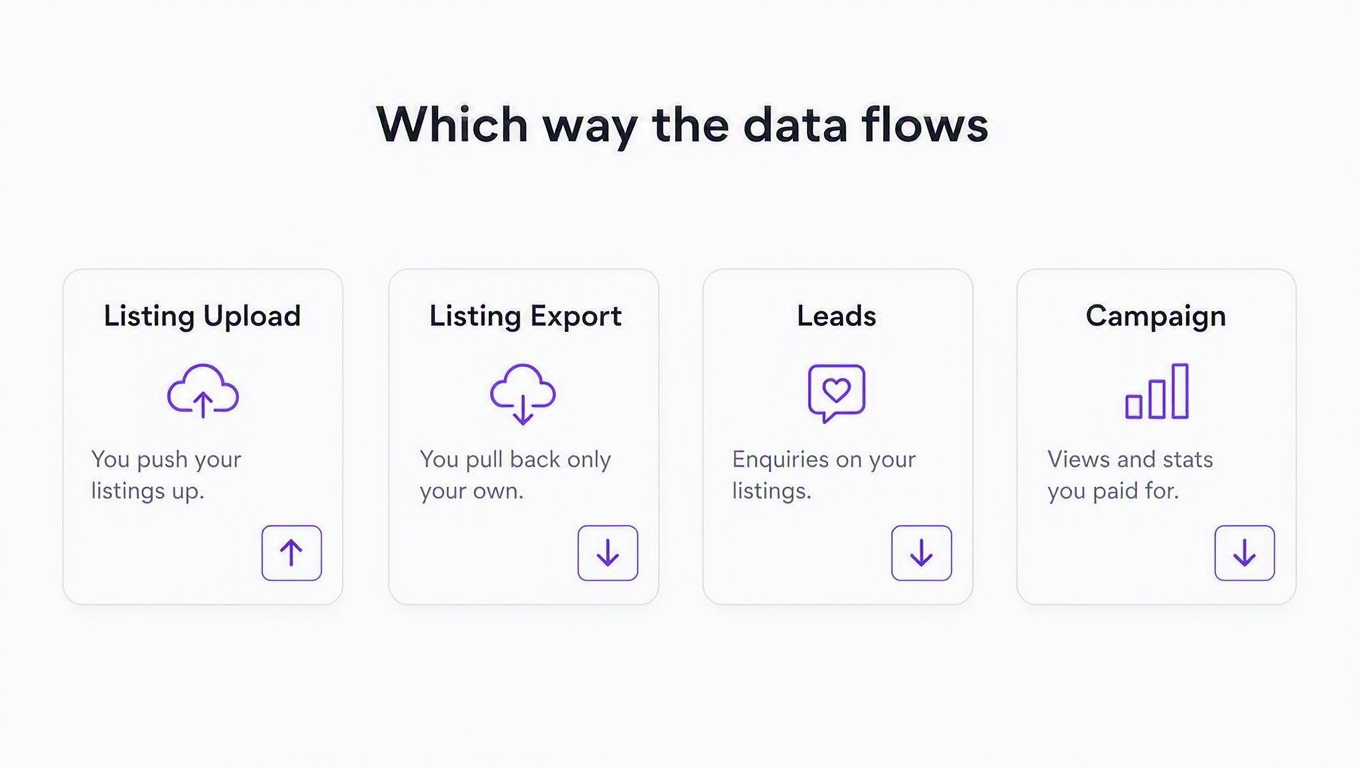
Now look at the arrows. Listing Upload is a one-way street by design, and REA says so in its own FAQ: the API exists for XML providers to push listings to REA, and it does not retrieve them. The payload format is REAXML, the long-standing Australian listing schema, whose DTD is published openly. If you have ever wondered why every Australian agency CRM speaks the same slightly archaic XML dialect, that file is why.
The Listing Export API, and why it isn't the one you want
This is the endpoint that sends people down a two-day rabbit hole, so let's be precise about it. Listing Export returns listings in REAXML, supports residential, rental, rural, land and commercial types, covers both active and sold listings, is paginated at 200 listings a page via an x-next-link header, and REA confirms in the FAQ that using it costs customers nothing.
All of which sounds excellent until you read the usage page, which says you can export listings from "agencies you are entitled" to. The scope is listing:listings:export, and it is granted per partner, not per developer. To get it you submit a partner application, wait for REA's support team to issue credentials, and then, in REA's own onboarding words, every agency you intend to represent has to set up an integration pointing at your account.
Filter by agency_id and you get that agency's listings. Omit it and you get all listings across the agencies that authorised you. Neither is the market. It's your customers' data, returned to your customers' software, which is exactly the product REA meant to build.
Question: can't I just become a partner and onboard a few agencies?
You can, and if you're building agency software you absolutely should. Pull your customers' listings from Listing Export, receive their enquiries through Leads, show campaign performance from Campaign, and you have a legitimate, supported, rate-limited integration with no scraping anywhere in it.
But if your product is a portfolio screener, a rent index, a buyer's-agent tool, a suburb comparison app, or anything else that needs to see the whole market rather than one agency's slice, partner onboarding solves nothing. You'd need every agency in Australia to individually authorise you. That's not an integration project. That's a sales org.
Why the door is shut
Portals do not sell houses. They sell attention, and listings are what buys it. REA Group's FY26 results put average monthly visits at 146.4 million, up 11%, and roughly 104.5 million more monthly visits than its nearest competitor, with residential revenue climbing 12% to A$1,290 million (as reported by Online Marketplaces). Agents pay for depth-of-listing products because the audience is there, and the audience is there because the listings are. Handing out a free market-wide feed would dismantle both sides of that loop at once.
REA is unusually direct about this. Its robots.txt opens with a plain-English preamble rather than a rule: automated access is not permitted, with a narrow carve-out for general search engines, and an explicit note that the carve-out does not extend to sites that aggregate property listings as a business. Below the preamble sit around thirty user-agent rules, most of them blanket blocks, and they cover most of the AI crawlers you would recognise. Whatever you think of the legal weight of a robots.txt file, nobody can claim the position is ambiguous.
This interview with REA on how portals think about their data is worth fifteen minutes if you're deciding whether to build against them:

One more official door worth knowing about: REA points anyone after market insights, automated valuations and property reports at PropTrack, its data and analytics arm. If you need AVMs and market analytics rather than live listings, start there. It is a commercial data business, not a self-serve developer API, but it is the right door for that question.
Your four real options in 2026
Every route to realestate.com.au listing data trades money against engineering time against fragility. The honest comparison:
| Option | Pricing | Setup effort | Where it hurts |
|---|---|---|---|
| Official Partner Platform | Free from REA | Weeks (application, credentials, per-agency authorisation) | Only returns listings from agencies that authorised you. No market-wide access exists at any price. |
| DIY scraper (headless browser + proxies) | "Free," plus proxies and your time | Days to build, forever to maintain | Bot detection, layout changes, IP bans. Every scraper is a maintenance contract you sign with yourself. |
| Scraper marketplaces (e.g. Apify actors) | Roughly $0.90 to $3 per 1,000 results depending on the actor | Hours | You still own schemas, dedup, pagination and monitoring, and actors break when the site shifts underneath them. |
| Open-source wrappers (e.g. realestate-com-au-api on PyPI) | Free | Hours | The best-known one is still on version 0.0.1b1, last released in December 2019. Nobody to email when it stops. |
| Hosted REST endpoints (RealtyAPI) | Subscription plans (see current pricing) | Minutes | Covers realestate.com.au's residential world only, and it sits on the paid plans rather than the free tier. |
That PyPI date is worth sitting with. A package literally named realestate-com-au-api, still the top Python result for the query, has not shipped a release since 2019. It is not abandoned out of laziness. It's abandoned because maintaining an unofficial client against a site with this much anti-bot investment is a full-time job that pays nothing. We wrote up the general version of that trade-off in web scraping vs. using an API.
Is scraping realestate.com.au legal?
The quiet question. The unsatisfying answer: scraping publicly visible pages is not automatically unlawful in Australia, but REA's terms prohibit it, the robots.txt preamble singles out listing aggregators by name, and REA Group is large enough to make a point of it if it chooses. The legal picture is genuinely ambiguous; the engineering picture is not. Most teams don't stop scraping because a lawyer called. They stop because the Tuesday deploy broke again. We go deeper in is website scraping legal? and, for how we think about our own sourcing, is RealtyAPI legal?
What RealtyAPI's realestate.com.au endpoints cover
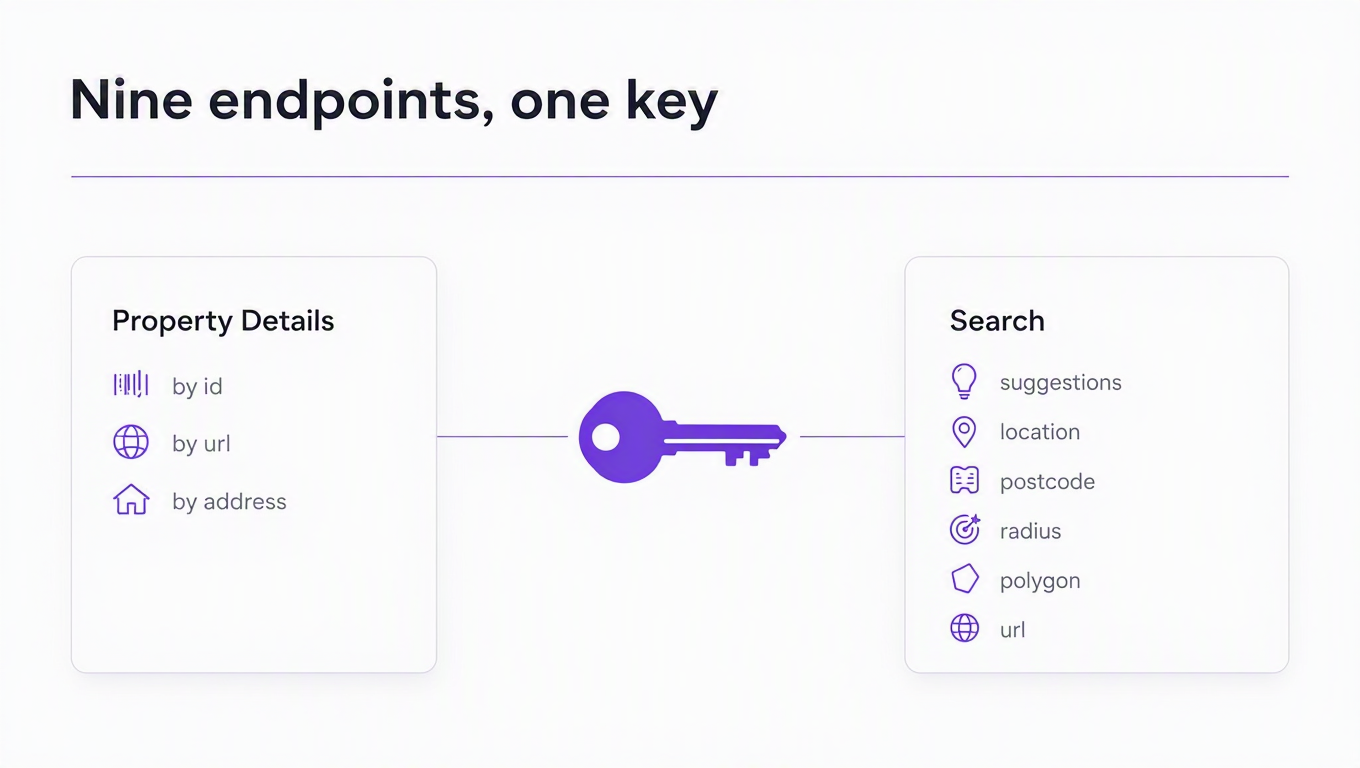
RealtyAPI runs hosted realestate.com.au endpoints as part of its real estate data platform: you call a normal REST endpoint with an API key, and proxies, headless browsers and anti-bot plumbing stop being your problem. Nine endpoints cover the surface.
| Endpoint | What it returns |
|---|---|
GET /autocomplete | Search-box suggestions across suburbs, postcodes, regions, states, addresses and listings, with geo metadata ready to feed into a search |
GET /search/bylocation | Free-text location search: suburb, postcode, region, state or address, with the full filter set |
GET /search/byzip | Postcode-only search, for when you want exactly four digits and no fuzziness |
GET /search/bycoordinates | Everything within a radius in kilometres of a latitude and longitude |
GET /search/bypolygon | Search a drawn shape: a neighbourhood outline, a school catchment, a hand-drawn map region |
GET /search/byurl | Paste a realestate.com.au search URL and run the search it represents |
GET /details/byid | Full details for one listing, by the listingId every search row carries |
GET /details/byurl | Same, from a listing URL, with the id parsed out for you |
GET /details/byaddress | Same, from a street address, resolved through autocomplete first |
The filters that make it feel Australian
Generic global listing APIs treat Australia like anywhere else, which is how you end up unable to answer "four-bedroom house on 600 square metres, not going to auction, within 10km of the CBD." The search parameters below are the ones that carry local meaning:
searchType:For_Sale,For_RentorSold. Sold is a first-class channel here, not an afterthought.maxSoldAge: bound the sold window as90:days,6:monthsor2:years. Only meaningful alongsidesearchType=Sold.propertyType: the Australian vocabulary, includingAcreage,Rural,Villa,Block_of_UnitsandRetirement, not just house and apartment.landSizeRange: square metres, because land size is a headline number in Australia in a way it isn't in most markets.carSpacesRange: car spaces are a filter on the portal itself, so they're a filter here.excludeAuctions,excludePrivateSales,excludeUnderContract,excludeNoDisplayPrice: auction culture makes these genuinely load-bearing. The last one drops every listing whose price reads "Contact Agent".surroundingSuburbs: include or exclude neighbouring suburbs. Read the gotchas below before you assume the default.furnishedandpetsAllowed: rental-side filters that mirror the site's own.constructionStatus:establishedornew, for separating existing homes from new builds.
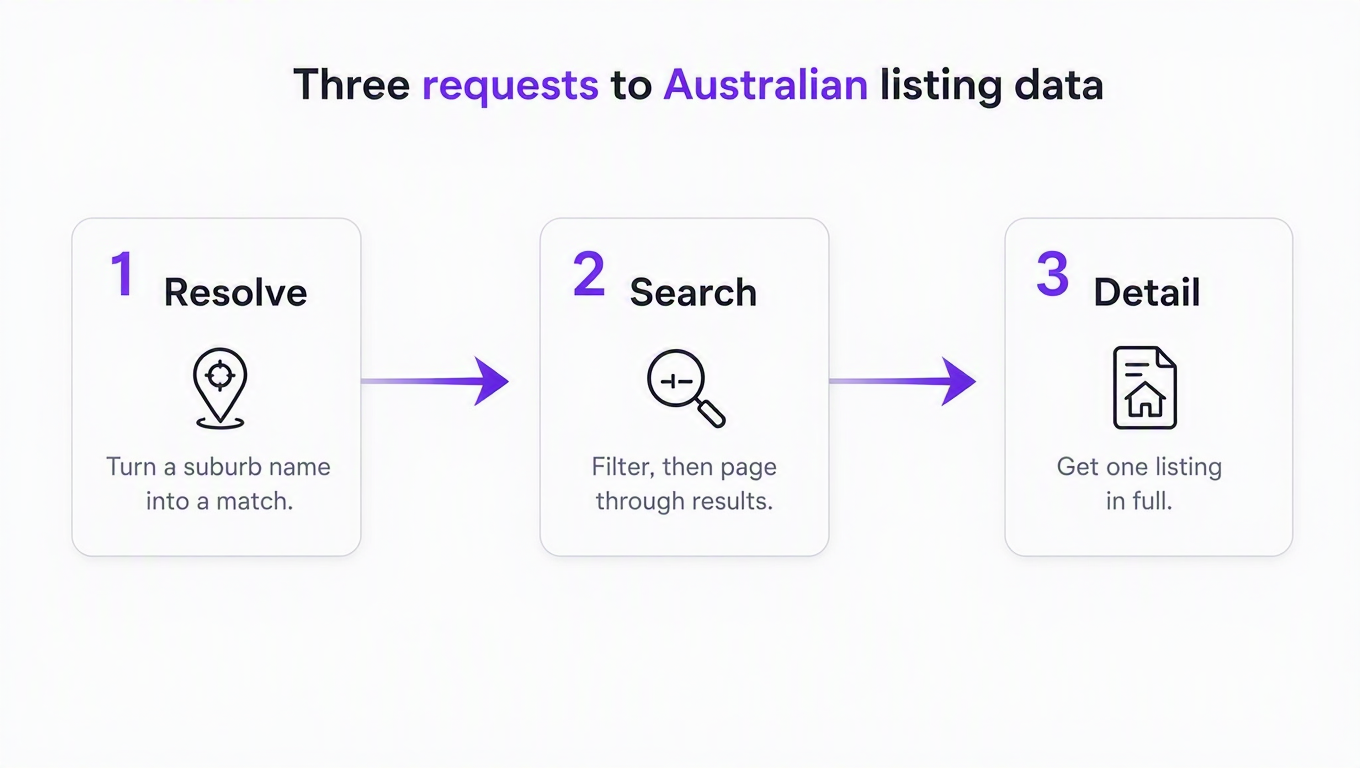
Quick-start: Australian listings in three requests
Base URL: https://realestateau.realtyapi.io. Auth: your key in the x-realtyapi-key header. One note before you start: realestate.com.au sits in RealtyAPI's premium set, so it's available on the subscription plans rather than the free tier. The free tier is still the right place to feel out request and response shapes on the standard APIs first, and the docs cover key setup in a couple of minutes.
1. Resolve the location
curl "https://realestateau.realtyapi.io/autocomplete?input=Bondi&types=suburb" \
  -H "x-realtyapi-key: YOUR_KEY"
You can skip this and pass a free-text location straight to search, but resolving first is how you avoid the classic bug where "Richmond" quietly means Victoria on Monday and New South Wales on Tuesday. Australia has a lot of repeated suburb names.
2. Search
curl "https://realestateau.realtyapi.io/search/bylocation?location=Bondi,%20NSW%202026&searchType=For_Sale&bedsRange=min:3&priceRange=min:1500000,max:3000000&excludeAuctions=true&surroundingSuburbs=false" \
  -H "x-realtyapi-key: YOUR_KEY"
Note the range syntax: min: and max: as a comma-separated pair, not two separate parameters. Each result row carries a listingId, address, price, photos, beds, baths, parking, land size, status, listing date and the listing agent block. The response includes a nextPage boolean, and resultCount goes up to 200 per page.
3. Get the full listing
curl "https://realestateau.realtyapi.io/details/byid?listingId=150342808" \
  -H "x-realtyapi-key: YOUR_KEY"
If you only have a URL, /details/byurl takes it directly and parses the trailing eight or nine digit id for you. If you only have a street address, /details/byaddress resolves it through autocomplete first, which costs two credits instead of one and only works for listings that are currently on market.
A production-ish Python loop
Here is the same flow with pagination and the error handling you actually want, because any API fronting live web data will occasionally have a bad minute upstream:
import time
import requests

BASE = "https://realestateau.realtyapi.io"
HEADERS = {"x-realtyapi-key": "YOUR_KEY"}

def get(path, **params):
    for attempt in range(3):
        r = requests.get(BASE + path, params=params, headers=HEADERS, timeout=60)
        if r.status_code in (429, 502, 503, 504):
            time.sleep(2 ** attempt)
            continue
        r.raise_for_status()
        return r.json()
    raise RuntimeError(f"{path} failed after 3 attempts")

def search(**filters):
    page = 1
    while True:
        data = get("/search/bylocation", page=page, resultCount=200, **filters)
        rows = data.get("results") or data.get("listings") or []
        if not rows:
            break
        for row in rows:
            yield row
        if not data.get("nextPage"):
            break
        page += 1

seen = set()
for row in search(location="Bondi, NSW 2026",
                  searchType="For_Sale",
                  bedsRange="min:3",
                  landSizeRange="min:400",
                  surroundingSuburbs="false"):
    listing_id = row.get("listingId")
    if listing_id in seen:      # same listing can surface twice across pages
        continue
    seen.add(listing_id)
    print(listing_id, row.get("price"))
From there it's your product. Diff daily snapshots into Postgres for a price-drop watcher, run searchType=Sold with maxSoldAge for a suburb-level comparable set, or point /search/bypolygon at a school catchment for a family-relocation tool. The point of an API over a scraper is that this loop is the whole integration. There's no proxy pool underneath it for you to babysit at 2am.
Five gotchas that will bite you
Every wrapper over a real portal inherits that portal's quirks. Better to know them on day one than to discover them in a bug report:
surroundingSuburbsdefaults to true. This mirrors the website, but it means a search for one suburb returns its neighbours too. If you're computing a median for Bondi and quietly averaging in Bronte, this is why. Set it tofalsefor anything analytical.- Bathrooms and car spaces honour
minonly. The upstream search ignores the maximum on both, sobathsRange=min:2,max:3silently behaves asmin:2. Filter the ceiling in your own code. - Bedrooms top out at 5+. The portal's own vocabulary caps there, so
min:7resolves to five or more. If you need genuinely large homes, filter on the returned bed count yourself. - Polygon and radius searches evaluate as bounding boxes. Both endpoints reduce your shape to the smallest rectangle containing it, so results can include listings just outside the exact outline. Do a point-in-polygon check client-side when strict containment matters.
- Pagination is not a total count. Page until
nextPageis false rather than assuming a result total, and dedupe bylistingIdas you go. Live listing sets shift underneath a paginated read; that's true of every portal, not just this one.
What you still can't get
The honesty section. These endpoints return what realestate.com.au shows publicly: active listings, sold history within the window you ask for, and full detail on any listing you can name. They are not a time machine and not a CRM.
No enquiry or lead data, because that belongs to the agency and lives behind REA's Leads API. No commercial property, since realcommercial.com.au is a separate site with its own inventory. No long-run price series, though the pagination loop above plus a cron job and a database gets you further than you'd think, and searchType=Sold covers the recent past directly. And if your app needs coverage beyond Australia, this alone won't do it. That's what pairing sources is for, the same way we worked through which Rightmove APIs actually exist, what Idealista's official API does and doesn't do, and whether StreetEasy has an API at all. If you're still choosing, the listing API comparison lays the options side by side.
Key takeaways
- realestate.com.au has a real, free, well-documented API, and it is not for you unless you serve agencies. Every endpoint is scoped to a customer's own data, and access is granted by individual agencies rather than bought.
- Listing Export is the trap. The name promises the market; the docs scope it to the agencies that authorised your partner account. Read the usage page before you plan a sprint around it.
- The closure is commercial, not technical. With 146.4 million average monthly visits and residential revenue over A$1.2 billion in FY26, listings are the asset. A free market-wide feed would compete with the business.
- Unofficial clients rot fast. The best-known Python wrapper has been on 0.0.1b1 since 2019. Anything you build yourself against this site becomes a maintenance job, not a feature.
- Whatever route you pick, keep the integration one layer thick. If a source changes, you want to swap one client file, not an application's worth of parsing assumptions.
If you're building for the Australian market, the fastest way to find out whether this data fits your product is to run the three requests above against your own suburb and read what comes back. Ten minutes and a subscription plan will tell you more than another afternoon of reading partner documentation that was never written for you.