How to Clone Site Safely: Step-by-Step Guide 2026
You've got a redesign deadline, a live site you can't afford to break, and a client asking why staging still shows last month's pages. You need a copy that behaves like production, without sending real orders, real emails, or real leads anywhere dangerous. That's the core job behind most searches for how to clone site content safely. The download is the easy part. The work is choosing the right method, clearing what you're allowed to reuse, isolating the copy, and testing it like a product, not a screenshot.
Choose the Cloning Method That Fits Your Goal
A team that needs a staging copy before a redesign doesn't have the same job as someone archiving old documentation. Treating both as one task is how you end up with a folder of HTML that looks right and does nothing useful.
I would start by naming which of four goals you're serving. It might be a staging copy of your own site, an offline archive, a host migration, or a private learning copy of a public page. Each goal tolerates different gaps. An archive can lose search. A staging copy for client approval can't lose checkout, forms, or login states.
What Each Method Actually Preserves
| Method | Best for | Tools | Keeps dynamic content | Typical effort |
|---|---|---|---|---|
| Static mirror | Brochure sites, documentation, archived pages | wget, HTTrack | No, forms and search break | A few hours |
| CMS export and import | WordPress, Drupal, HubSpot blogs | Built-in export, WP-CLI, import tools | Partly, posts and media move, plugins may not | Half a day to two days |
| Full app copy | SaaS products, custom web apps | git clone, pg_dump or mysqldump, Docker | Yes, if config and secrets are reset | One to five days |
| DevOps environment clone | Production-like staging for complex stacks | Terraform, Docker Compose, Kubernetes namespace copies | Yes, including services and queues | Several days to weeks |
A static mirror wins on speed because it only saves what a browser receives. You get pages, styles, and images, but you don't get the database queries, session handling, or server logic behind them. Forms submit nowhere, site search returns nothing, and account pages are just dead templates.
CMS export sits in the middle. Posts, pages, and media usually move cleanly, especially with WP-CLI or a platform importer, but plugin settings, custom fields, and embedded blocks often need manual repair. A full app copy takes longer because you're moving code, data, and runtime together. A DevOps clone costs the most upfront, yet it pays back when you need queues, cron jobs, and third-party services to behave like production.
Quick test: If the site has a login, a database, or a payment step, a static mirror is the wrong tool.
Pick for the behavior you must test, not the pages you can see. If nobody needs to log in, search, or pay on the copy, mirror it and move on. If those flows are the point of the staging review, budget for the heavier method now instead of rebuilding around a broken mirror later.
Check the Legal Limits Before You Copy Anything
Publicly visible doesn't mean commercially licensed. You can open a page, save it, and study it, and still have no right to republish its text, photos, code, or branding. Copying a site is a technical act. Reusing it is a legal one.
The U.S. Copyright Office FAQ on what copyright protects states that website writings, artwork, photographs, and other original authorship can be protected as soon as they're fixed in tangible form, including digital storage. It also states that copyright generally doesn't protect raw facts, ideas, systems, or methods of operation, though the creative expression of those elements can be protected. Registration is generally voluntary, but it's normally required before an owner of a U.S. work can bring an infringement lawsuit.
That distinction decides most cloning disputes. Rebuilding a listing search or booking flow in your own code can be lawful. Copying the original descriptions, illustrations, source code, or distinctive visual presentation to power it is a different risk.
Run This Preflight First
- Confirm ownership or permission: Make sure you own the site or hold written permission for the intended use.
- Inventory reusable assets: List every non-factual asset you plan to reuse, with its license, source, and collection date.
- Read the access rules: Check robots.txt and the terms of service. A crawler instruction isn't a license, and provider terms still apply to your own integrations, as our terms of service illustrates.
- Slow down automated requests: Limit request rate so you don't burden the origin server.
- Keep branding out: Don't copy logos, brand names, or trademarks that imply affiliation.
Migration, staging, backup, and private learning on a site you control are usually the low-risk cases. Republishing another company's listings, copying its branding, bypassing logins, or redistributing scraped data commercially are high-risk cases. Changing colors or paraphrasing a few paragraphs doesn't solve that problem.
Use a Clean Room Path for Third-Party References
- Inventory the reference site's information architecture, page types, URL patterns, and form states from its public behavior only.
- Recreate the design system in your own code instead of exporting the original markup.
- Replace all text, images, icons, trademarks, and proprietary data with original or licensed equivalents before launch.
That approach gives you a similar product idea without carrying over someone else's expression. If you can't document authorization or independent creation for a non-factual asset, don't ship it.
How to Set Up Hosting, DNS and Dynamic Features
Isolate the clone first, decorate it later. Most cloning accidents aren't build failures. They're leaks, where a copy sends real email, gets indexed by Google, or shares cookies with production and confuses real users.
Put the copy on a staging subdomain such as staging.yourdomain.com, on a separate host or at least a separate account, with its own TLS certificate. If your current provider makes separate staging awkward, it helps to find hosting that fits your needs before the migration window, not during it. Separate infrastructure means a bad deploy, a runaway import, or a plugin update on staging can't take the live site down with it.
Make DNS Reversible
Lower the DNS TTL to 300 seconds a day before any cutover. Short TTLs let you roll back in minutes if the new host misbehaves, instead of waiting for stale records to expire while users hit a broken site. Raise it again after the move settles, because permanently short TTLs add lookup overhead for no benefit.
You don't need public DNS to test. Map the staging server to the domain in your local hosts file, and your browser will load the copy as if it were live while production traffic stays untouched. That trick catches absolute URL problems, cookie issues, and redirect loops that a staging subdomain sometimes hides.
Block Search Engines and Strangers
Serve an X-Robots-Tag: noindex header on every staging response. A robots.txt disallow alone can backfire, because a blocked page can still appear in results as a bare URL. The header travels with the response and tells crawlers not to index what they fetch.
Add HTTP basic auth in front of the whole staging host. Password protection keeps competitors, customers, and scrapers out, and it prevents half-finished pricing or unreleased listings from circulating as screenshots. Share one staging credential with reviewers and rotate it when the project ends.
Duplicate pages don't need bad intent to cause damage. An indexable clone can compete with the original in search and split the signals both pages need.
Neutralize Dynamic Features
Replace contact forms, search, login, and checkout with sandbox versions before anyone tests. Disable outgoing email at the server or application level, not just in one form plugin, because password resets and order notifications often use separate paths. Mock third-party APIs where you can, so a load test on staging doesn't burn production quota or pollute a live analytics property.
When the clone displays listings or other external data, feed it through an authorized data API rather than scraping pages on a schedule. You'll get structured fields, predictable refresh behavior, and a clear record of where each record came from. That matters when a price changes or a listing disappears and someone asks why staging disagrees with production.
Work through the small checks that staging setups usually miss:
- Mixed content: Load the clone over HTTPS and fix any asset still requested over plain HTTP.
- Cookie domains: Confirm session and auth cookies are scoped to the staging host, not the parent domain.
- Cache behavior: Purge page and object caches after every config change, then reload in a private window.
- Analytics and tags: Swap production measurement IDs for staging properties, or remove them entirely.
- Canonical tags: Point them at staging URLs or remove them, so test pages don't send confusing signals.
Secret rotation and sandbox account replacement belong with the data move itself, because they're tied to the database and config you're copying. The authorized data decision also needs a final check during testing, when you confirm the clone handles fresh, stale, and missing records correctly. What you're building here is the fence. Everything inside it should be safe to break.
How to Mirror a Static Site with wget or HTTrack
A pixel-perfect mirror feels safe until you deploy it. The copy carries over everything, broken contact forms, hard-coded API keys in JavaScript, and pages set to index that will compete with the original in search. Use mirroring only for pages you own that have no server logic worth preserving, brochure sites, documentation, event archives, and retired marketing sites. The output is a folder of plain files you can browse locally, archive, or redeploy.
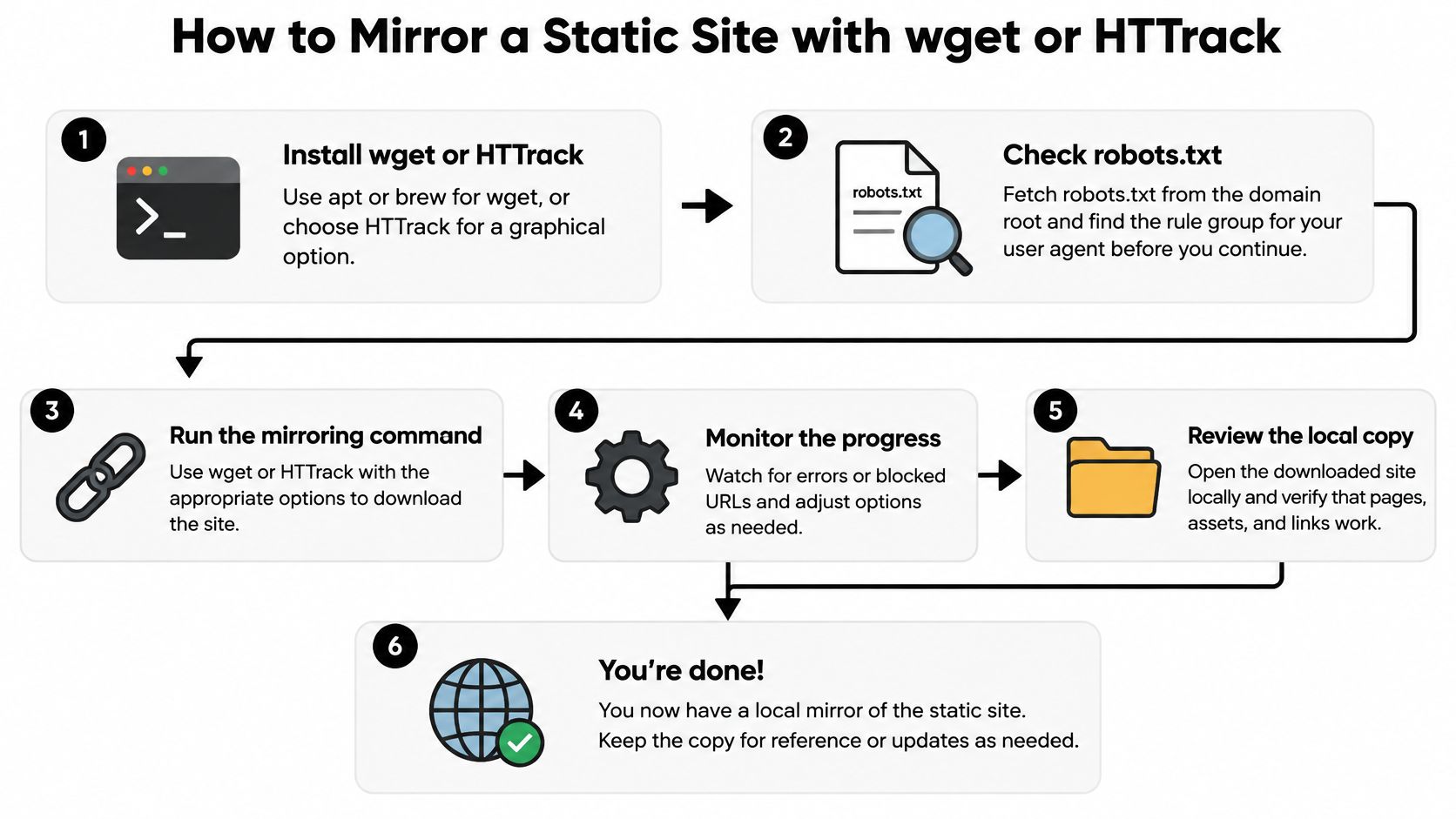
Confirm you have the right to copy before you fetch a single asset. Fetch robots.txt from the domain root, find the group that matches your user agent, and stay out of disallowed paths. The IETF Robots Exclusion Protocol, RFC 9309, published in September 2022, defines how operators publish those Allow and Disallow rules. The protocol governs crawler access. It does not grant ownership or a license to reuse content.
Mirror with wget Step by Step
- Install the tool. Install wget with apt or brew for a scriptable workflow, or install HTTrack if you prefer a graphical job with visible errors, pause controls, and editable scan rules. Both fetch the same public files. Choose based on whether you will repeat the job in a script.
- Run the mirror command against your own domain. Use
wget --mirror --convert-links --adjust-extension --page-requisites --no-parent --wait=2 --limit-rate=200k https://www.yourdomain.com/. The mirror flag recurses through linked pages, page-requisites pulls CSS, images, and fonts, convert-links rewrites URLs for local viewing, and adjust-extension saves pages with sensible file extensions. No-parent keeps the crawl from climbing above the starting path, while the wait and rate limit keep you from hammering the server. - Inspect the output folder. Open the downloaded tree and look for missing stylesheets, fonts, and images before you assume the mirror worked. Assets loaded by JavaScript or served from another host are the usual gaps. Span hosts only for a CDN you control, because a wider crawl pulls in third-party files you have no right to redistribute.
- Serve it locally and click everything. Run
python3 -m http.server 8000inside the output folder, then click every navigation link, footer link, and in-page anchor. Note broken paths as you find them. Viewing files directly from disk hides relative URL problems that a local server exposes. Keyboard through the pages and run a quick accessibility pass at this stage, since mirrored markup preserves missing labels, low contrast text, and skipped headings exactly as they were.
The HTTrack Alternative
Create a project, add the starting URL, set scan rules to stay on the domain, and set a connection limit before starting. HTTrack suits a one-off archive where you want to watch errors accumulate and adjust without reconstructing a long command.
Replace what a mirror cannot run. Swap forms for a mailto link or an embedded form service, replace site search with a static index or remove it, and remove widgets that depended on the original server. A mirrored form that submits nowhere is worse than no form, because users think their message went through. Scan the copied source for live keys and analytics IDs and rotate or remove them before the clone goes anywhere public.
A successful mirror is one where every internal link resolves locally with the network cable pulled.
Watch for two common disappointments. First, JavaScript-heavy sites may mirror as empty shells, because wget saves the initial HTML rather than what the browser renders after scripts run. Second, query-string pages can produce tangled filenames that need cleanup before redeployment. Neither problem means you ran the command wrong. Both mean the site was never static, and you will get a better result from a CMS export or a full app copy.
How to Move Data, Assets and CMS Content
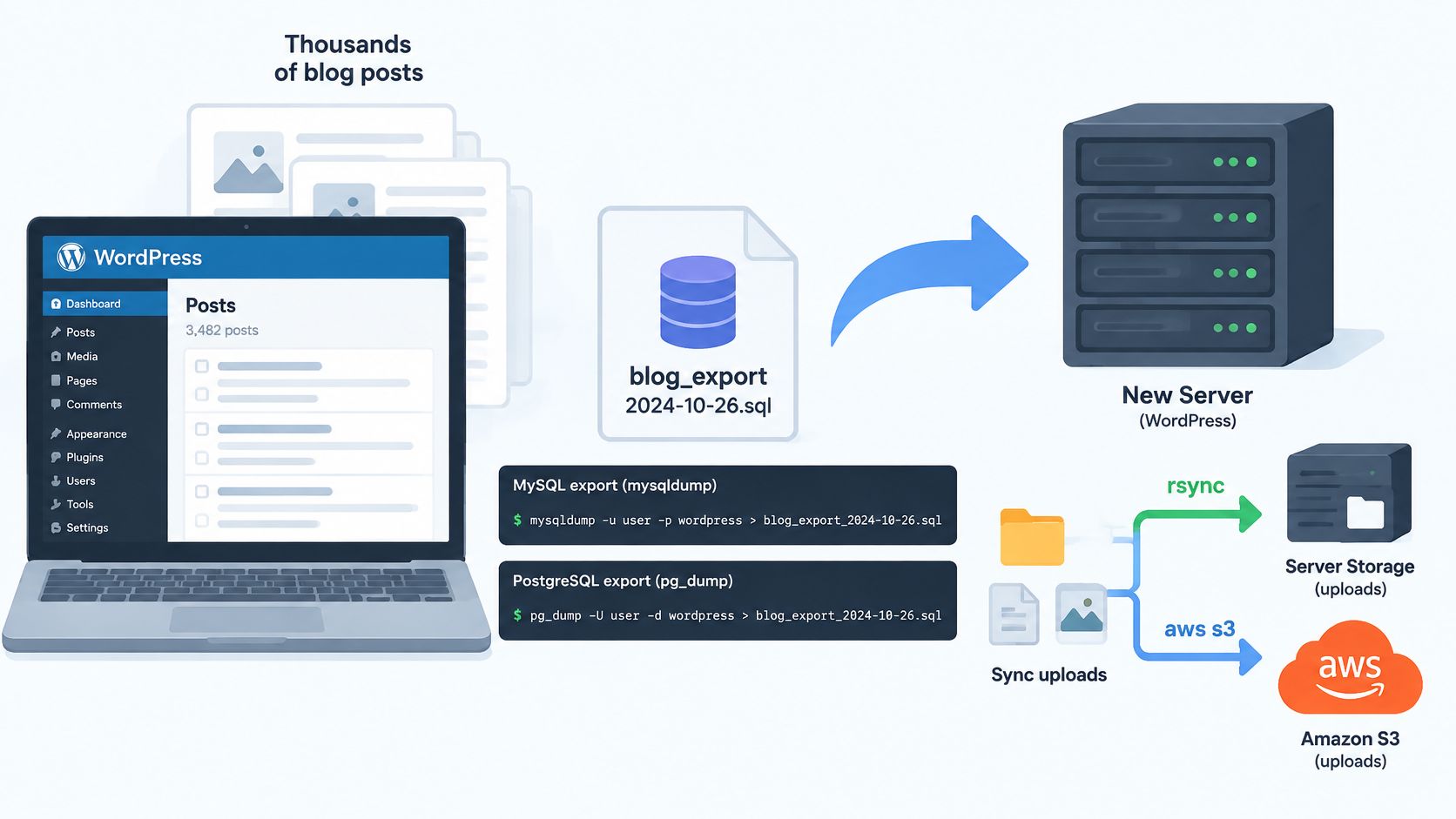
Take a WordPress blog with several thousand posts as the working example. The theme files are easy to copy. The risk sits in the database rows, the uploads folder, and the config values that still point at production.
The diagram below shows the shape of a database-led migration to a new server.
Move in This Order
Export the database. Dump it with mysqldump or pg_dump, and keep the file with a date stamp in its name. A dated dump gives you a clean restore point when an import half-completes or a search-replace goes wrong.
Sync uploaded media. Copy uploads with rsync or aws s3 sync so file paths stay identical. Matching paths matter because post content and attachment metadata store those locations throughout the database.
Rewrite production URLs. Replace hard-coded live URLs with wp search-replace or the equivalent for your platform, and run it with the dry-run option first. The dry run shows how many rows will change, which catches surprises such as a staging URL that's already present in imported content.
Regenerate image sizes. Rebuild thumbnails after the move, because generated sizes often go missing when media libraries move between servers. A post can look fine in the editor while every card image on the archive page is broken.
Protect serialized settings. Verify options stored as serialized arrays before and after replacement. A naive string replace corrupts length-prefixed data, because the stored character counts no longer match the new values, and the symptom is often a settings page that resets.
Reset every secret. Rotate API keys, replace mail credentials, and point payment and map embeds at sandbox accounts. Staging should never be able to send real messages, charge real cards, or write leads into a live CRM.
The short walkthrough below shows a typical export and import flow in action.
Where Each Data Type Trips You Up
| Data type | Where it usually lives | How to copy it | Common pitfall |
|---|---|---|---|
| Database | MySQL, PostgreSQL, SQLite | mysqldump, pg_dump | Live URLs stored inside rows |
| Uploaded media | wp-content/uploads, S3 bucket | rsync, aws s3 sync | Missing thumbnails from unregenerated sizes |
| Environment config | .env files, secrets manager | Copy the structure, replace the values | Live API keys copied to staging |
| Serialized settings | WordPress options, PHP serialized arrays | Serialization-aware search-replace | Corrupted data after a plain string replace |
| Third-party embeds | Maps, payment widgets, forms | Point them at sandbox accounts | Real charges or leads reaching live accounts |
Move data last, after the code runs.
That order sounds backwards, but it saves rework. Get the codebase booting on the new host with a scratch database, fix PHP or Node version mismatches, and confirm file permissions. Then import the production data once, run your replacements once, and test the result you intend to ship.
Test the Clone and Decide Whether to Launch It
A clone can match the original pixel for pixel and still fail the people using it. Screenshots prove appearance. They say nothing about keyboard access, error handling, or what happens when a data source goes quiet at the worst moment.
That's not a theoretical worry. Research summarized in a Carnegie Mellon study on accessible code generation reports that approximately 96% of web pages contain accessibility violations. The same 2025 benchmark found that generated HTML often looks semantically valid while failing full accessibility compliance without further prompting and human review. Copying markup faithfully can preserve the original site's defects just as faithfully.
Test Behavior, Not Just Appearance
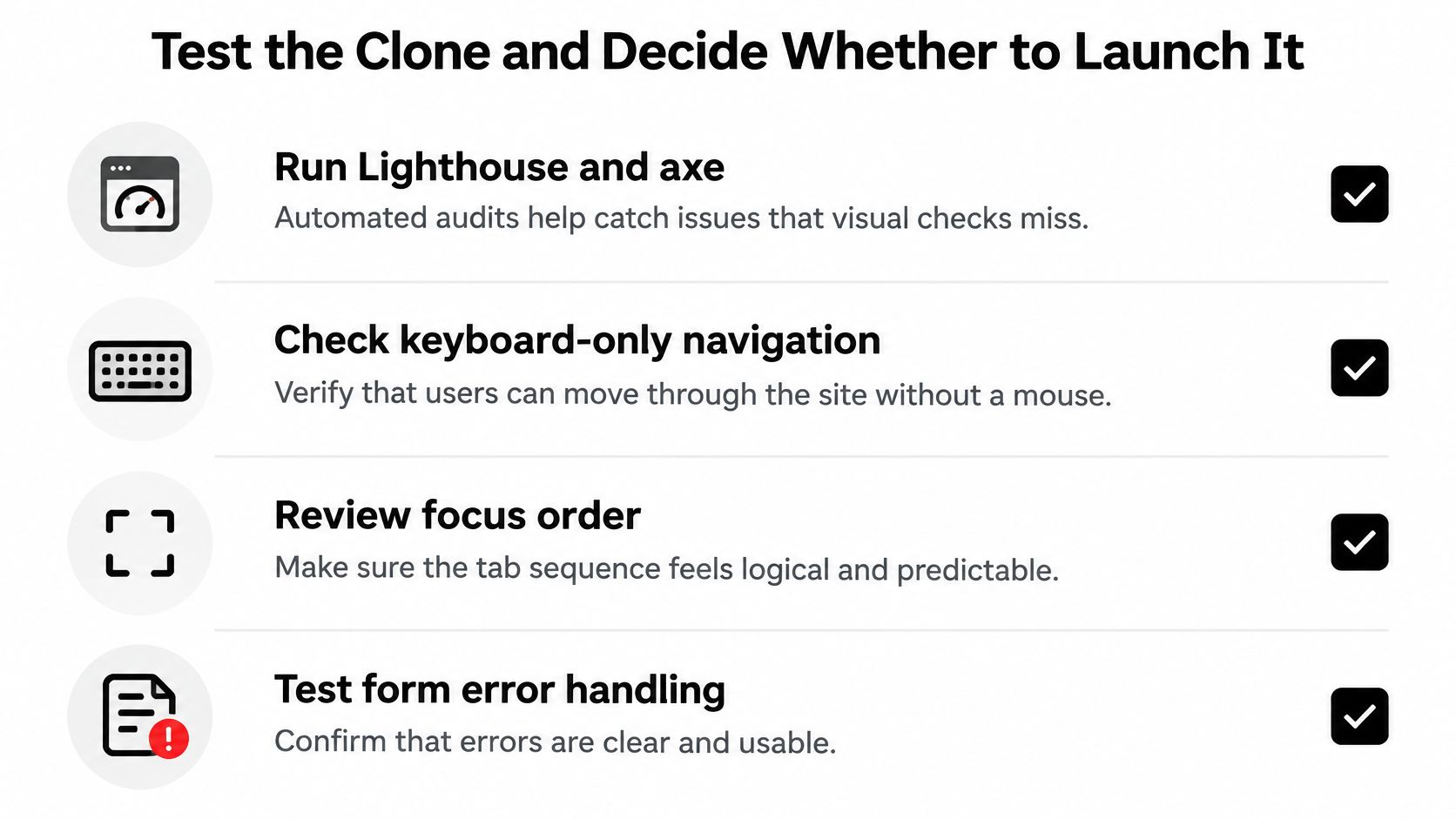
Run automated audits with Lighthouse and axe first, because they catch missing labels, contrast failures, and heading problems at scale. Then put the mouse away. Tab through the full page, check that focus order follows the visual layout, submit forms with bad data, and confirm error messages are announced and placed where users can find them.
Check responsive breakpoints at real mobile and desktop widths, not just by dragging a desktop window narrower. Crawl the clone for broken internal links and missing images. A crawler will find the orphaned landing page with the dead hero image that nobody clicks during manual review.
For data-driven components, test the empty, loading, stale, and failed states, not only the happy path. On a real estate build, that means map and list synchronization, filters, pagination, image alternatives, and price and availability updates when a source is unavailable. Decide in advance whether the page shows last known prices with a timestamp or hides them. Either answer can work. A wrong price can't.
Confirm the Safety Checks Still Hold
Verify the noindex header and robots rules are live on staging, then submit a test form and confirm it lands in the sandbox inbox. Check how the clone handles personal data against your own published commitments, such as the practices described in a privacy policy. Finally, rehearse the rollback. Restoring the previous DNS or redeploying the last release should be a practiced step, not an improvisation during an outage.
Make the launch call a go or no-go decision against blocking items. Broken checkout, live secrets, indexable duplicates, inaccessible forms, and unlicensed assets are blockers. If any blocker fails, keep the clone as staging, fix or rebuild the failing parts with your own data, and retest. If the app needs listings, the practical fix is an authorized source, and developers can get an API key instantly from the Get your API key button on the site instead of reusing scraped records.
Deliberate reconstruction beats exact copying more often than teams expect. You keep the flows users already understand, drop the defects nobody meant to preserve, and launch something you can defend technically and legally.
If your clone needs live property data instead of copied pages, RealtyAPI.io gives you one developer-first API for listings, pricing, and market signals from major platforms, with REST, GraphQL, and webhooks ready for staging or production. Get an API key in seconds, wire it into your rebuild, and ship a clone that runs on fresh authorized data rather than a fragile scrape.