Is There a Homes.com API? How to Get Listing Data

Search for Homes.com API and something unusual happens. Unlike most portal-API searches, which return nothing but scraper landing pages, the top results include a press release from Homes.com itself: "Homes.com Launches API to Streamline Real Estate Communications." Real company, real announcement, real developer portal URL at the bottom.
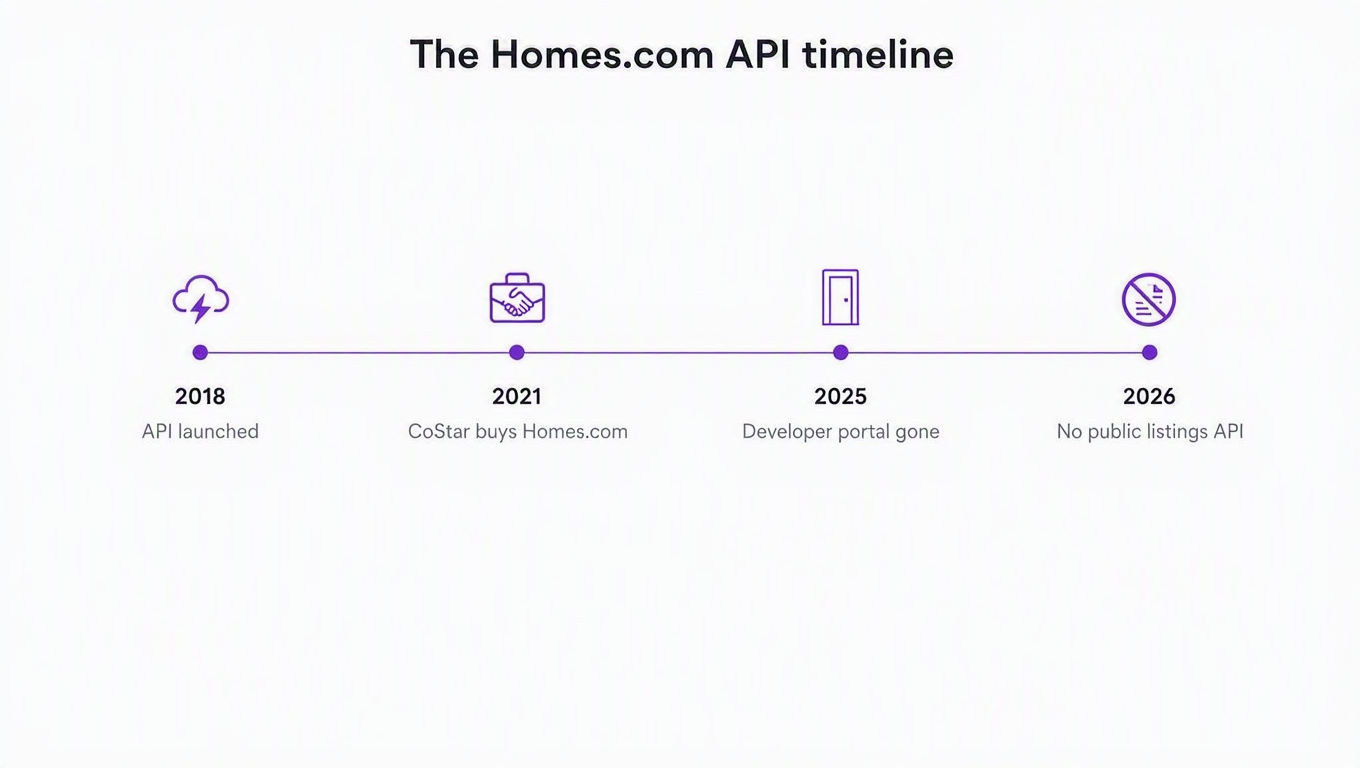
So the API exists. Great. Except the announcement is from 2018, the portal URL now serves a placeholder page, and the thing it launched was never going to give you listings anyway.
Here is the full story, including the part every other page on this query skips: what that API actually did, why CoStar had no reason to keep it, and what you can run this afternoon instead.
The short answer
Homes.com has no public listings API in 2026. There is no developer portal, no key to request, no sandbox, and no documented way to pull for-sale or rental inventory out of Homes.com programmatically.
The API that Homes.com announced in 2018 was real, but it pointed the other way: it moved leads and contacts between the Homes.com Connect platform and partner CRMs. It was plumbing for an advertising business, not a data feed. And that plumbing is now gone.
The API Homes.com actually launched
On November 6, 2018, Homes.com (then a division of Dominion Enterprises, based in Norfolk, Virginia) announced its API. The release is specific about what it was for:
The new Homes.com API provides an easy way for leads, contacts, and associated lead activity to be shared between Homes.com Connect and our integration partners.
The named examples tell you everything. An agent using BombBomb could pull lead information from Homes.com into a video email campaign. When that lead converted, the record could be pushed into DocuSign Rooms for Real Estate. Dave Mele, then president of Homes.com, framed it around customers using "a variety of tools when working with clients."
Technically it was a normal thing for its era. The developer portal at api.homesconnect.com published a Swagger / OpenAPI 2.0 specification, pointed at a Swagger UI browser, and even suggested generating client libraries with Swagger Codegen. API directories that indexed it recorded three method families: Leads360, Listing360 and Token360. Leads in, tokens for auth, and listing records scoped to the Connect account that owned them.
Notice what is missing from all of that: any way to ask "what is for sale in Charlotte." The API assumed you were already a Homes.com customer with your own leads and your own listings inside Connect. It was a sync layer for people who were paying, which is a completely different product from the market-wide feed developers go looking for.
This walkthrough of piping Homes.com leads into agent CRMs is a good picture of the world that API was built for:
Where that portal is today
You can watch it die in the Internet Archive. Snapshots of api.homesconnect.com return a working "Homes.com Connect API" landing page from January 2019 straight through July 2023, with the footer quietly changing from "© 2019 Homes.com" to "© 2023 CoStar Group, Inc." along the way. The next capture, in March 2025, is an HTTP 410 Gone, the status code that specifically means a resource has been deliberately and permanently removed.
Load it today and you get a purple gradient and four words: This domain is coming soon. Eight years after launch, the developer URL printed in Homes.com's own press release is a parked page, and the domain's name servers now point at a domain brokerage. That is about as clear a signal as an organization can send about a developer program it has no further use for.
Why CoStar had no reason to keep it
This is the part that turns a dead URL into a strategy you can reason about.
CoStar Group announced its acquisition of Homes.com in April 2021 and closed it the following month for $156 million in cash. At the time, CoStar described the property as drawing roughly 5 million monthly visitors, carrying about 1.8 million residential listings, and running on listing feeds covering more than 90% of all MLS subscribers in the United States. CoStar then spent heavily to make it a genuine rival to Zillow, folding in Homesnap along the way (homesnap.com now answers with a 301 redirect to www.homes.com).
But CoStar also changed the business model, and that is what killed the API. The old Homes.com sold leads to agents. CoStar's Homes.com sells exposure under a banner it repeats everywhere: Your Listing, Your Lead. Buyer inquiries route to the listing agent rather than being sold on to whoever bought the ZIP code.
An API is an expression of a business model, and when the model changes the API is collateral. Leads360 existed to shuttle purchased leads into a CRM. Take away the lead-selling business and the endpoint has no job. Nobody had to make a decision about developer relations; the product it served simply stopped existing, and a 410 followed a couple of years later.
It also explains why no replacement appeared. Homes.com's product is the agent's brand sitting on top of listing data. Handing that data to anyone with a credit card would furnish competitors with the exact inventory the marketing product is built around. That is the same logic behind the missing Apartments.com listings API, which is not a coincidence: CoStar owns that one too.
What the site itself tells you
When a portal won't publish docs, read its robots.txt. Homes.com's is genuinely informative, and it is short enough to read in a minute.
There are exactly three user-agent groups: *, AdsBot-Google and AdsBot-Google-Mobile. That is worth pausing on, because portals in other markets have spent the last two years stuffing their robots files with rules against AI crawlers. Homes.com names none of them. What it does block is more targeted:
- Nearly every filtered search URL. A long list of
Disallow: *?*<param>=*rules coversbeds,price-max,property_type,listing_type,bed-max,kwsand a dozen more. In other words, precisely the URLs a scraper generates. - The analytical pages.
/market/,/analytics/and/report/are all disallowed, which is a decent hint about which pages CoStar considers proprietary output rather than public listing content. - Brokerage and agent-parameter pages (
/brokerage/,*?*brkg=*,*?*agp=*), which are newer additions.
And then 35 sitemap files, including active and new property indexes, agent-directory indexes by city and neighborhood, and sold-listing indexes. The canonical pages are wide open to crawlers; the query-string combinations are not. Homes.com wants search engines indexing its city pages and does not want anyone enumerating its filter space.
The enforcement is separate from the request. Homes.com sits behind Akamai, and a plain scripted request tends to come back as Access Denied with an errors.edgesuite.net reference rather than HTML. I hit that repeatedly while researching this piece, on the terms page and on robots.txt itself. The Internet Archive's crawler has been collecting 403s on that same file for stretches of 2026. You can get through with realistic browser headers, some of the time. That "some of the time" is the entire cost model of scraping this site.
Your four options in 2026
Every route to Homes.com data trades money against engineering time against fragility. Honestly compared:
| Option | Pricing | Setup effort | Where it hurts |
|---|---|---|---|
| Official Homes.com listings API | Doesn't exist | n/a | The 2018 API was a lead and contact sync for Homes.com Connect. Its portal returns a placeholder page, and nothing replaced it. |
| DIY scraper (headless browser plus proxies) | "Free," plus proxies and your time | Days to build, indefinitely to maintain | An Akamai edge that denies plain requests, filtered-search URLs disallowed in robots.txt, and a layout that changes without telling you. |
| Scraper marketplaces | From $10.00 per 1,000 results on one Apify actor; another charges $20.00/month plus usage | Hours | Roughly ten times what comparable actors charge for easier portals, which is the anti-bot budget showing up on your invoice. You still own schemas, dedup and monitoring, and actors break when the site shifts. |
| Managed scraping APIs (ScraperAPI, ScrapingBee and similar) | Priced per successful request on their own plans | Hours | They return you HTML, not listings. Parsing, pagination and schema stability are still your problem. |
| Hosted REST endpoints (RealtyAPI) | Free tier to start, then plans by monthly request volume (see pricing) | Minutes | Covers what Homes.com publishes, so it inherits the portal's coverage and its gaps. Not an MLS replacement. |
If you are seriously weighing the build-it-yourself route, we set out the general trade-off in web scraping vs. using an API. The short version: scraping wins when the data has no API at any price and your volume is tiny. It loses the moment uptime matters, and Homes.com is on the expensive end of that curve.
Is any of this legal?
The question everyone asks quietly. Scraping publicly visible pages is not automatically illegal in the United States, but Homes.com's terms prohibit automated access, and CoStar is unusually willing to litigate over data. Courts have moved back and forth on public-data scraping for years, and none of that ambiguity makes your Tuesday deploy more reliable when the bot wall tightens. We cover the landscape in is website scraping legal? and our own sourcing in how RealtyAPI sources data. The practical read has not changed: the legal risk is genuinely ambiguous, the engineering pain is certain, and most teams quit over the second one.
What about going to the MLS instead?
Reasonable instinct, since Homes.com is fed by MLS data in the first place. It is also a much bigger project than it sounds: MLS access means association membership or a broker relationship, per-MLS approval, and a different agreement in every market. We wrote up what is actually available in free MLS API: what exists and what doesn't. If you need one national view today rather than a licensing project this quarter, portal data is the pragmatic answer.
What RealtyAPI's Homes.com endpoints cover
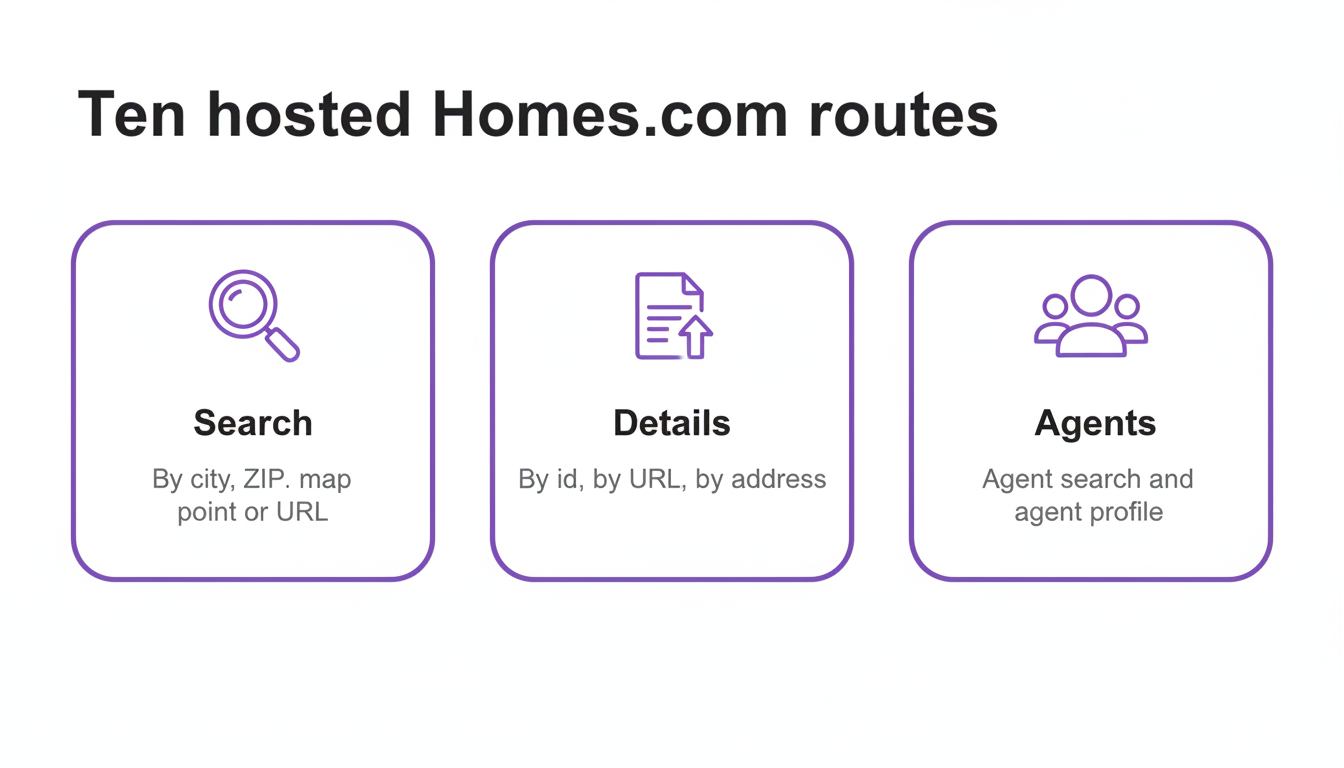
RealtyAPI runs hosted Homes.com endpoints as part of its real estate data platform. You call a normal REST endpoint with an API key, and proxies, browser fingerprints and anti-bot plumbing stop being your problem. Ten endpoints across three groups:
| Endpoint | What it returns |
|---|---|
GET /search/bylocation | Listings for a free-text location: city, neighborhood, ZIP, county or address. The canonical search, with the full filter set |
GET /search/byzip | Listings inside one ZIP code, same filters |
GET /search/bycoordinates | Listings within a radius of a latitude/longitude point |
GET /search/byurl | Replays a homes.com search-results page you paste in, parsing the filters out of the URL |
GET /autocomplete | Type-ahead place suggestions with coordinates, for feeding the search endpoints |
GET /details/byid | Full detail for one property by its homes.com id |
GET /details/byurl | Same detail, keyed by a homes.com property URL |
GET /details/byaddress | Same detail, resolved from a street address |
GET /agent/search | Agents by name, with profile URLs |
GET /agent/details | One agent's profile: office and brokerage, contact, license, bio, photo, active listings and sold count |
The agent endpoints are the interesting part
Most portal integrations treat agents as a name string attached to a listing. On Homes.com that is backwards, because the agent is the product. "Your Listing, Your Lead" means every listing page is built around the listing agent's brand, and Homes.com maintains a full agent directory with its own sitemap indexes by city and neighborhood.
So the pair of agent endpoints buys you something the search endpoints alone do not: go from a listing to the agent who holds it, then to that agent's brokerage, license, active inventory and sold count. If you are building brokerage competitive intelligence, a recruiting tool, or a referral network, that traversal is the whole product, and it is the part a search-results scraper never reaches.
Filters worth knowing
The search endpoints share one filter set, and a few of its conventions will bite you if you assume otherwise:
searchTypetakesFor_Sale(the default),For_RentorSold. Sold inventory through the same interface is genuinely useful for comps work.- Ranges use a
min:/max:string syntax, not two parameters:priceRange=min:300000,max:700000, and likewisebedsRangeandbathsRange. Either half alone is valid. propertyTypeacceptsHouse,Townhouse,Condo,MultiFamily,Land,MobileandCommercial, comma-separated, defaulting to everything.sortOrderhas twelve values, and not all of them work for every search type.Open_Houseis for-sale only, whilePrice_Reduced,Square_Feet,BedroomsandBathroomsare not supported for rentals.Newestis the one you want for a new-listings feed.resultCountcaps at 40, matching the portal's own page size, and defaults to 20. Asking for more does not get you more.
On the details side you get materially more than a search row: price, beds and baths, size, description, the agents attached to the listing, all photos, days on market, and history across tax, price, purchase and mortgage records. There is also an engagement block carrying totalViews, favorites and shares, which is the portal telling you how much attention a listing is getting. Very few sources hand you demand and supply signals in the same response.
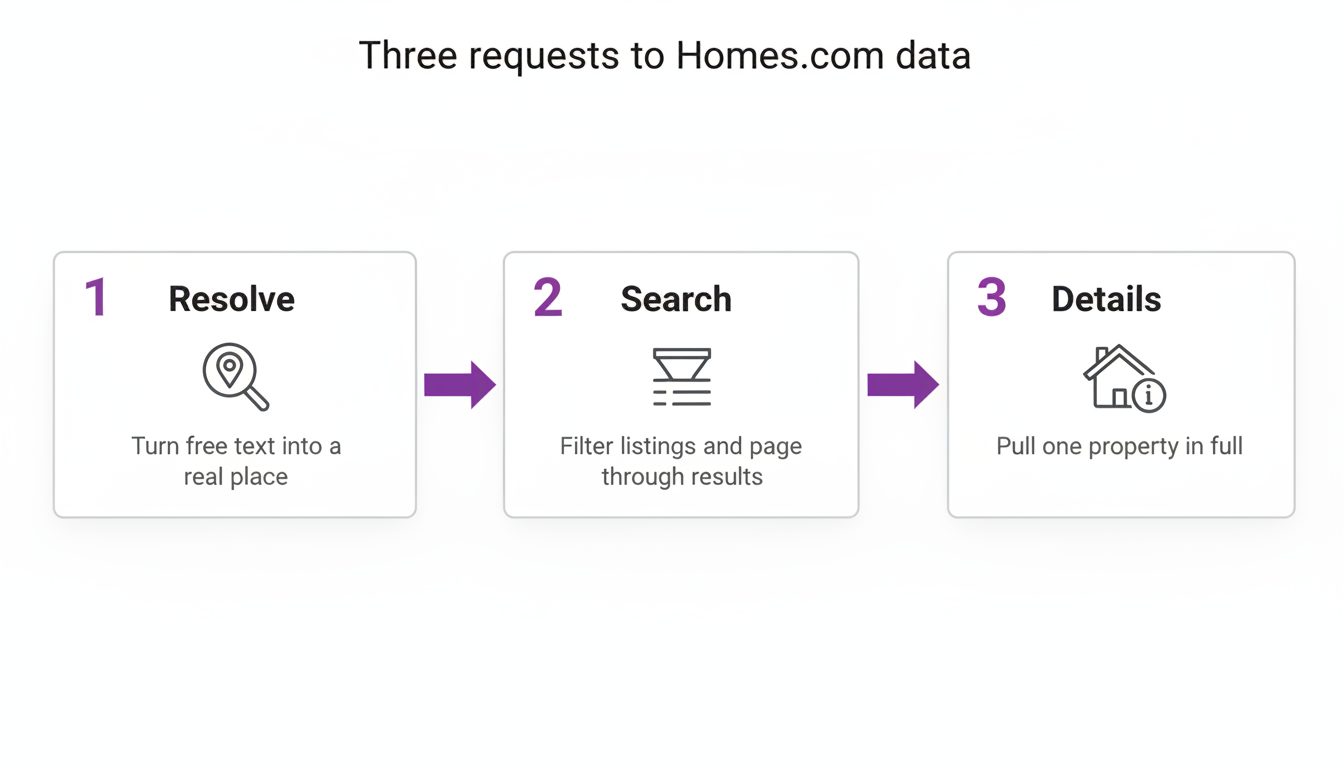
Quick start: Homes.com data in three requests
Base URL: https://homes.realtyapi.io. Auth is one header, x-realtyapi-key. Homes.com is in the standard set, so the free tier reaches it; the docs cover key setup in a couple of minutes.
Skip the header and the API tells you plainly, which is also a clean look at the response envelope:
{
  "message": "401: missing API key in the header",
  "source": "homes.com",
  "total": 0,
  "nextPage": false,
  "resultCount": 0,
  "searchResults": [],
  "detail": {}
}
1. Resolve a place
curl "https://homes.realtyapi.io/autocomplete?input=Charlotte" \
  -H "x-realtyapi-key: YOUR_KEY"
You get back suggestions with display names and coordinates. Search accepts free text directly, so this step is optional for a one-off, but it is how you turn a user's half-typed input into something you can store and re-query consistently.
2. Search listings
curl "https://homes.realtyapi.io/search/bylocation?location=Charlotte,%20NC&searchType=For_Sale&propertyType=House,Townhouse&priceRange=min:300000,max:700000&bedsRange=min:3&sortOrder=Newest&resultCount=40" \
  -H "x-realtyapi-key: YOUR_KEY"
Results arrive in searchResults, with total for the matching count and nextPage as the boolean you page on. Each result carries the id you hand to the details endpoint.
3. Pull one property in full
curl "https://homes.realtyapi.io/details/byid?id=PROPERTY_ID" \
  -H "x-realtyapi-key: YOUR_KEY"
If all you have is a URL a colleague pasted into Slack, /details/byurl takes it as-is. If all you have is a street address, /details/byaddress resolves it for you.
A production-ish Python loop
The same flow with pagination and the error handling you actually want, because anything fronting live web data will have a bad minute upstream eventually:
import requests

BASE = "https://homes.realtyapi.io"
HEADERS = {"x-realtyapi-key": "YOUR_KEY"}

def get(path, **params):
    r = requests.get(BASE + path, params=params, headers=HEADERS, timeout=60)
    r.raise_for_status()
    data = r.json()
    # Upstream hiccups surface as a message with no results rather than a 5xx
    if not data.get("searchResults") and str(data.get("message", "")).startswith(("4", "5")):
        raise RuntimeError(f"Upstream error: {data['message']}")
    return data

def search(location, **filters):
    page = 1
    while True:
        data = get("/search/bylocation", location=location, page=page,
                   resultCount=40, **filters)
        results = data.get("searchResults") or []
        if not results:
            break
        for listing in results:
            yield listing
        if not data.get("nextPage"):
            break
        page += 1

new_listings = search("Charlotte, NC",
                      searchType="For_Sale",
                      propertyType="House,Townhouse",
                      priceRange="min:300000,max:700000",
                      bedsRange="min:3",
                      sortOrder="Newest")

for listing in new_listings:
    print(listing.get("id"))
Note the loop breaks on an empty page as well as on nextPage, because trusting a single termination signal is how overnight jobs turn into infinite ones. Ask me how I know.
From here it is your product: diff each run against Postgres for a price-drop watcher, walk /agent/details across a metro for brokerage market-share reporting, or join Sold results with the tax and price history for automated comps. The point of an API over a scraper is that this loop is the whole integration. There is no proxy pool underneath it for you to babysit.
What you still can't get
The honesty section, because a comparison that only lists strengths is marketing.
These endpoints return what Homes.com publishes. Where the portal's own coverage is thin in a market, so is what you get back; this is portal data, not an MLS license, and it should not be sold to anyone as one. The history you can read is the history Homes.com puts on the page, not a warehouse you can query across years, so longitudinal analysis still means snapshotting on a schedule and storing your own copy. The pagination loop above plus a cron job and a database gets you further than you would expect.
And if your app needs a view wider than one portal, no single source will do it. That is what pairing sources is for, the same way we worked through whether Redfin has an API, what counts as a Realtor.com API, the StreetEasy question, and the listing APIs worth comparing.
Key takeaways
- The Homes.com API in your search results is real, and it is not what you want. The 2018 announcement launched a lead and contact sync for Homes.com Connect, documented in Swagger 2.0. Its developer portal went 410 Gone and now serves a placeholder.
- It died because the business model changed, not because of developer relations. CoStar's "Your Listing, Your Lead" routes inquiries to the listing agent, so the lead-shuttling endpoints lost their job. Expect no replacement: the listing data is what the marketing product is built on.
- Read the robots.txt before you write a scraper. Homes.com disallows nearly every filtered-search URL plus its market and analytics pages, while publishing 35 sitemaps of canonical pages. It is telling you exactly which access pattern it objects to.
- Scraping this portal costs real money. Marketplace actors start around $10 per 1,000 results, roughly ten times comparable actors for friendlier sites, and that premium is the Akamai edge priced in.
- Treat the agent endpoints as a first-class feature, not a footnote. On a portal built around agent branding, listing to agent to brokerage to sold count is a traversal you cannot get from search results alone.
If you are building anything on US residential data, the quickest way to find out whether this fits is to run the three requests above against your own metro and read what comes back. The free tier is enough to see the response shapes properly, and the plans only matter once you know the data is right for you.