Scraping vs Crawling: A Practical 2026 Guide
Crawling discovers and fetches pages, scraping turns selected content into structured fields, and many production jobs need both or neither. If you're collecting listing data, that line decides what you build, what you pay to run, and what breaks first.
Say your team already has 2,000 apartment URLs and needs price and availability every morning. You don't need a crawler wandering the whole portal. You need a narrow extractor, or maybe no collector at all. Say you don't know which listings exist yet. Then discovery is the missing job, and extraction comes second.
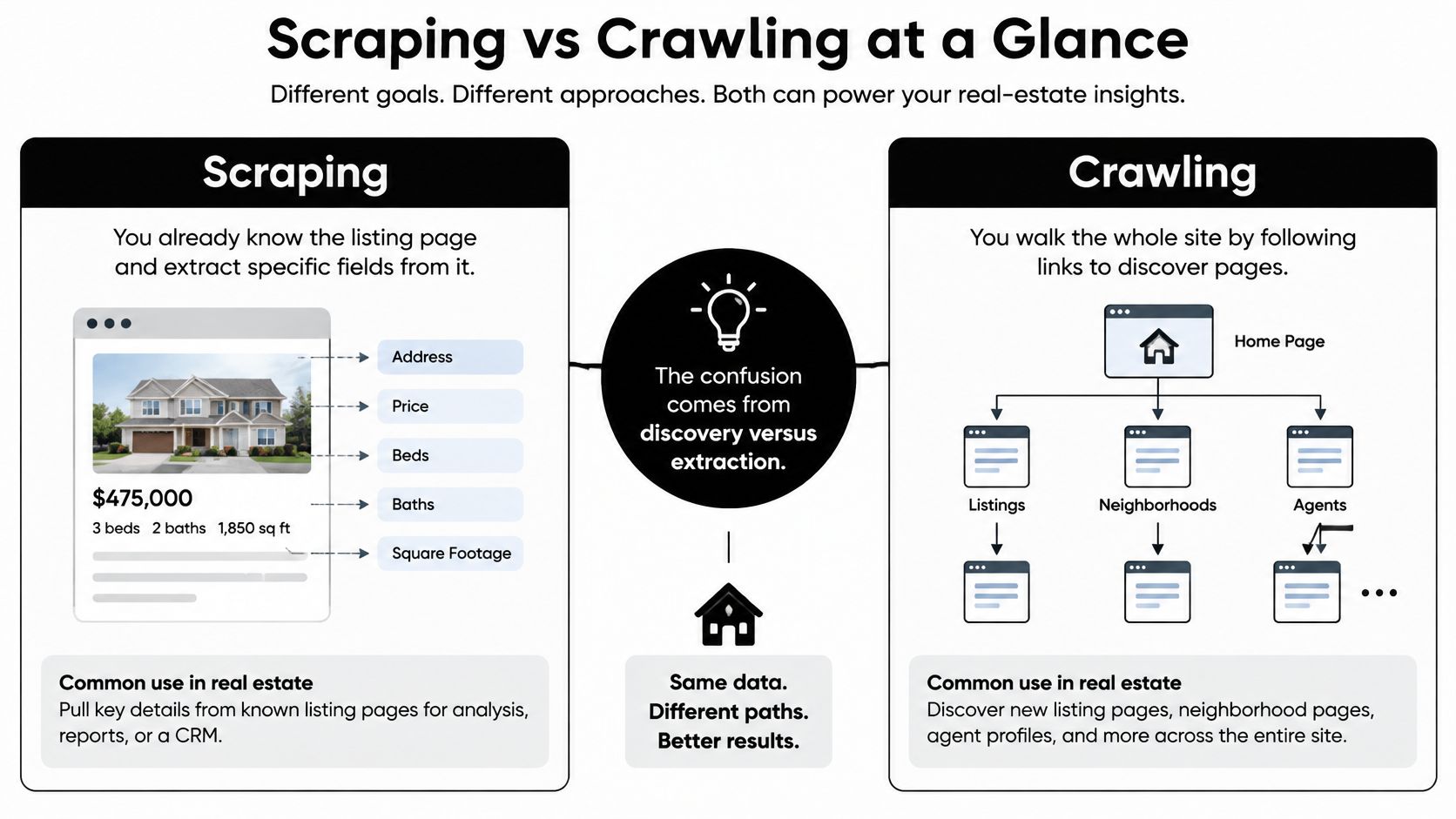
Scraping vs Crawling at a Glance
Monday morning after a weekend of broken selectors is where this mix-up usually surfaces. A real-estate team says it's scraping, but its script is walking an entire site, following filters and pagination. Or it says it's crawling, when it already knows the listing URLs and only needs price, beds, and availability. The names sound interchangeable. The engineering isn't.
Crawling discovers and fetches resources, usually by following links or sitemaps. Scraping extracts chosen fields from pages already in hand and shapes them into records an app can store.
That one line covers most decisions in a scraping vs crawling argument. Put the two side by side before you argue about tools.
Scraping vs Crawling on the Decisions That Matter
| Dimension | Crawling | Scraping |
|---|---|---|
| Primary job | Discover and fetch URLs | Extract selected fields into records |
| Typical start | Seed URLs, sitemaps, or link graphs | Known URLs, search results, or API-like page endpoints |
| Output | A frontier of pages and change signals | Structured fields such as price, address, availability, reviews |
| Scale | Site or web wide, repeated revisits | A defined set of pages or records |
| Main engineering load | Frontier, dedupe, host scheduling, robots.txt | Selectors or JSON parsing, JS rendering, schema drift, validation |
| What usually breaks it | Duplicate URLs and overloaded hosts | Layout changes and missing fields |
| Real-estate example | Find new listing URLs on an index | Pull price, amenities, and status from those detail pages |
Purpose matters as much as mechanics. A 2024 academic review defines scraping as automated internet data collection that captures information intended to be used or rendered on a webpage or app, while crawling generally refers to automated scanning that discovers pages so search engines can link to and index them. The same review notes that websites may permit crawling for indexing while prohibiting scraping in their terms of service, so an identical request can be treated differently depending on its purpose.
Scraping isn't automatically the heavier job. A narrow pass over known, changed URLs often moves less data than an unrestricted crawl.
That's the correction many teams miss. A crawler that revisits every filter combination nightly can dwarf a scraper that checks a fixed list of detail pages. Judge load by URL scope and revisit frequency, not by the label you put on the script.
If you're new to the extraction side, a practical introduction to scraping websites from CodeWords is a useful primer on selectors and page structure before you wire up a full pipeline. The pipeline view is what turns these two definitions into something you can operate, debug, and price.
How a Discovery and Extraction Pipeline Works
Treat a combined bot as five stages, not one script. When one stage fails, you want to know which one, and you don't want a parsing error to trigger a full recrawl.
The visual below maps those stages from seed to stored change.
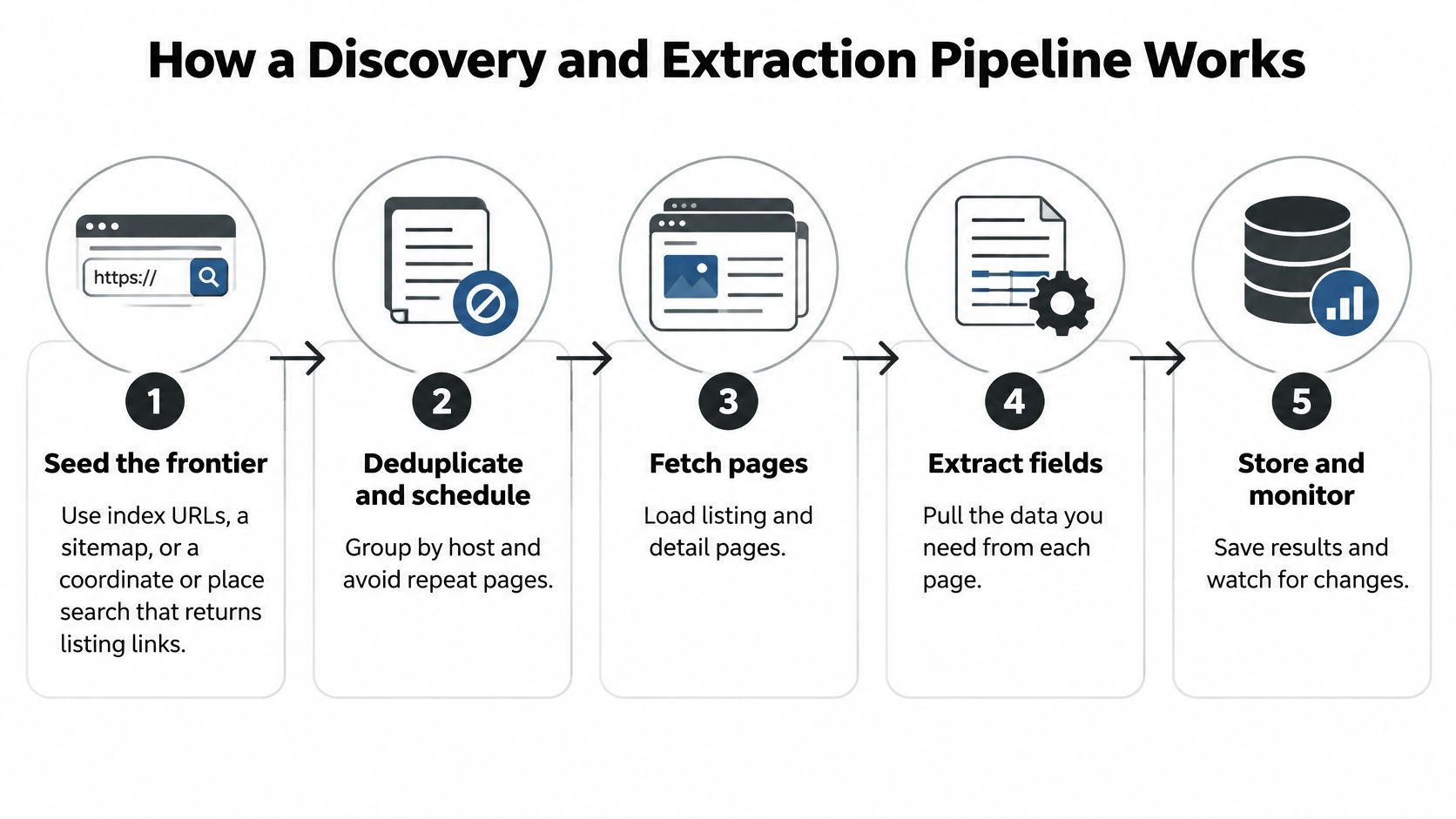
- Seed the frontier: Start with index URLs, a sitemap, or a coordinate or place search that returns listing links. A crawl framework such as Scrapy or Crawlee belongs here.
- Deduplicate and schedule by host: Normalize URLs, strip tracking parameters, and group requests so the same detail page isn't fetched twice in one cycle.
- Fetch only what the schedule allows: Check robots.txt before a request leaves the queue, cap concurrency per host, and honour backoff signals.
- Extract on changed detail pages: Use CSS or XPath selectors, embedded JSON, or DOM fields, then validate price, status, and address. An HTML parser such as BeautifulSoup fits static pages. A headless browser such as Playwright or Puppeteer fits JavaScript-heavy detail pages, and it belongs only at this stage.
- Normalize and store the change: Write one consistent schema and a change record, not a full duplicate copy of every page.
Google frames the first half plainly. Its guide to how Search works describes crawling as automated downloading of page content, with robots.txt handled separately as a control on which URLs crawlers may request. Extraction is a later use of that content, which is exactly why it needs its own code, tests, and alerts.
Why the Split Pays
A market monitor doesn't need every page every hour. Crawl the listing index to find new property URLs. Then scrape only detail pages whose content changed. You cut bandwidth, parsing cost, and duplicate rows in one move.
Each stage also fails differently, so give each one its own retry rule and metric. Discovery retries on timeout. Extraction shouldn't retry blindly when filled price fields suddenly drop, because that usually means a layout change, not a dead host. Retrying a broken selector just produces empty records faster.
This short walkthrough shows the fetch and parse mechanics that sit inside stages three and four.
Pipeline Stages, Signals and Metrics
| Stage | Failure signal | Metric |
|---|---|---|
| Seed and discovery | Timeouts on index or sitemap pages | New listing URLs found per cycle |
| Dedupe and schedule | Same detail URL fetched twice in one cycle | Duplicate fetches per cycle |
| Fetch with robots check | 429 or 503 responses | Requests per fresh listing |
| Extract and validate | Sudden drop in filled price fields | Filled price rate per batch |
| Normalize and store change | Missing fields or schema mismatch | Fresh usable listings per day |
Track fresh usable listings per day, not raw pages fetched. Pages fetched rewards waste. Fresh listings tells you what the product received.
A RealtyAPI-style monitor can stop at targeted fields such as availability, price changes, amenities, or reviews without turning every call into open-ended traversal. Our API introduction shows that targeted shape, one structured request instead of a frontier you have to maintain.
Politeness Rules That Keep Collection Reliable
Robots.txt is not a lock, and it isn't a legal blessing. It's a crawl-governance signal. Treating it as either of the other two things causes most of the confusion here.
A compliant client fetches /robots.txt at the host root before scheduling, matches rules by user-agent and path, and keeps disallowed URLs out of the frontier. RFC 9309, published on September 9, 2022, formalized the Robots Exclusion Protocol originally created in 1994 and specifies that rules must be served at /robots.txt in the top-level path. An arbitrary file buried in a subdirectory isn't a substitute.
Google gives the practical reading. Its robots.txt introduction states that robots.txt rules can prevent a crawler from requesting specified paths, primarily to avoid overloading a site, but they do not guarantee that a URL stays out of search results. Google recommends noindex directives or authentication when the objective is preventing indexing rather than merely reducing crawling.
What Compliance Actually Buys You
On a listing site, the cause and effect is direct. Skipping faceted search URLs, internal site search, and heavy media assets lowers request volume and server load. Permitted listing pages still get covered. You fetch less and lose nothing you needed.
Scrapers don't get an exemption because they're targeted. Jumping straight to known URLs doesn't remove request-rate, consent, or data-retention responsibilities. Run the same robots check before the fetch, whether the URL came from a crawl frontier or a spreadsheet.
And because robots.txt doesn't authenticate anyone or encrypt anything, it can't protect pricing feeds, personal data, or proprietary APIs. If you're a site owner relying on it as security, you've misread what the file does.
Habits That Survive Real Hosts
- Cap concurrency per host: Set a conservative ceiling per domain, not just a global worker count, because ten workers can still hammer one small portal.
- Back off on 429 and 503: Use exponential backoff with jitter, and treat repeated 503 responses as a stop signal for that host, not a retry contest.
- Send conditional requests: Use ETag or Last-Modified headers so unchanged pages aren't downloaded again in full.
- Identify your client: Put a real name and contact route in the user-agent so an operator can reach you instead of blocking your range.
- Tie revisit rate to change rate: Listings in a sleepy market don't need hourly checks. Slow down when a site starts erroring rather than holding a fixed rate.
Our own rate limit documentation exists for the same reason on the API side. Predictable limits beat heroic retry logic.
Practical rule: Log the robots fetch time, every disallowed skip, status codes by host, and bytes per fresh listing. If you can't show those four, you can't prove you're being polite.
Those logs pay off twice. They help you debug coverage gaps, and they're your evidence if a site operator asks what your client has been doing.
Legal and Ethical Lines Public Pages Do Not Erase
A scraper that runs perfectly can still be the wrong architecture. If it keeps more personal data than your product uses, you've built risk into the database and called it coverage.
Most scraping vs crawling guides collapse four separate questions into one vague warning. Keep them apart.
Four Questions, Not One
- Etiquette: Robots.txt, client identity, and request rate. These govern how you behave on someone else's infrastructure. They don't grant you rights to the data.
- Contract: The site's terms. Indexing may be welcome while bulk extraction, resale, or bypassing access controls is prohibited. A page you can view isn't automatically a page you may harvest.
- Privacy: Obligations that attach to personal data even when it's publicly visible. Listing work gets specific on this point, and it's covered below.
- Copyright and database rights: Whether you're reusing creative text, photography, or a substantial compiled dataset someone invested in building. The answer shifts with jurisdiction, field, and purpose.
Reporting on privacy authorities and bot activity makes two points worth stating plainly. Publicly accessible personal data can remain protected, so publicly visible doesn't mean unrestricted reuse. And some AI crawlers do not reliably identify themselves or respect robots.txt, which limits the file's effectiveness as an enforcement tool. That second point is a warning about a weak shield for site owners. It isn't a loophole for collectors.
Field-Level Risk in Property Data
Not every field carries the same exposure. Prices and amenity lists are usually lower risk. They describe a property, not a person.
Other fields need a reason. Host profiles, reviews tied to a person, phone numbers, accessibility details, and precise inferred location can identify or characterize someone. If you collect them, you need a purpose, minimization, a retention limit, and a way to delete or correct the record.
That's why compliance depends on the data field, purpose, jurisdiction, access method, and retention policy, not merely on whether a page is public. Answer those five per field, in writing, before you build.
The Inventory Test
Write a short data inventory first. For each field, note why the product needs it, how long you'll keep it, and where it came from. Drop anything that fails that test. A field you never display and never query is pure liability.
If you want a structured way to run that review, this responsible data collection checklist from Evoproxy is a sensible starting template for rate, identity, and retention decisions.
On our side, we only aggregate publicly available data that does not require a login. That boundary is spelled out in our terms of service, and it still leaves customers responsible for not reselling access or collecting beyond what their authorized use allows. A provider's limit doesn't transfer your obligations away.
Get counsel to review purpose and jurisdiction before anything ships. Then ask the harder product question, whether maintaining this stack is even the work your team should own.
A Listing Monitor Built the Efficient Way
A PropTech team wants to track price and availability changes for apartments in one city. It needs a fresh record when a listing changes, not a copy of every portal page. The design should follow the job's URL scope, revisit frequency, and cost per fresh record.
Path A is the open crawl. Start at the city index, follow every pagination and filter URL, download photo pages, and parse the results on a schedule. This finds listings, but it also refetches unchanged pages and spends requests on content the monitor does not need.
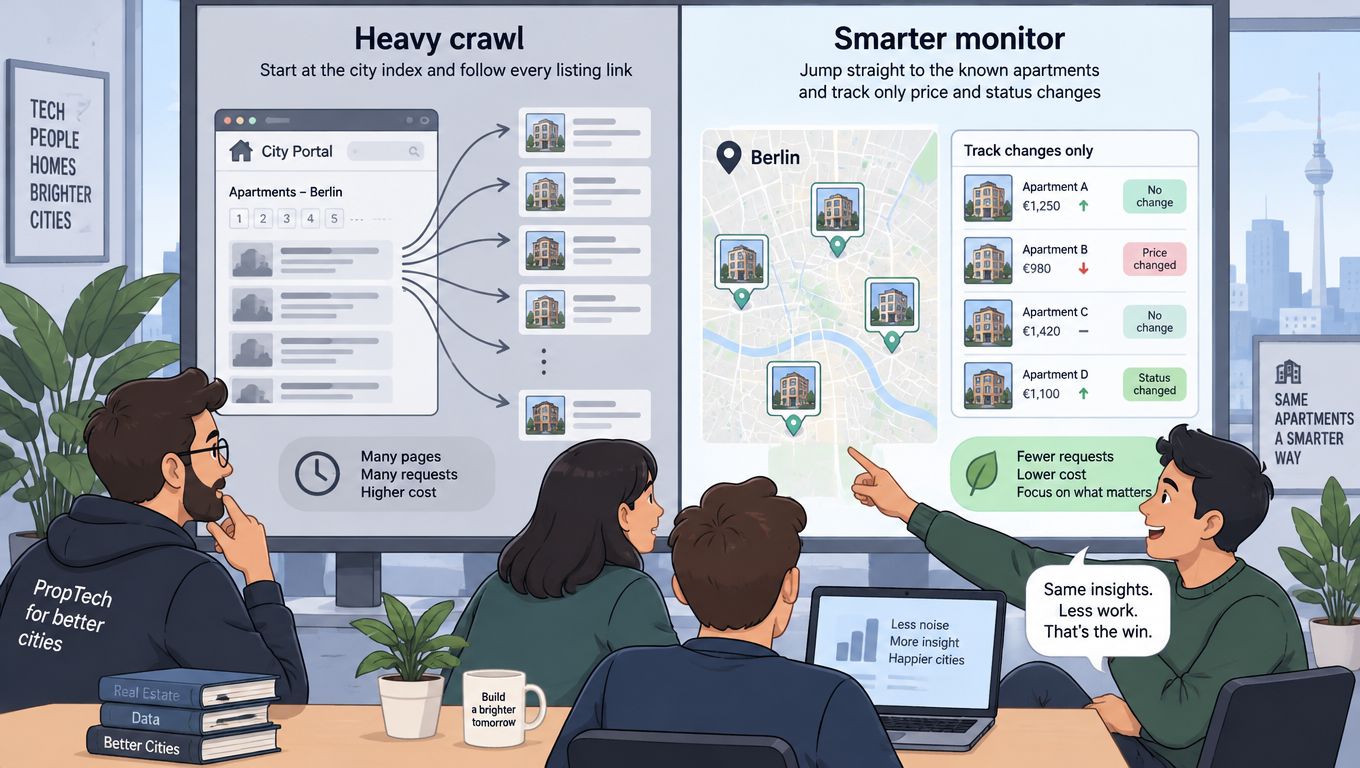
Path B is a narrow incremental extractor. Discover new listing URLs from an index or a place or coordinate search, then store each URL, listing ID, and a hash of price and status. On later runs, check for changes and fetch details only when the index snippet or a conditional request indicates an update.
Extract only the fields the product uses, such as price, beds, availability, and amenities. Skip contact fields the product does not show. Measure changed listings captured per thousand requests, not pages downloaded. That makes the tradeoff concrete: a focused revisit can cost less than repeatedly crawling a broad set of URLs.
Path C uses a unified API. A service such as RealtyAPI.io can return normalized JSON for a destination, coordinate, place, or URL search, so the team skips custom seed, fetch, and parse stages. A Zillow search by address endpoint is one example of an address-based search option. Use an API when the roadmap calls for user-facing search or monitoring, rather than maintaining selectors.
Three Paths for One City Monitor
| Path | What it does | Main cost driver | Use when |
|---|---|---|---|
| Path A, full crawl | Visits index, filter, and photo pages on a schedule | Refetching unchanged pages and unnecessary requests | Broad discovery is the goal |
| Path B, incremental scrape | Discovers listings, then checks details for changes | Fresh records captured per request | The URL set is narrow and collection is permitted |
| Path C, unified API | Returns normalized search results as JSON | API usage and the required freshness | The product needs search or monitoring without custom parsers |
Custom scraping can still fit a narrow job, such as collecting from a site you operate or auditing a small set of URLs you are authorized to access. For other jobs, include the ongoing work of maintaining parsers and handling page changes in the cost per fresh record.
Collection also uses someone else's infrastructure. Cloudflare reported that AI and search crawler traffic increased by 18% across its customer network from May 2024 to May 2025. Keep requests scoped to the records you need, and revisit them only as often as the product requires. A targeted extractor is often lighter than an open crawl, but technical politeness does not settle contract, privacy, or database-rights questions.
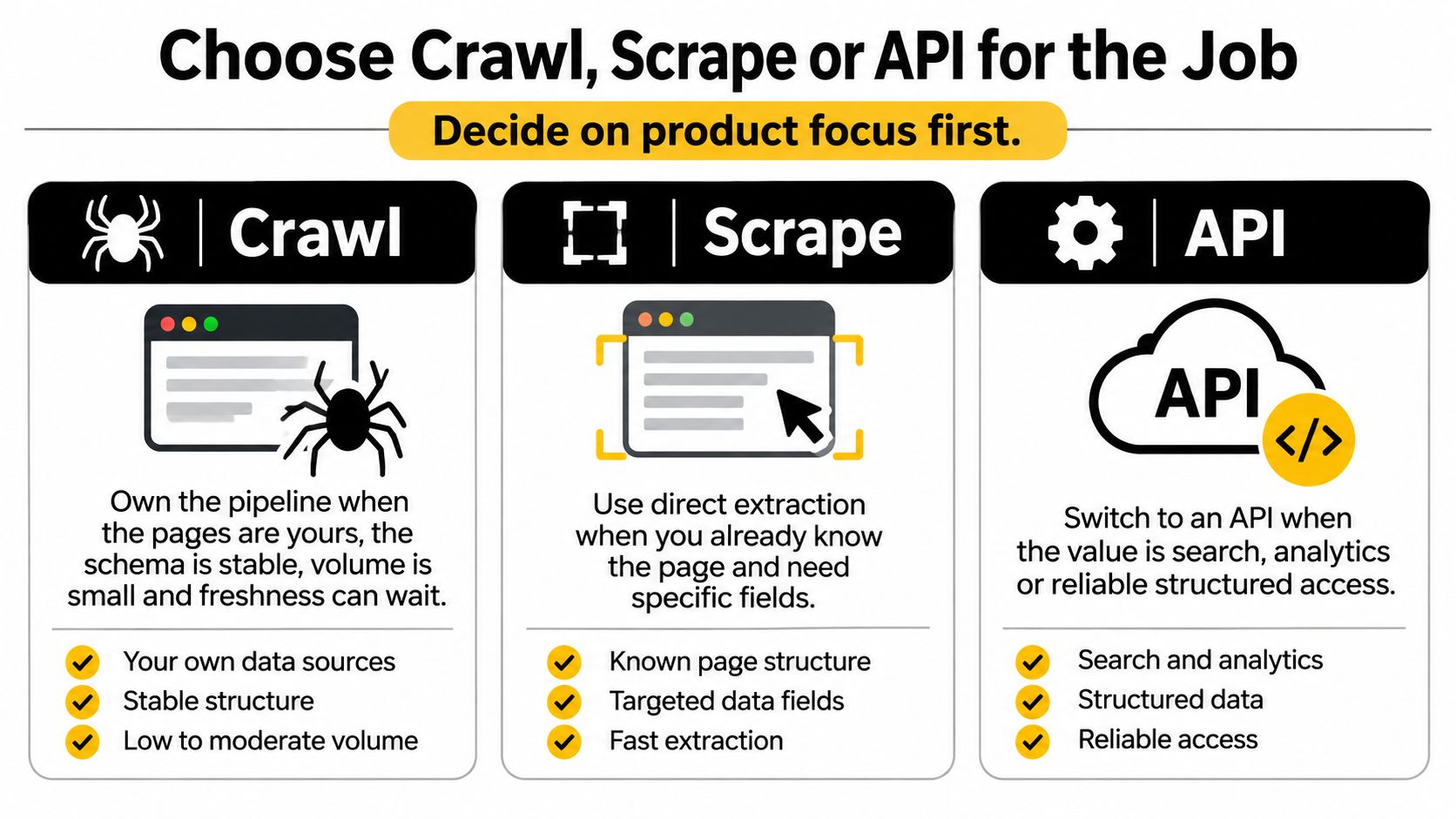
Choose Crawl, Scrape or API for the Job
Decide on product focus first, tooling second. The wrong order is how teams end up maintaining a parser farm when they meant to ship a search page.
Own the pipeline when the pages are yours, the schema is stable, volume is small, and freshness can wait. In that world, a crawl framework and a parser you control are cheap, transparent, and easy to fix because you can change both ends.
Move to an API when the value sits in search, analytics, or monitoring, and the cost sits in captchas, anti-bot changes, and breakage every time a portal redesigns. That cost is real but easy to underestimate, because it shows up as scattered engineering hours rather than an invoice.
RealtyAPI.io is a unified layer over public listings and market signals from major portals. Integration uses one base URL and one header, and returns pure JSON, with code samples in common languages instead of a parser per site. You don't build or maintain your own scrapers, and you pay only for what you use.
Two operating details matter for freshness. Every request fetches live data directly from the source, and cached data is not served. Retries are handled with automatic exponential backoff and smart queuing, so a flaky upstream doesn't become your on-call problem.
Limits Worth Saying Out Loud
An API isn't a blank cheque. Some complex endpoints, such as detailed property data or map searches, may cost more than one request per call, while a standard lookup typically costs one credit. Budget for that before you model unit economics.
Customers also may not resell, redistribute, or sublicense API access without authorization, or collect data beyond their authorized usage. And the shape of the product is specific. It fits destination, coordinate, place, or URL search, plus normalized sold prices and price history. It doesn't fit mirroring an entire portal, and it isn't meant to.
If your plan needs a login wall routed around or a terms ban ignored, the answer isn't a cleverer crawler. It's a different plan.
Which Method Fits the Job
| Your situation | Use | Why |
|---|---|---|
| You do not yet know the listing URLs | Narrow crawl from seeds or a sitemap | Discovery is the missing piece |
| You have URLs and need price or status | Incremental scrape of changed pages | Extraction without refetching the whole site |
| You are shipping search or market monitoring on public listings | Unified real-estate API such as RealtyAPI | Fresh public data without maintaining selectors and anti-bot work |
| Volume is a one-off audit of pages you may access | Small targeted scrape | A pipeline would cost more than the task |
| Pages need a login or terms ban automation | Neither crawl nor scrape | Access rules are not a technical puzzle to route around |
| The useful output includes phone numbers or host identity you will not show | Cut the fields or do not collect | Extra personal data raises risk without helping the product |
Before You Write Code
Write three things down first. Your field list, nothing more than the product displays or queries. Your freshness window, in hours or days, because hourly and daily monitors are different systems. And your estimate of requests per fresh listing, which is the number that tells you whether a custom pipeline beats a per-call price.
Then confirm robots.txt, the site's terms, and whether any field on your list is personal. That check takes an afternoon. Skipping it can cost you the dataset.
If you land on the API row, run one small test instead of a big evaluation. The Free plan gives 250 requests per month with no credit card required, which is enough for a single-city proof. Pull one city, compare filled price and availability fields against a manual page check, and count how many records you'd ship. Keep retries on the provider side and don't build a homegrown crawler beside it just in case.
That test answers the only question that matters in a scraping vs crawling decision. Not which label sounds right, but what it costs you, per fresh usable record, to keep the data true.
Stop maintaining selectors for portals you don't own and get live, normalized listing data through one JSON API instead, with 250 free monthly requests to test a single city before you commit. Visit RealtyAPI.io to grab a key and run your first search by address, coordinates, place, or URL today.