Real Estate API to Google Sheets: Apps Script or Add-on?

Every Monday someone on a small investing team opens Redfin, runs the same search, and pastes forty rows into a tab called Deals. Then they fix the columns that didn't paste right. By Wednesday the prices are stale. By Friday nobody trusts the sheet. The search takes four seconds; the copying eats the morning.
This guide is about replacing that paste with an API call that lands straight in your spreadsheet. It is deliberately not a "copy this script and you're done" tutorial, because that script cannot exist: your tabs are named differently from ours, your columns sit in a different order, and every portal behind a real estate API returns a different JSON shape. What we can give you is the part that is the same for everyone: what a request looks like, a Google Apps Script pattern that works for any endpoint, a prompt that gets Claude, ChatGPT, or Grok to write the sheet-specific mapping for you, and an honest comparison of the no-code add-ons (API Connector, Apipheny, Coefficient) if you would rather not touch code at all.
Three ways to get a real estate API into Google Sheets
There are exactly three routes, and which one you take depends on how much you want to own.
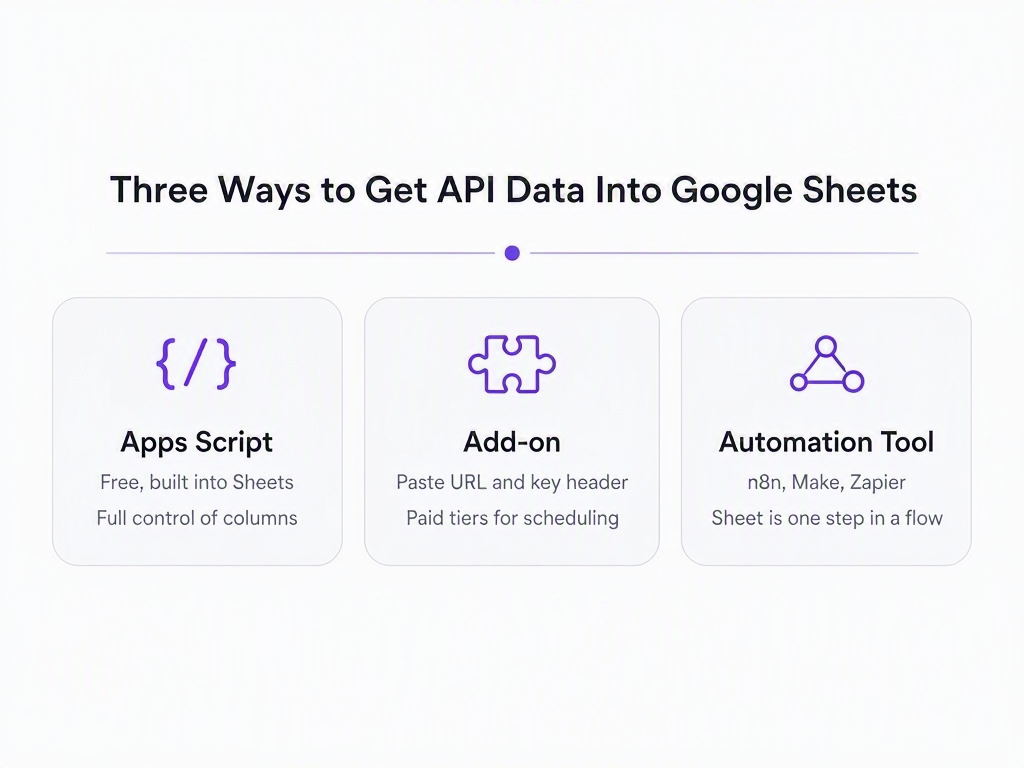
- Google Apps Script. Built into every Google Sheet under Extensions. You write a little JavaScript that calls the API with
UrlFetchApp, reshapes the JSON, and writes rows withsetValues. Free, no install, and you decide exactly which field goes in which column. The cost is your time, or the time of whoever writes the script for you (more on that below). - A no-code add-on. API Connector, Apipheny, and Coefficient all do the same basic thing: you paste a URL, add your API key as a header, and they flatten the JSON response into columns. Fast to set up, nothing to maintain, and you pay once you want scheduled refreshes or more than a handful of requests a month. You also live with their flattening rules rather than your own.
- An automation tool outside the sheet. n8n, Make, and Zapier can call an API and append rows through their Google Sheets node. This is the right shape when the sheet is one stop in a longer pipeline (fetch, filter, alert, then log to a sheet). RealtyAPI has a verified n8n community node if that is your world; this post sticks to the first two routes.
The spreadsheet is still the most widely deployed real estate analytics tool on the planet, and every data team that sneers at it ends up exporting to it anyway. Investors, brokerages, and lenders run on Sheets because the person who needs the answer can change the formula themselves. An API that can't reach a sheet is, for a lot of people, an API that doesn't exist.
What every RealtyAPI request has in common
The good news is that the request side is boring, in the best way. Whichever portal you are pulling from, the call has the same four parts:
- A per-portal subdomain. Redfin is
https://redfin.realtyapi.io, Realtor ishttps://realtor.realtyapi.io, Zoopla ishttps://zoopla.realtyapi.io, and so on. The endpoint path comes from that portal's docs page, for example /search/bylocation on Redfin. - One header:
x-realtyapi-key: YOUR_KEY. Keys are created in the dashboard under API Keys. - Query parameters for the search (location, price range, beds, sort order, page).
- JSON back, with a credit counted per request. Most endpoints cost one credit; a few heavier ones cost more, and the playground says which (how credits work). The free plan includes 250 requests a month with no card, which is plenty to build and test a sheet.
curl "https://redfin.realtyapi.io/search/bylocation?locationName=Austin%2C%20TX&searchType=For_Sale&sortOrder=Newest&resultCount=3" \
  -H "x-realtyapi-key: YOUR_KEY"
The response side is where the sameness ends. Redfin's search comes back as an envelope with message, nextPage, resultCount, and a searchResults array, and each result keeps its fields under homeData:
{
  "message": "Success",
  "nextPage": true,
  "resultCount": 3,
  "searchResults": [
    {
      "homeData": {
        "propertyId": "32786983",
        "url": "/TX/Austin/11464-Bristle-Oak-Trl-78750/home/32786983",
        "priceInfo": { "amount": "490000" },
        "beds": 3,
        "baths": 2.0,
        "sqftInfo": { "amount": "1953" },
        "yearBuilt": { "yearBuilt": 1982 },
        "daysOnMarket": { "daysOnMarket": "1", "listingAddedDate": "2026-08-23T05:11:39.623Z" },
        "addressInfo": { "formattedStreetLine": "11464 Bristle Oak Trl", "city": "Austin", "state": "TX", "zip": "78750" }
      }
    }
  ]
}
Notice three things a human would gloss over and a script will not: the price is a string, the URL is relative (you need to prepend https://www.redfin.com), and the year lives two levels down. A different portal puts its price, address, and listing link in completely different places. Same request shape, different response shape. That is the whole reason the column mapping has to be yours, and it is also the reason the mapping is the only part worth writing carefully.
Step 1: write your sheet contract before any code
The part of this job only you can do is also the part nobody does first. Before a line of script exists, write down what the sheet should look like when it works. We call it the sheet contract, and it fits in a table:
| Item | Example | Why it matters |
|---|---|---|
| Tab that receives data | Listings | The script addresses tabs by name. Rename the tab later and the script breaks. |
| Header row (exact order) | ID, Address, Price, Beds, Baths, Sq Ft, Year Built, Listed, Link | This is the field mapping. Every column needs a source path in the JSON. |
| Where the search inputs live | Settings!B2 = location, Settings!B3 = search type, Settings!B4 = max price | Lets a non-coder change "Austin, TX" to "Denver, CO" without opening the script. |
| Overwrite or append | Overwrite rows 2 onward each run | Overwrite gives a clean snapshot; append gives history but needs a date column and de-duplication. |
| Refresh cadence | Daily at 6 AM | Drives the trigger and the monthly credit budget (1 run × 1 page × 30 days = 30 credits). |
| Failure behaviour | Write the error to Settings!B6, leave old rows alone | A blank sheet at 6 AM with no explanation is worse than yesterday's data. |
Should the search parameters live in the script or in the sheet? In the sheet, always. The person who changes the city is rarely the person who wrote the script, and "open Extensions, find line 14, change the string, save, re-run" is how a working integration dies the first week someone goes on holiday.
Step 2: the Apps Script pattern that works for any endpoint
Open your spreadsheet, then Extensions → Apps Script. Before pasting anything, store your key: in the script editor go to Project Settings → Script Properties and add REALTYAPI_KEY. Why not a cell? Because cells get shared, exported to CSV, and screenshotted. Script properties stay with the project.
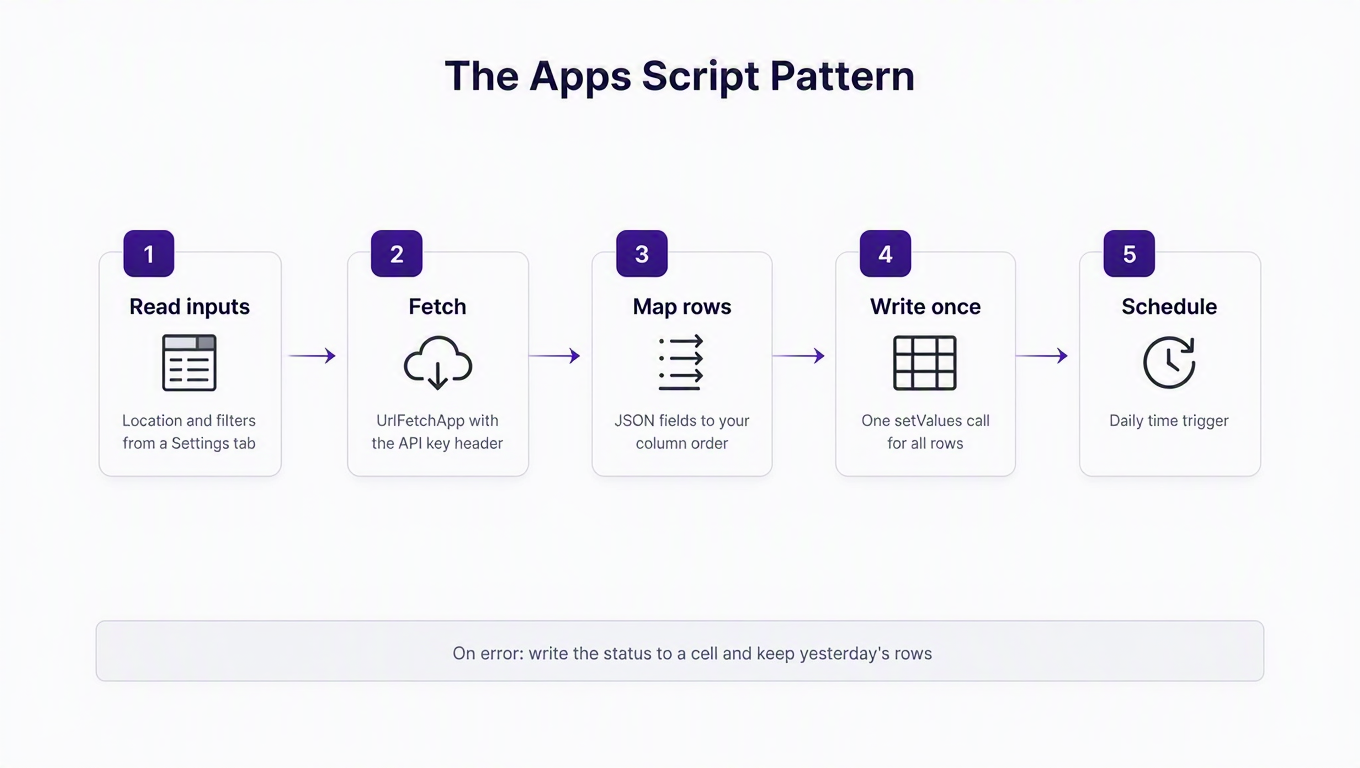
Here is the whole pattern, using the Redfin search from above and the contract from Step 1. The only lines that are Redfin-specific are inside toRow(), which is the point: swap that one function and the rest works for any endpoint on any portal.
// RealtyAPI -> Google Sheets. Settings tab holds inputs; Listings tab receives rows.
const BASE = 'https://redfin.realtyapi.io';
const ENDPOINT = '/search/bylocation';
const HEADERS = ['ID', 'Address', 'Price', 'Beds', 'Baths', 'Sq Ft', 'Year Built', 'Listed', 'Link'];

function refreshListings() {
  const ss = SpreadsheetApp.getActiveSpreadsheet();
  const settings = ss.getSheetByName('Settings');
  const out = ss.getSheetByName('Listings');
  if (!settings || !out) throw new Error('Missing Settings or Listings tab');

  const apiKey = PropertiesService.getScriptProperties().getProperty('REALTYAPI_KEY');
  if (!apiKey) throw new Error('Add REALTYAPI_KEY under Project Settings > Script Properties');

  const params = {
    locationName: settings.getRange('B2').getValue(),   // e.g. "Austin, TX"
    searchType:   settings.getRange('B3').getValue() || 'For_Sale',
    maxPrice:     settings.getRange('B4').getValue() || '',
    sortOrder:    'Newest',
    resultCount:  100,
  };
  const qs = Object.keys(params)
    .filter(k => params[k] !== '' && params[k] !== null)
    .map(k => encodeURIComponent(k) + '=' + encodeURIComponent(params[k]))
    .join('&');

  const res = UrlFetchApp.fetch(BASE + ENDPOINT + '?' + qs, {
    method: 'get',
    headers: { 'x-realtyapi-key': apiKey },
    muteHttpExceptions: true,   // let us read the body on 401/429 instead of throwing
  });

  const status = res.getResponseCode();
  if (status !== 200) {
    settings.getRange('B6').setValue('HTTP ' + status + ': ' + res.getContentText().slice(0, 200));
    return;   // keep yesterday's rows
  }

  const body = JSON.parse(res.getContentText());
  const rows = (body.searchResults || []).map(toRow);
  if (rows.length === 0) {
    settings.getRange('B6').setValue('0 results at ' + new Date().toISOString());
    return;
  }

  // One write, not one per cell. Apps Script charges you in round-trips.
  out.getRange(1, 1, 1, HEADERS.length).setValues([HEADERS]);
  const lastRow = out.getLastRow();
  if (lastRow > 1) out.getRange(2, 1, lastRow - 1, HEADERS.length).clearContent();
  out.getRange(2, 1, rows.length, HEADERS.length).setValues(rows);
  settings.getRange('B6').setValue('OK ' + rows.length + ' rows at ' + new Date().toISOString());
}

// The only portal-specific part. Paths come from a real sample response.
function toRow(r) {
  const h = r.homeData || {};
  const a = h.addressInfo || {};
  return [
    h.propertyId || '',
    [a.formattedStreetLine, a.city, a.state, a.zip].filter(Boolean).join(', '),
    Number((h.priceInfo || {}).amount) || '',        // string -> number
    h.beds != null ? h.beds : '',
    h.baths != null ? h.baths : '',
    Number((h.sqftInfo || {}).amount) || '',
    (h.yearBuilt || {}).yearBuilt || '',
    ((h.daysOnMarket || {}).listingAddedDate || '').slice(0, 10),
    h.url ? 'https://www.redfin.com' + h.url : '',
  ];
}
Run refreshListings once from the editor (it will ask for permission to connect to an external service and to edit the sheet; both are expected). The Listings tab should fill in like this:
| ID | Address | Price | Beds | Baths | Sq Ft | Year Built | Listed | Link |
|---|---|---|---|---|---|---|---|---|
| 32786983 | 11464 Bristle Oak Trl, Austin, TX, 78750 | 490000 | 3 | 2 | 1953 | 1982 | 2026-08-23 | https://www.redfin.com/TX/Austin/… |
| … | … | … | … | … | … | … | … | … |
Then schedule it: in the editor's left rail open Triggers → Add Trigger, choose refreshListings, event source "Time-driven", and pick the cadence from your contract. That is the entire integration. No server, no cron box, nothing to keep alive.
Common errors, and what they actually mean
- HTTP 401 in
Settings!B6. The key is missing, mistyped, or pasted with a trailing space. Re-check Script Properties, not the code. - Any other 4xx. The body in
Settings!B6says why, and the status codes page explains each one (429 means slow down and wait). Check usage in the dashboard before you add retries; retrying a limit error just burns more of it. TypeError: Cannot read properties of undefined. YourtoRow()assumes a path that this portal doesn't use. LogJSON.stringify(body.searchResults[0])and fix the path. This is the error you will see most, and it's a mapping error, not an API error.- "Exceeded maximum execution time". You looped through too many pages in one run. Either cap
resultCount, or store the last page number in Script Properties and continue on the next trigger. - Everything works manually, nothing happens on the trigger. The trigger runs as the user who created it, so if that person loses access to the sheet, the trigger fails. Open Executions in the left rail to see the actual error.
Why not a custom function like =REALTYAPI("Austin, TX") in a cell? It looks elegant, and it fights you on three fronts: a custom function must return within 30 seconds or the cell shows #ERROR!, it only recalculates when its arguments change (so it will never refresh on a schedule), and every cell that uses it is its own API call, so a column of 200 addresses is 200 credits each time someone re-opens the sheet. Use a function that writes rows. Keep custom functions for formulas.
Step 3: let a coding agent write the mapping for your sheet
Here is the honest state of things in 2026: the script above is no longer the hard part. A coding agent will write a correct toRow() for any portal in one shot if you give it the right three inputs. Most people give it the wrong ones (a link to the docs and "make it work"), then spend an hour arguing with it about column D.
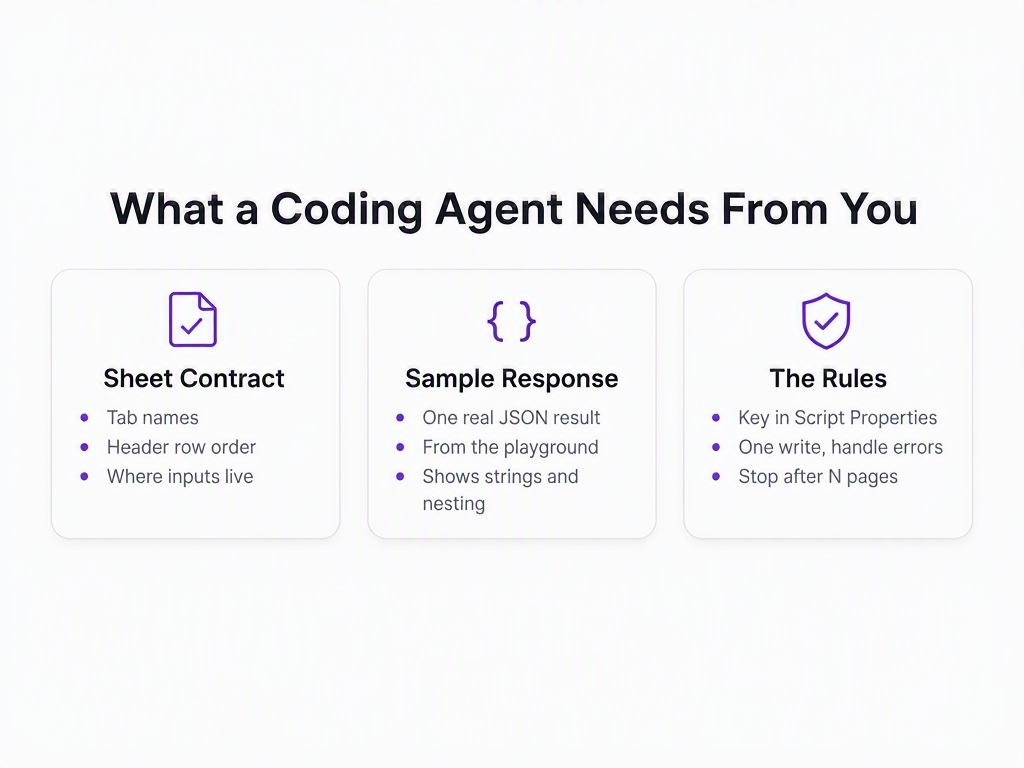
Give it these, in this order:
- Your sheet contract from Step 1, verbatim. Tab names, the exact header row, where the inputs live, overwrite vs append.
- One real sample response for the endpoint you want. Run it in the playground or with the curl above and paste the JSON. Trim it to two or three results; the agent needs the shape, not the volume. This single input is worth more than the docs, because the docs tell you a field exists and the sample tells you it is a string, nested two levels down, and relative.
- The rules: key from Script Properties, never in code or a cell; read inputs from the Settings tab; one
setValueswrite; on non-200 write the status to the sheet and keep old rows; if the response has anextPageflag, loop it but stop after a fixed number of pages.
A prompt that works, for Claude, ChatGPT, Grok, or whatever you have open:
Write a Google Apps Script function called refreshListings for the spreadsheet below.

SHEET CONTRACT
- Tab "Settings": B2 = location, B3 = search type (For_Sale | For_Rent | Sold), B4 = max price, B6 = status message
- Tab "Listings": header row exactly: ID, Address, Price, Beds, Baths, Sq Ft, Year Built, Listed, Link
- Overwrite rows 2+ on every run.

API
- GET https://redfin.realtyapi.io/search/bylocation
- Header: x-realtyapi-key, read from Script Properties key REALTYAPI_KEY
- Query params: locationName, searchType, maxPrice, sortOrder=Newest, resultCount=100, page
- Sample response (2 results, trimmed): <paste JSON here>

RULES
- Use UrlFetchApp with muteHttpExceptions: true. On non-200, write "HTTP <code>: <first 200 chars>" to Settings!B6 and return without touching Listings.
- Convert price and sqft to numbers. Prepend https://www.redfin.com to the relative url.
- Follow nextPage up to 5 pages max, then stop.
- One setValues call for all rows. No per-cell writes.
- Do not invent fields that are not in the sample.
Why does this work so reliably? Because with a sample in hand, mapping is mechanical: the agent is matching a header name to a JSON path and writing a null-safe accessor. That is exactly the kind of tedious, zero-judgment work these tools are best at. The judgment (which columns, which tab, what happens on failure) is all in your contract, and you wrote that in five minutes before touching the agent.
If you use an agent that can run tools, such as Claude Code or Cursor, you can skip step 2 of the inputs: connect the RealtyAPI MCP server and the agent fetches its own sample, which means it never guesses a path. Ask me how many times "the docs say priceInfo.amount" turned into a column of undefined before that existed.
Apps Script limits you will actually hit
Google publishes its quotas, and three of them shape how you should design a sheet integration:
| Limit | Consumer Gmail account | Google Workspace account | What it means for you |
|---|---|---|---|
| Script runtime | 6 min / execution | 6 min / execution | Paginate in bounded chunks; never "fetch all pages" in one run. |
| Custom function runtime | 30 sec / execution | 30 sec / execution | Don't fetch from cell formulas. |
| URL Fetch calls | 20,000 / day | 100,000 / day | You will run out of RealtyAPI credits long before this. |
| Triggers total runtime | 90 min / day | 6 hr / day | A daily or hourly refresh is fine; a per-minute one on a Gmail account is not. |
| URL Fetch response size | 50 MB / call | 50 MB / call | Not a concern for listing searches. |
Quotas are almost never what kills a sheet integration. A response shape changing and a column silently filling with blanks is what kills it. The portal adds a wrapper object, the price moves under a new key, and your sheet keeps "working" with empty cells until someone makes a decision on it. Cheap insurance: after mapping, check that a required field (price, say) is non-empty on the first row, and if it isn't, write "mapping broke, see row 1" to the status cell instead of overwriting. Google's own custom functions guide makes the same point about round-trips from the other direction: fewer, bigger reads and writes.
No-code add-ons compared: API Connector vs Apipheny vs Coefficient
If the script above made you tired, the add-ons exist for you. All three work the same way with RealtyAPI: new request, paste the full URL with query parameters, add a header named x-realtyapi-key with your key, run. They differ on price, free-tier size, and how much control you get over the flattened output. Prices below were read from each vendor's pricing page in August 2026; they move, so check before you buy.
| Add-on | Free tier | Paid from | Scheduled refresh | Limitations worth knowing |
|---|---|---|---|---|
| API Connector (Mixed Analytics) | 100 requests/mo, 3 saved requests, 1,000 rows, no scheduling | Starter $15/mo (2,500 req, daily); Business $29/mo (60,000 req, hourly); Team $58/mo (300,000 req, 5 users) | Daily on Starter, hourly on Business and up | Single user until Team. Free tier's 1,000-row cap is fine for one search, tight for many. |
| Apipheny | 50 API calls/mo, 5 saved calls per sheet, no scheduling, no pagination or response viewer | Hobby $10/seat/mo (500 calls); Pro $15/seat/mo (5,000 calls, daily/weekly/monthly refresh); Business $29/seat/mo (50,000 calls, hourly); $499 one-time "unlimited" | Pro: daily/weekly/monthly; Business and lifetime: hourly | Free tier is a trial in all but name. Pagination, cell references, and the =APIPHENY() function start at Hobby. |
| Coefficient (Connect Any API) | 3 data sources, 5,000-row imports, 50 import refreshes/mo, manual refresh | Starter $49/mo (500 refreshes, daily); Pro $99/user/mo (5,000 refreshes, hourly, up to 5 users) | Daily on Starter, hourly on Pro | Priced for teams, not hobbyists. GET and POST only. Default import limit 1,000 rows. Only the import's creator can edit it. |
API Connector is the one most people should try first. Its free tier is the most usable of the three (100 requests a month covers a daily refresh with room to spare), and the field editor lets you pick which JSON paths become columns, which is the closest a no-code tool gets to writing your own toRow(). Apipheny is cheaper at the low end and has a lifetime deal, but its free tier (50 calls, no pagination, no scheduling) is really a demo; budget for Hobby or Pro from day one. Coefficient is a different animal: a team reporting product with an API connector bolted on. Its Connect Any API handles API-key headers, query parameters, and page-number pagination (which matches RealtyAPI's page parameter), and it auto-detects the array in the response. At $49 a month and up, it makes sense when the sheet already has Coefficient for Salesforce or HubSpot, not as a first purchase.
If you want to see the add-on route end to end, this walkthrough pulls Redfin listing data into a sheet with Apipheny. It uses a RapidAPI-hosted source rather than RealtyAPI, but the mechanics are identical: paste the URL, add the key header, run.

One thing none of the add-ons will do for you: decide what a row is. Each flattens nested JSON by its own rules, so a Redfin result with photos and brokers underneath homeData can balloon into sixty columns you never asked for. You will spend your first twenty minutes hiding columns either way. That is not a knock on the tools; it is a reminder that the contract from Step 1 is still the first thing to write.
How to choose
- You can read JavaScript, or you have a coding agent open: Apps Script. It is free, the schedule is free, and the mapping is exactly what you want. Total cost is your RealtyAPI credits and nothing else.
- You never want to see code and you refresh daily or less: API Connector's free tier, then Starter if you outgrow it.
- You need hourly refreshes without code: API Connector Business or Apipheny Business. Count credits first: hourly is 720 requests a month per saved search, before pagination.
- The sheet is one step in a bigger flow (alert on price drops, then log them): n8n with the RealtyAPI node, or the approach in our price drop alerts guide, writing to the sheet at the end.
Whichever route you take, the response-parsing notes in how to parse RealtyAPI data apply, and if you are searching by a pasted portal URL instead of by location, search by URL is usually the simpler endpoint to wire up.
Key takeaways
- Write the sheet contract first. Tab names, header order, where inputs live, overwrite vs append, what happens on failure. Every other step, human or AI, is downstream of it.
- The request is the same for every portal; the response is not. One subdomain, one header, query params, JSON. Budget your effort on the mapping, because that is the only part that is yours.
- Give a coding agent a real sample response, not the docs. Strings that look like numbers, relative URLs, and nesting only show up in a sample. With one, the mapping is a one-shot job.
- Write rows from a scheduled function, not from cell formulas. Custom functions time out at 30 seconds, don't refresh on a timer, and cost one credit per cell.
- Add-ons trade control for time. API Connector's free tier covers a daily refresh; Apipheny needs a paid tier to be useful; Coefficient is for teams already on it. All three need a status check you add yourself.
The free RealtyAPI plan gives you 250 requests a month with no card, which is more than enough to build the sheet, test the mapping against a real response in the playground, and run it daily for weeks before you spend anything. Grab a key, paste the contract above into your agent of choice, and retire the Monday paste.