Instagram Comment Search: How to Search Comments via API

The usual advice for Instagram comment search is to open a post and press Ctrl+F. That's useful for finding text already loaded in your browser, but it isn't a reliable way to search an account's comments. Before writing code or buying an export tool, decide which comments you're authorized to retrieve.
A workable backend separates retrieval, storage, and search. Retrieve a defined set of comments through an appropriate access route, preserve their context, then query your own index. Don't promise a complete Instagram comment history when your system can only verify a bounded collection.
What Instagram Lets You Search and What It Doesn't
Instagram doesn't offer an ordinary search box that searches every comment across posts. Its native search experience and a reusable comment index are different things, so start by choosing the scope you can access.
Manual lookup and your own archive
Browser Find searches the text loaded on one post page. Open the thread, expand replies, and keep loading comments before using Ctrl+F or Cmd+F. Even then, describe the result as a search of the loaded thread, not proof that an absent comment never existed.
Bustle's guide to searching Instagram comments describes both this loaded-comment limitation and the account-data download route, which includes comments you posted, their dates, and associated accounts or posts, but excludes deleted comments. The archive is useful for searching your own activity. It isn't an export of everyone's comments on your posts.
Programmatic access has boundaries
The Graph API route covers comments on media owned by your authorized professional account. The mentions workflow handles comments tagging your Business or Creator account through mentioned_comment; it isn't a general search for your brand's name.
Content Library is a separate, approval-based research route. Its keyword search follows documented query rules and scope restrictions, rather than providing an unrestricted commercial comment-search endpoint.
Scraping logged-in pages may look like a shortcut. In practice, it couples your collector to interface changes, session state, and whatever Instagram displays, while creating terms-of-service and account-safety risks.
Comment search routes compared
| Route | What It Searches | Access Needed | Main Limit |
|---|---|---|---|
| Browser Find (Ctrl+F or Cmd+F) on a post | Comments loaded on one post | Public view | Only loaded comments; tap load more first |
| Account data download | Comments you posted, with dates and posts | Your own login | Deleted comments are excluded |
| Graph API comments on your media | Comments on posts from your professional account | Professional account and app authorisation | Only media you own |
Mentions via mentioned_comment |
Comments that tag your business or creator account | Professional account and webhook setup | Only comments that mention your account |
| Content Library keyword search | Public content matched with Boolean keyword rules | Approved researcher access | Approval and query scope limits |
| Scraping logged-in pages | Whatever the page displays | No API access; authenticated browser session | Breaks often and may violate Instagram's terms |
Searching someone's username doesn't reveal every comment they've left on other people's posts. Choose a route by ownership, permissions, and retrievable scope, not by the breadth of a tool's marketing claim.
How to Pull Comments from Your Posts with the API
Start with a professional account you control and a single known post. Meta's mentions documentation distinguishes authorized professional-account media from comments that tag the account through mentioned_comment. Neither route authorizes arbitrary searches across other accounts' comment histories.
The account connection and token setup come before retrieval.
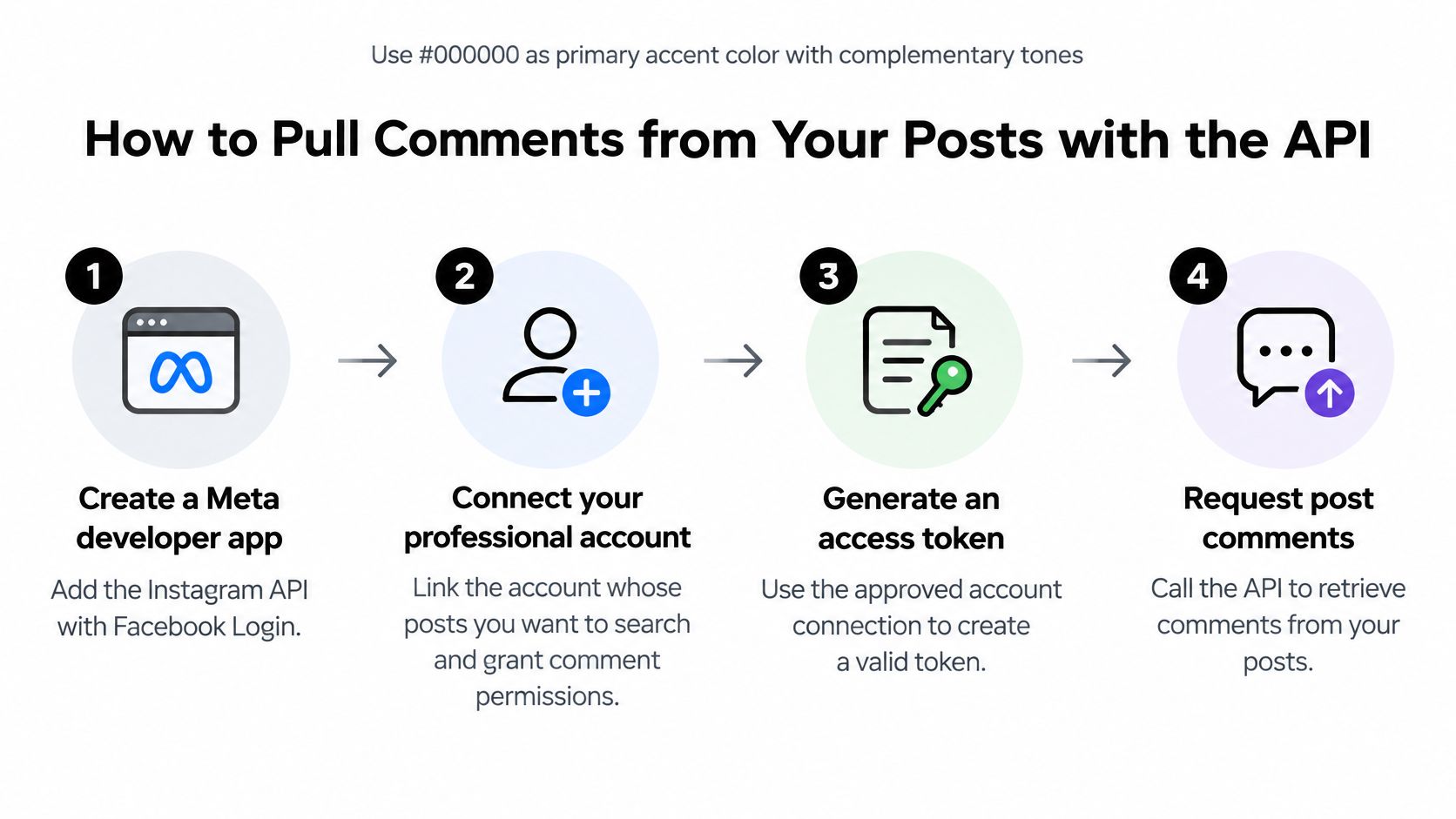
Connect the account and enumerate media
- Create the app. Add the Instagram API with Facebook Login in the Meta developer dashboard. Use the permissions and review requirements applicable to your chosen API version.
- Authorize the professional account. Connect the account whose posts you'll search and grant the necessary comment access.
- Protect the token. Put it in an environment variable or secret manager. Never commit it, include it in screenshots, or write paging URLs containing credentials into ordinary logs.
- Enumerate media. Request
GET /{ig-user-id}/media, retaining each media ID and publication timestamp. Paginate this collection too. - Retrieve comments. Request
GET /{media-id}/commentswith supported fields such asid,text,username,timestamp,replies. - Retrieve replies explicitly. Follow
GET /{comment-id}/replieswhere appropriate and save the parent comment ID. An embedded replies collection can itself require pagination.
For broader integration planning, the RealtyAPI.io documentation introduction is a separate reference for your property-data integration. Keep its credentials and ingestion jobs separate from your Instagram authorization.
Persist pages before advancing
This minimal Python loop assumes COMMENTS_ENDPOINT contains the versioned comments endpoint for your selected media. It demonstrates pagination, not production retry handling.
import json
import os
from pathlib import Path

import requests

url = os.environ["COMMENTS_ENDPOINT"]
params = {
    "access_token": os.environ["INSTAGRAM_ACCESS_TOKEN"],
    "fields": "id,text,username,timestamp,replies",
}
comments = []
output = Path("comment-pages")
output.mkdir(exist_ok=True)
page_number = 0

while url:
    response = requests.get(url, params=params, timeout=30)
    response.raise_for_status()
    payload = response.json()
    page = payload["data"]

    temporary = output / f"{page_number}.tmp"
    destination = output / f"{page_number}.json"
    temporary.write_text(json.dumps(page), encoding="utf-8")
    temporary.replace(destination)

    comments.extend(page)
    url = payload.get("paging", {}).get("next")
    params = None
    page_number += 1
Persist a page before requesting its successor. For production, replace numbered files with idempotent database upserts and a transactional checkpoint.
The following walkthrough provides additional setup context.
If property inquiries will feed a newsletter workflow, HarvestMyData's guide to build an email list that converts is relevant to the separate subscription process. A public comment isn't permission to add its author to an email list.
Finish the initial test by comparing stored comments and replies with a manual inspection of that post. Matching totals are a useful smoke test, not proof of historical completeness. Investigate discrepancies before scaling to the rest of your media.
Handling Rate Limits and Retries in Code
Put retry decisions in one request wrapper, not inside every ingestion loop. When Instagram rejects a burst or returns a transient server error, the worker should slow down and resume the same page, not restart the account import.
Retry transient failures, not broken permissions
Use exponential backoff with jitter. The following configuration starts with a two-second wait, doubles between retries, and permits five retries after the initial request. These are implementation choices, not Instagram's published quota.
The Python wrapper returns page data and pagination state. Supply a logger configured to redact tokens and personal information.
import random
import time
import requests

def fetch_page(url, params, log):
    for attempt in range(6):
        response = requests.get(url, params=params, timeout=30)
        payload = response.json()
        error = payload.get("error", {})
        retryable = (
            response.status_code == 429
            or response.status_code >= 500
            or error.get("is_transient") is True
        )

        if response.ok and not error:
            paging = payload.get("paging", {})
            return {
                "data": payload.get("data", []),
                "cursor": paging.get("cursors", {}).get("after"),
                "next": paging.get("next"),
            }

        log(response.status_code, error)
        if not retryable or attempt == 5:
            response.raise_for_status()
            raise RuntimeError("API error; inspect sanitized log")

        time.sleep(2 ** (attempt + 1) + random.random())
The equivalent JavaScript pattern uses an asynchronous delay so the worker doesn't block the event loop.
const delay = ms => new Promise(resolve => setTimeout(resolve, ms));

async function fetchPage(url, options, log) {
  for (let attempt = 0; attempt <= 5; attempt++) {
    const response = await fetch(url, options);
    const body = await response.json();
    const error = body.error;
    const retryable =
      response.status === 429 ||
      response.status >= 500 ||
      error?.is_transient === true;

    if (response.ok && !error) {
      return {
        data: body.data ?? [],
        cursor: body.paging?.cursors?.after ?? null,
        next: body.paging?.next ?? null
      };
    }

    log(response.status, error);
    if (!retryable || attempt === 5) {
      throw new Error("API request failed; preserve checkpoint");
    }

    await delay((2 ** (attempt + 1) + Math.random()) * 1000);
  }
}
Add transport-timeout handling around these wrappers in production. Check Meta's documented error codes for your endpoint too, because HTTP status alone doesn't identify every quota error. Honor an applicable server-provided retry delay when it requires a longer wait.
Retry schedule for rate-limit and server errors
| Attempt | Wait Before Retry | Action |
|---|---|---|
| 1 | 2 seconds plus jitter | Retry the same request |
| 2 | 4 seconds plus jitter | Retry the same request |
| 3 | 8 seconds plus jitter | Retry and log the error body |
| 4 | 16 seconds plus jitter | Retry and log a warning |
| 5 | 32 seconds plus jitter | Final retry; if it fails, stop, save the cursor and resume later |
Bound jobs and commit checkpoints
Meta's Instagram Comments Data guide sets an estimated response-size limit of 1 million for asynchronous comment search, with that estimate meaning 1 million or more. That constraint belongs to the Content Library workflow, not a general Graph API page-size allowance.
Partition eligible jobs by account, media, or supported time filters. Poll asynchronous jobs with backoff, and process queued work steadily instead of launching every request together. Consult the RealtyAPI.io rate-limit documentation separately for that integration; don't reuse quota assumptions between providers.
Checkpoint rule: Commit comment upserts and the next-page checkpoint together. If either operation fails, replay the page safely.
Use the immutable comment ID as the unique key. When retries are exhausted, retain the failed request's checkpoint, mark the job incomplete, and resume later without calling the partial result complete.
How to Filter Comments by Keyword, Username and Date
Once comments are stored, search locally. Keep the original text alongside a derived search representation so you can explain why a result matched.
Apply Unicode NFKC normalization and case folding before matching. NFKC helps reconcile compatibility forms such as full-width characters; it doesn't remove accents or make every visually similar character equivalent. If accent-insensitive search is required, implement and label it separately.
Make matching rules explicit
The following Python function uses whole-token matching for words and phrases, supports AND or OR, and labels raw-text matches separately from normalized matches. It expects timezone-aware timestamps and a timezone-aware start date.
import re
import unicodedata
from datetime import datetime, timezone

def normalize(text):
    return unicodedata.normalize("NFKC", text).casefold()

def contains(text, term):
    if not term:
        return False
    return re.search(
        r"(?<!\w)" + re.escape(term) + r"(?!\w)", text
    ) is not None

def filter_comments(comments, keywords, start_date, mode="OR"):
    if mode not in {"AND", "OR"}:
        raise ValueError("Use AND or OR")
    if start_date.tzinfo is None:
        raise ValueError("start_date must include a timezone")
    if not keywords:
        return []

    combine = all if mode == "AND" else any
    matches = []
    start = start_date.astimezone(timezone.utc)

    for comment in comments:
        timestamp = datetime.fromisoformat(
            comment["timestamp"].replace("Z", "+00:00")
        ).astimezone(timezone.utc)
        if timestamp < start:
            continue

        text = comment["text"]
        raw = combine(contains(text, term) for term in keywords)
        normalized = combine(
            contains(normalize(text), normalize(term))
            for term in keywords
        )
        if raw or normalized:
            matches.append({
                **comment,
                "match_type": "exact" if raw else "normalised"
            })
    return matches
Here, exact means the requested text matched without normalization. It doesn't mean the entire comment equals the query.
Separate text search from structured filters
- Usernames: Filter an exact lower-cased handle field. Don't interpret a username mentioned inside the text as the comment's author.
- Dates: Query the comment's UTC timestamp, while keeping collection time in another field.
- Special tokens: Extract hashtags, mentions, and URLs into exact-match fields. Keep emoji variants as explicit keyword entries where needed.
- Boolean behavior: Define AND as every term matching and OR as any term matching.
Meta's Content Library search documentation directs developers to advanced-search rules for multiple keywords and Boolean operators. Don't assume your local query syntax transfers unchanged to that service.
Two traps deserve explicit tests. A whole-token search for price won't find prices unless you add that form or implement stemming. Meanwhile, not available contains available, so a textual match isn't a verified availability signal.
Before scheduling the filter, test it against a deliberately labeled set of ten comments containing expected matches, expected non-matches, and ambiguous phrases. Treat that number as a starting test fixture, not a quality guarantee.
Privacy and Compliance Rules for Comment Data
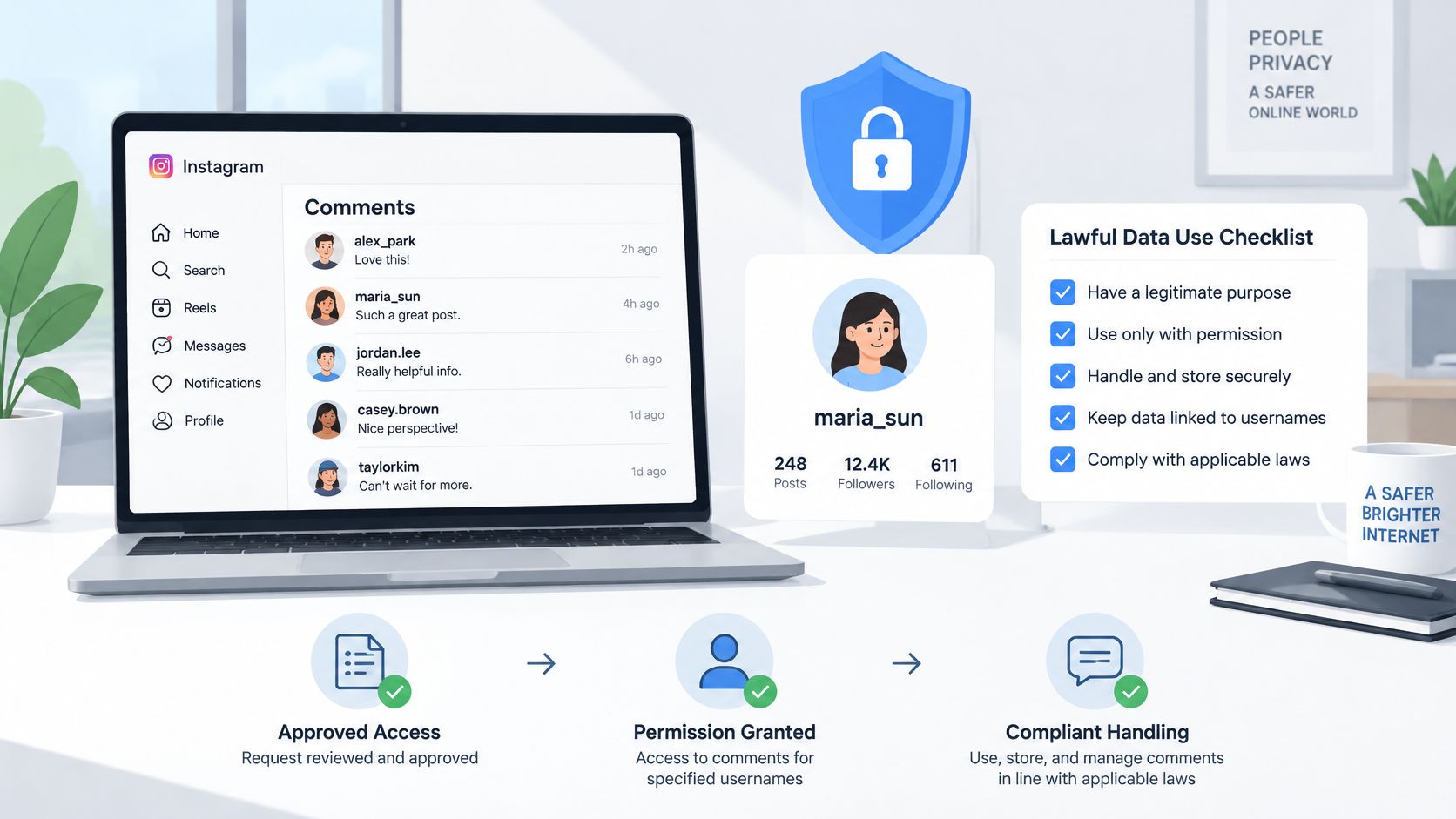
Treat comments linked to handles as personal data, not anonymous raw material. Public visibility doesn't settle whether your planned collection, retention, profiling, or marketing use is lawful.
An Instagram hostility-prediction study demonstrates how comment text can be analyzed alongside linguistic and social features to forecast hostility. That analytical usefulness is also a reason to limit collection: a searchable history can reveal more about a person than an isolated reply.
Collect for a defined purpose
Document what the system does before it starts ingesting. Moderating owned listing posts is a different purpose from constructing histories of individual commenters.
- Establish authority and lawful basis: Use accounts you manage or have permission to analyze. Account access alone doesn't settle every privacy obligation.
- Minimize content: Retain text, timestamp, and handle where necessary. Skip profile photographs, biographies, and follower lists.
- Keep essential provenance: Preserve post ID, comment ID, parent relationship, collection time, and access route.
- Restrict access: Separate application credentials from datasets and limit exports to people who need them.
The following illustration summarizes the handling stages, from collection through removal.
Expire records and verify removals carefully
Choose a defensible retention period. For example, a moderation project might propose 90 days, but that's a hypothetical policy choice, not a legal safe harbor. Apply expiry to search indexes, exports, and downstream copies, not just the primary table.
Recheck retained records on a schedule. If a comment stops appearing, distinguish confirmed removal from permission failure, temporary unavailability, or changed moderation visibility. Remove inaccessible content from active search according to your policy and log the observation without claiming certainty you don't have.
A missing comment in your results is not proof it never existed.
Don't identify commenters beyond their public handles or assemble personal dossiers from their histories. Scraping adds contractual and account-safety risks; technical feasibility isn't authorization.
Assess whether GDPR, CCPA, or other applicable rules cover your organization and affected people. Geography matters, but so do the law's other applicability conditions. The RealtyAPI.io privacy policy is a separate policy reference for that service, not legal clearance for your Instagram pipeline.
Common Problems and How to Fix Them
A short result set is the first failure to investigate, but don't immediately blame deleted comments. Inspect the job's final saved page and its pagination state. An import that stopped after a successful response can still be incomplete.
Diagnose from a known comment
Choose a comment you can identify on an authorized post and trace it through the pipeline. Check the raw response, persisted record, normalized text, and search result. This separates retrieval failures from indexing failures without rerunning the entire account.
For duplicated records, inspect your storage key before changing retry behavior. Retries are expected; duplicate logical rows mean the write path isn't idempotent. For missing replies, inspect whether your worker scheduled and completed the child collection rather than assuming an embedded preview contained the thread.
Comment search symptoms, causes and fixes
| Symptom | Likely Cause | Fix |
|---|---|---|
| Fewer comments than the post shows | Only the first page was read | Follow the paging next link until it returns no data |
| Duplicate rows after a retry | Pages saved without a unique key | De-duplicate by immutable comment ID |
| Replies missing from threads | Replies were never requested | Call the replies endpoint and store the parent comment ID |
| Keyword misses accents or emoji | Matching without normalisation | Apply Unicode NFKC and case folding before matching |
| Older posts return nothing | Media outside your account or token scope | Confirm media ownership and token permissions |
| Sudden rate-limit errors | Too many calls in a short window | Apply backoff and reduce batch size |
Normalization is a baseline fix, not a universal one. Accent folding and emoji variation handling need their own policies and fixtures. Likewise, an old post returning nothing can reflect a discovery filter or failed checkpoint, not just ownership or permissions.
Make every fix observable
Record job status as complete, partial, or failed. Store the last successful page checkpoint and a sanitized error category so an operator can distinguish an authorization problem from an exhausted retry budget.
After a fix, rerun the affected post and compare unique IDs, parent relationships, and known matches. A count that stays constant can still conceal one missing comment and one duplicate.
As an operating practice, manually inspect ten to twenty comments per run, including replies and awkward Unicode examples. That sample can expose silent errors early, but it doesn't establish a measured recall rate or prove completeness.
Choose Your Comment Search Method Today
The right Instagram comment search route depends on the access you have, not on which method promises the largest dataset. A narrow search you can reproduce is more useful than a broad export with unexplained gaps.
Match the method to the job
- You manage the professional account: Ingest comments from your owned media through the Graph API, then search the records you store.
- You need business mentions: Use the supported mentions workflow and webhook notifications to identify relevant comment context.
- You need your own past activity: Search the account-data archive locally and document its historical limits.
- You're conducting eligible public-content research: Apply for Content Library access and validate how its queries behave before designing the analysis.
- You lack a permitted programmatic route: Use a documented manual sample rather than scraping around access restrictions.
For property applications, keep social intent separate from listing facts. A comment asking about rent, accessibility, or availability identifies an inquiry, not a verified property attribute. Preserve the comment's context before associating it with a listing record.
Make the first run small enough to inspect
Start with one owned post. Retrieve its comments and replies, then compare stored records with the visible thread. Resolve unexplained gaps before scheduling a daily sync. Add retry handling, transactional checkpoints, and a clear status for partial results.
The RealtyAPI.io documentation covers the property-data side of an application. Keep that integration separate from Meta's account permissions and Instagram comment-access scope.
Decision standard: Record what you searched, how you retrieved it, and when you collected it.
A reliable comment search preserves provenance and states its limits. Build an auditable collection before expanding the accounts or posts you process.
RealtyAPI.io provides a real estate data API for property search, listing details, and market monitoring. Explore RealtyAPI.io for the property-data integration, while keeping Instagram comment ingestion in its own authorized, auditable pipeline.