GraphQL Request Example: Queries, Mutations, and Auth
You've got a GraphQL endpoint, a sprint ticket, and a teammate asking for property listings before lunch. The first pause usually isn't the query itself. It's the transport.
Do you send a GET because you're reading data? Do you post raw GraphQL text? Do you need an operation name, or is that optional ceremony?
That confusion is normal because a lot of GraphQL examples stop too early. They show a tiny query and skip the part that breaks in production: the HTTP envelope, the headers, the variables object, the auth, and the error handling when the server sends back errors with an HTTP success status.
GraphQL has been public since 2015, when Facebook open-sourced the specification and reference implementation after starting development internally in 2012, which is why it's often framed as a newer API style than REST's 2000 era roots (historical GraphQL timeline). It's also not niche anymore. Recent reporting says 61.7% of developers actively use GraphQL, and 56.3% of respondents make more than 100,000 GraphQL API calls per month, with 28.7% exceeding 1 million calls monthly (GraphQL usage reporting).
That scale changes what a useful GraphQL request example should look like. Not a toy. A request you can paste into curl, move into fetch, port to Python, and ship the same day.
A Real GraphQL Request in Context
A common task looks like this: pull active property listings from a GraphQL endpoint, filter them, and get the result into an app fast enough to unblock the frontend. If you're using a real estate data service such as the RealtyAPI documentation, you'll usually start with a single endpoint rather than a list of resource URLs.
The first practical decision is the HTTP method. For GraphQL over HTTP, POST is the canonical starting point. The request body is JSON, and that JSON contains the GraphQL document in a query field. That shape is what most tooling, examples, and production integrations expect.
Here's the kind of request envelope people deploy:
- Endpoint: one GraphQL URL, often something like
/graphql - Method:
POST - Headers:
Content-Type: application/json, plus auth if needed - Body: a JSON object with
query, oftenvariables, and sometimesoperationName
Practical rule: If you're unsure where to begin, send
POSTwithapplication/jsonand put your GraphQL document insidequery. That path fails less often than trying to be clever with transport up front.
The payoff is speed. Once the envelope is right, the query becomes the easy part. You can swap fields, add variables, rename the operation, and keep the rest of the request intact. That's the difference between a hello-world snippet and a request shape you can reuse across local testing, CI jobs, and backend services.
Anatomy of a GraphQL Request
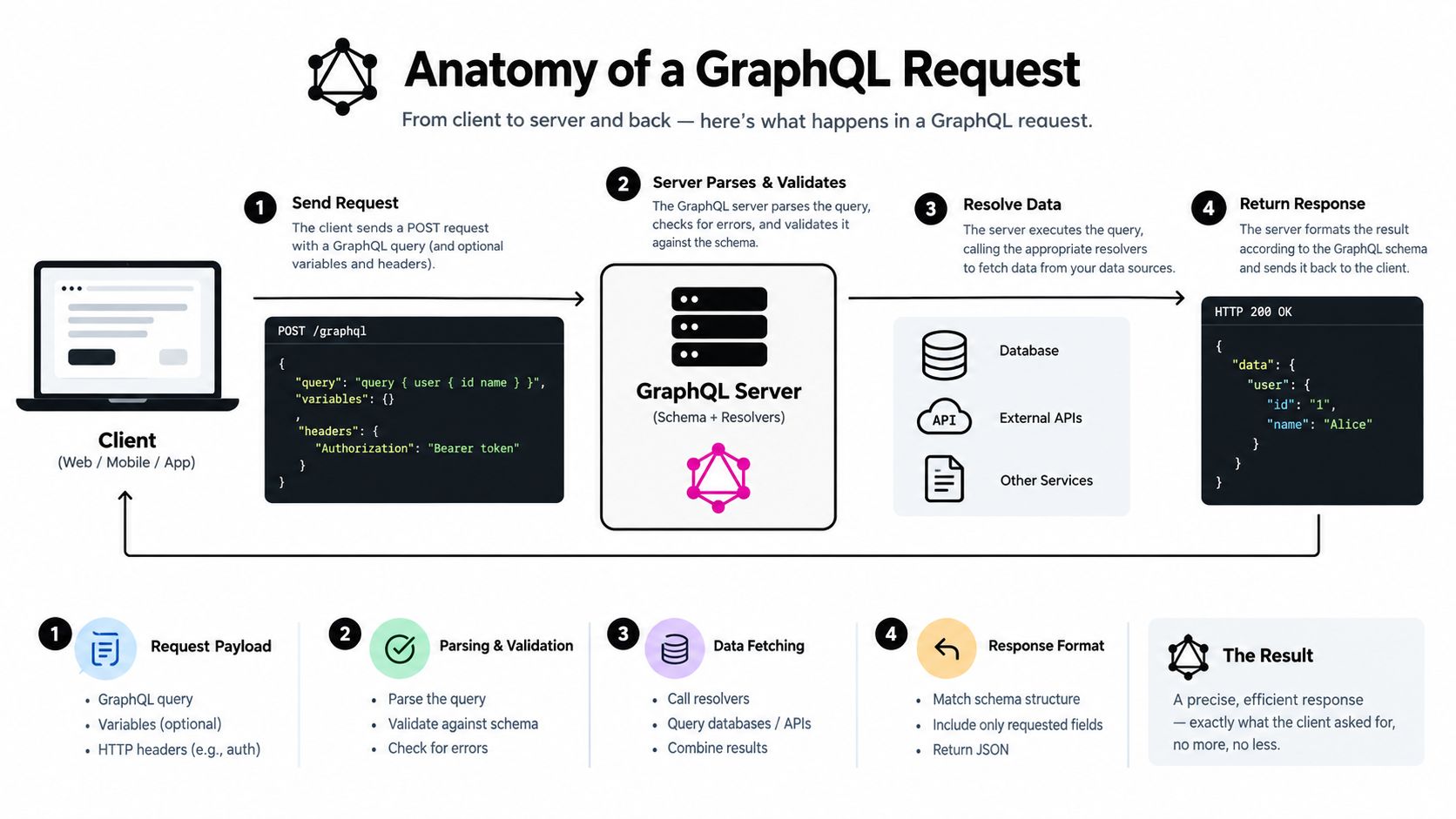
A GraphQL request has a tighter structure than many REST calls. The GraphQL specification defines the request around an operation document, an optional operation name, optional variable values, and an initial root value. The document must contain at least one OperationDefinition and may include FragmentDefinition (GraphQL specification October 2021).
The JSON envelope
For HTTP transport, the body is typically a JSON object with:
queryfor the GraphQL documentoperationNamewhen the document contains multiple operations or when you want explicit namingvariablesfor runtime valuesextensionsfor implementation-specific metadata
The GraphQL over HTTP guidance uses application/json as the content type, and it also allows GET where the query is sent as a URL parameter and variables are URL-encoded JSON when present (GraphQL over HTTP guidance).
{
  "query": "query GetListings($status: String!) { listings(status: $status) { id address price } }",
  "operationName": "GetListings",
  "variables": {
    "status": "ACTIVE"
  }
}
What belongs in headers and what doesn't
Headers are separate from the GraphQL body. Keep them that way.
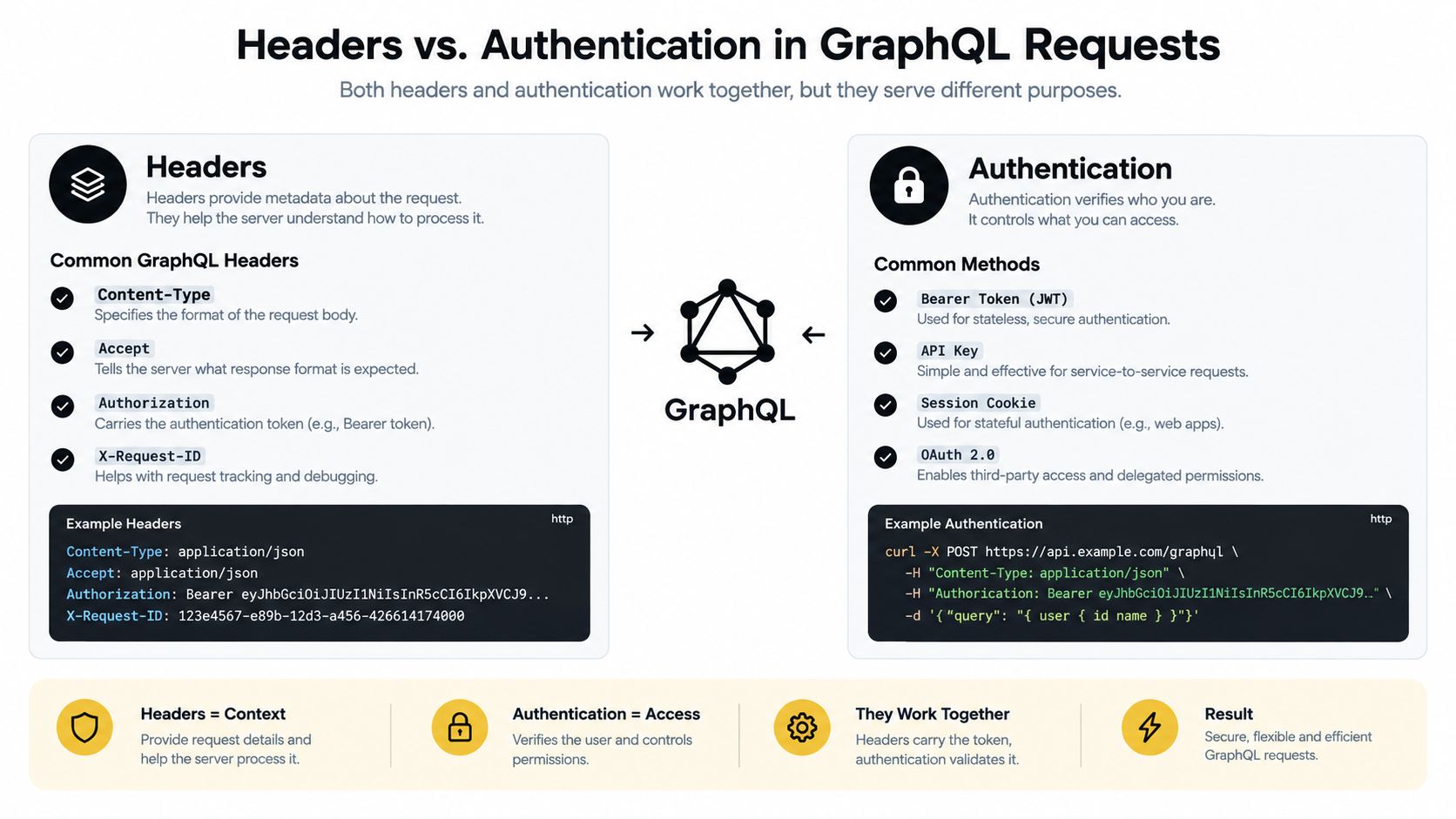
Content-Typetells the server you're sending JSONAcceptcan express what response format you expectAuthorizationcarries the token or credential- Custom headers can carry API keys or tracing metadata
A useful mental model is simple: the body describes the GraphQL operation, while the headers describe the HTTP request carrying it.
Queries and mutations differ because of the operation type inside the GraphQL document, not because one must use one HTTP method and the other must use another.
That distinction trips up people coming from REST. A mutation still commonly travels over POST, but so do most queries.
Query Request Example Across Curl, Fetch, and Python
The fastest way to make GraphQL click is to send the same query through three clients and watch what changes. The GraphQL part barely changes. The transport details do.
Use the same endpoint and payload in each client while testing against the RealtyAPI playground.
One query, one payload
{
  "query": "query SearchListings($status: String!, $limit: Int!) { listings(status: $status, first: $limit) { edges { node { id address price } } } }",
  "operationName": "SearchListings",
  "variables": {
    "status": "ACTIVE",
    "limit": 3
  }
}
Curl
curl -X POST "https://api.example.com/graphql" \
  -H "Content-Type: application/json" \
  -H "Accept: application/json" \
  -d '{"query":"query SearchListings($status: String!, $limit: Int!) { listings(status: $status, first: $limit) { edges { node { id address price } } } }","operationName":"SearchListings","variables":{"status":"ACTIVE","limit":3}}'
JavaScript fetch
const response = await fetch("https://api.example.com/graphql", {
  method: "POST",
  headers: {
    "Content-Type": "application/json",
    "Accept": "application/json"
  },
  body: JSON.stringify({
    query: `
      query SearchListings($status: String!, $limit: Int!) {
        listings(status: $status, first: $limit) {
          edges {
            node {
              id
              address
              price
            }
          }
        }
      }
    `,
    operationName: "SearchListings",
    variables: {
      status: "ACTIVE",
      limit: 3
    }
  })
});

const json = await response.json();
console.log(json);
Python requests
import requests

payload = {
    "query": """
        query SearchListings($status: String!, $limit: Int!) {
          listings(status: $status, first: $limit) {
            edges {
              node {
                id
                address
                price
              }
            }
          }
        }
    """,
    "operationName": "SearchListings",
    "variables": {
        "status": "ACTIVE",
        "limit": 3
    }
}

response = requests.post(
    "https://api.example.com/graphql",
    headers={
        "Content-Type": "application/json",
        "Accept": "application/json"
    },
    json=payload
)

print(response.json())
| Transport | Body Encoding | Headers Set Explicitly | Error Surface |
|---|---|---|---|
| Curl | Inline JSON string | Yes | Terminal output only unless piped to another tool |
| Fetch | JSON.stringify(...) |
Yes | Must inspect both HTTP status and parsed JSON |
| Python | json=payload |
Usually yes | Check status code, then parsed body |
Two gotchas that waste time
- Curl quoting breaks easily. Keep the JSON body compact unless you're building it from a file.
fetchwon't throw just because GraphQL returned logical errors. If the server replies with HTTP success and anerrorsarray,response.okcan still be true.
A valid response might look like this:
{
  "data": {
    "listings": {
      "edges": [
        {
          "node": {
            "id": "lst_123",
            "address": "123 Main St",
            "price": 450000
          }
        }
      ]
    }
  }
}
Mutation Request Example With Variables
Mutations are where sloppy examples usually go wrong. Inline interpolation feels quick until an address contains a quote, a newline, or some user input you didn't sanitize. Put dynamic values in the variables object instead.
A clean mutation payload
{
  "query": "mutation CreateListing($input: CreateListingInput!) { createListing(input: $input) { id address price bedrooms } }",
  "operationName": "CreateListing",
  "variables": {
    "input": {
      "address": "25 Market Street",
      "price": 525000,
      "bedrooms": 2
    }
  }
}
That separation matters because the query stays static while the values change. In practice, that makes requests easier to reuse, easier to validate against the schema, and less painful to log or inspect.
The same mutation in three clients
Curl:
curl -X POST "https://api.example.com/graphql" \
  -H "Content-Type: application/json" \
  -d '{"query":"mutation CreateListing($input: CreateListingInput!) { createListing(input: $input) { id address price bedrooms } }","operationName":"CreateListing","variables":{"input":{"address":"25 Market Street","price":525000,"bedrooms":2}}}'
JavaScript:
const res = await fetch("https://api.example.com/graphql", {
  method: "POST",
  headers: {
    "Content-Type": "application/json"
  },
  body: JSON.stringify({
    query: `
      mutation CreateListing($input: CreateListingInput!) {
        createListing(input: $input) {
          id
          address
          price
          bedrooms
        }
      }
    `,
    operationName: "CreateListing",
    variables: {
      input: {
        address: "25 Market Street",
        price: 525000,
        bedrooms: 2
      }
    }
  })
});

const json = await res.json();
Before the Python example, it helps to see the same pattern explained another way:
Python:
import requests

payload = {
    "query": """
        mutation CreateListing($input: CreateListingInput!) {
          createListing(input: $input) {
            id
            address
            price
            bedrooms
          }
        }
    """,
    "operationName": "CreateListing",
    "variables": {
        "input": {
            "address": "25 Market Street",
            "price": 525000,
            "bedrooms": 2
        }
    }
}

response = requests.post(
    "https://api.example.com/graphql",
    headers={"Content-Type": "application/json"},
    json=payload
)

print(response.json())
| Client | Query String | Variables Object | Headers |
|---|---|---|---|
| Curl | Inline in -d payload |
Nested JSON inside payload | Content-Type usually mandatory |
| Fetch | Multiline template string works well | Plain JS object | Explicit object in headers |
| Python | Triple-quoted string is readable | Native dict | Usually set Content-Type |
What to watch during writes
If your document contains multiple operations, operationName stops being optional in practice. It's also useful in logs because “CreateListing” is easier to trace than a raw query blob.
Field note: For retries, don't assume every mutation is safe to replay. If your API supports idempotency tokens, use them. Duplicate creates are harder to clean up than failed reads.
A typical mutation response includes data, and possibly errors. Grab the returned id immediately if a follow-up read or update depends on it.
Headers and Authentication in GraphQL Requests
Authentication in GraphQL lives at the HTTP layer. The server evaluates credentials before or during resolver execution, but the credentials themselves belong in headers or cookies, not in query variables.
If you're estimating usage-sensitive integrations, the RealtyAPI credits documentation is the kind of page worth checking before wiring credentials into production jobs.
Three patterns you'll actually see
Bearer token
- Curl:
-H "Authorization: Bearer <token>" - Fetch:
Authorization: "Bearer <token>" - Python:
headers={"Authorization": "Bearer <token>"}
- Curl:
API key header
- Common pattern:
X-API-Key: <key> - Some APIs use a different custom header. Follow the provider's docs exactly.
- Common pattern:
Cookie session
- Browser apps often send cookies automatically.
- Server-side clients can send a
Cookieheader directly when appropriate.
Copy-pastable examples
curl -X POST "https://api.example.com/graphql" \
  -H "Content-Type: application/json" \
  -H "Authorization: Bearer <token>" \
  -d '{"query":"query Me { me { id email } }"}'
await fetch("https://api.example.com/graphql", {
  method: "POST",
  headers: {
    "Content-Type": "application/json",
    "X-API-Key": "<key>"
  },
  body: JSON.stringify({ query: "{ viewer { id } }" })
});
requests.post(
    "https://api.example.com/graphql",
    headers={
        "Content-Type": "application/json",
        "Cookie": "sessionid=<session-value>"
    },
    json={"query": "{ account { id } }"}
)
Common mistakes
- Never put tokens in
variables. Variables are part of the GraphQL payload, not the transport credential layer. - Cookie auth needs CSRF protection. Browser convenience can turn into a security hole if the server doesn't check origin and anti-CSRF signals.
- Rotate keys when scopes change. Teams often keep old keys alive longer than they should.
GraphQL doesn't do authorization “per request body field” automatically. Resolver code or middleware still decides who can read or mutate which fields.
Pagination Patterns in GraphQL Requests
Pagination is where toy GraphQL examples start lying by omission. A list field that looks harmless in development can become the source of bloated responses and expensive nested fetches in production.
Independent GraphQL guidance leans toward static query strings and fetching only the fields and entities you need, because nested collections can return far more data than expected (The Graph querying best practices). That's why a good GraphQL request example should include pagination, not just a naked list field.
Cursor-based pagination
A common shape uses edges, node, and pageInfo.
query ListingsPage($first: Int!, $after: String) {
  listings(first: $first, after: $after) {
    edges {
      cursor
      node {
        id
        address
        price
      }
    }
    pageInfo {
      endCursor
      hasNextPage
    }
  }
}
Variables for the first page:
{
  "first": 10,
  "after": null
}
Variables for the next page:
{
  "first": 10,
  "after": "opaque-cursor-from-previous-page"
}
For a broader reference on API pagination trade-offs, the pagination guide from API Direct is useful because it maps concepts cleanly across styles.
| Pattern | Request Variables | Response Fields | Best For |
|---|---|---|---|
| Cursor | first, after |
edges, pageInfo.endCursor, pageInfo.hasNextPage |
Moving through changing datasets |
| Offset | limit, offset |
list plus optional count metadata | Simpler datasets and admin tools |
| Page number | page, pageSize |
list plus page metadata | Human-facing navigation |
Why cursor pagination usually wins
Cursor pagination holds up better when records shift between requests. Offset pagination can skip or duplicate rows when inserts happen between page loads. The GraphQL spec itself doesn't force one pagination model, so you need to learn the schema's conventions.
Keep page size intentional. “Give me everything” isn't a shortcut. It's how a fast query turns into a slow one once real data arrives.
In JavaScript or Python, the loop is straightforward: send the query, read pageInfo.endCursor, stop when hasNextPage is false, and feed the cursor into the next request.
Reading and Handling GraphQL Error Responses
GraphQL error handling trips up even experienced backend developers because transport success and application success are not the same thing. A GraphQL server can return HTTP success and still include a meaningful errors array.
The GraphQL over HTTP draft defines a standard request shape with a required query string and optional operationName and variables, and it says servers must support POST for that request type. It also notes that /graphql is a common path convention (GraphQL over HTTP draft). That standardization helps on the request side. The response side still requires discipline.
If you're mapping transport failures versus application failures in a real integration, keep the RealtyAPI status codes documentation nearby.
What an ugly response looks like
{
  "data": {
    "listing": null
  },
  "errors": [
    {
      "message": "Not authorized to access listing",
      "locations": [{ "line": 2, "column": 3 }],
      "path": ["listing"],
      "extensions": {
        "code": "FORBIDDEN",
        "requestId": "req_abc123"
      }
    }
  ]
}
How to read it
messageis useful for logs and debugging, but don't build logic on free-form text.locationspoints to the query document location.pathtells you which field failed.extensions.codeis often the most useful machine-readable hint.datamay still exist, partially.
In JavaScript, check both response.ok and json.errors. In Python, inspect response.status_code, then parse the body and inspect errors. In curl, piping to a JSON tool helps pull out errors[0].message quickly.
Retry transport problems differently from schema or auth failures. Validation and permission errors usually need code or credential changes, not blind retries.
GraphQL Request Tools Compared
The wire format may be the same, but your daily workflow changes a lot depending on the client. Some tools are better for discovery. Others are better for automation or simple scripts.
How the tools differ
GraphiQL is strong when you're still learning the schema. It's usually the quickest place to inspect types, try aliases, and look up field docs beside the query editor.
Apollo Studio fits teams that want shared operations and a schema-aware workflow. It's less about “send one request right now” and more about maintaining a library of known queries.
Postman works well when GraphQL sits beside REST or webhook testing in the same workspace. That matters on mixed API teams.
A plain HTTP client still wins for backend scripts, cron jobs, and reproducible debugging. curl, browser fetch, and Python requests keep the abstraction thin.
Tool comparison
| Tool | Best For | Auth Support | Variables Support |
|---|---|---|---|
| GraphiQL | Schema exploration and ad hoc queries | Yes | Yes |
| Apollo Studio | Shared operations and team workflows | Yes | Yes |
| Postman | Mixed API collections and test workflows | Yes | Yes |
| Plain HTTP client | Scripts, services, terminal debugging | Yes | Yes |
One workflow note that matters
All of these tools ultimately issue the same HTTP request. Choosing one doesn't lock you into a different GraphQL model. It just changes how easily you can inspect the schema, save request history, or automate execution.
In mixed API environments, teams often keep one general client plus one low-level fallback. That combination works well. For example, you might inspect a schema in GraphiQL, store a team request in Postman, and run the production job with Python or curl. If you need another provider in that mix, RealtyAPI.io is one option that exposes real estate data through GraphQL alongside REST and webhooks.
GraphQL Request Example Against RealtyAPI
Here's what a production-shaped request looks like when you tie the earlier pieces together. The pattern is simple: bearer auth in the header, POST to the GraphQL endpoint, query text in query, and pagination-friendly variables in variables.
Curl example
curl -X POST "https://api.realtyapi.io/graphql" \
  -H "Content-Type: application/json" \
  -H "Accept: application/json" \
  -H "Authorization: Bearer <token>" \
  -d '{
    "query":"query GetListings($limit: Int!, $after: String) { listings(first: $limit, after: $after) { edges { node { id address price bedrooms } } pageInfo { hasNextPage endCursor } } }",
    "operationName":"GetListings",
    "variables":{
      "limit":10,
      "after":null
    }
  }'
A response shape you should expect to handle:
{
  "data": {
    "listings": {
      "edges": [
        {
          "node": {
            "id": "lst_1",
            "address": "42 Oak Avenue",
            "price": 610000,
            "bedrooms": 3
          }
        }
      ],
      "pageInfo": {
        "hasNextPage": true,
        "endCursor": "cursor_1"
      }
    }
  }
}
Python example
import requests
from typing import Any, Dict

payload: Dict[str, Any] = {
    "query": """
        query GetListings($limit: Int!, $after: String) {
          listings(first: $limit, after: $after) {
            edges {
              node {
                id
                address
                price
                bedrooms
              }
            }
            pageInfo {
              hasNextPage
              endCursor
            }
          }
        }
    """,
    "operationName": "GetListings",
    "variables": {
        "limit": 10,
        "after": None
    }
}

response = requests.post(
    "https://api.realtyapi.io/graphql",
    headers={
        "Content-Type": "application/json",
        "Authorization": "Bearer <token>"
    },
    json=payload
)

body = response.json()
first_edge = body["data"]["listings"]["edges"][0]
print(first_edge["node"]["address"])
The useful part here isn't the field list. It's the shape. pageInfo.hasNextPage and endCursor give you the loop control you need for the next request. On the client side, guard for nullable values so Python code handles None cleanly and JavaScript checks for null before dereferencing nested fields.
Quick Reference Checklist for Every GraphQL Request
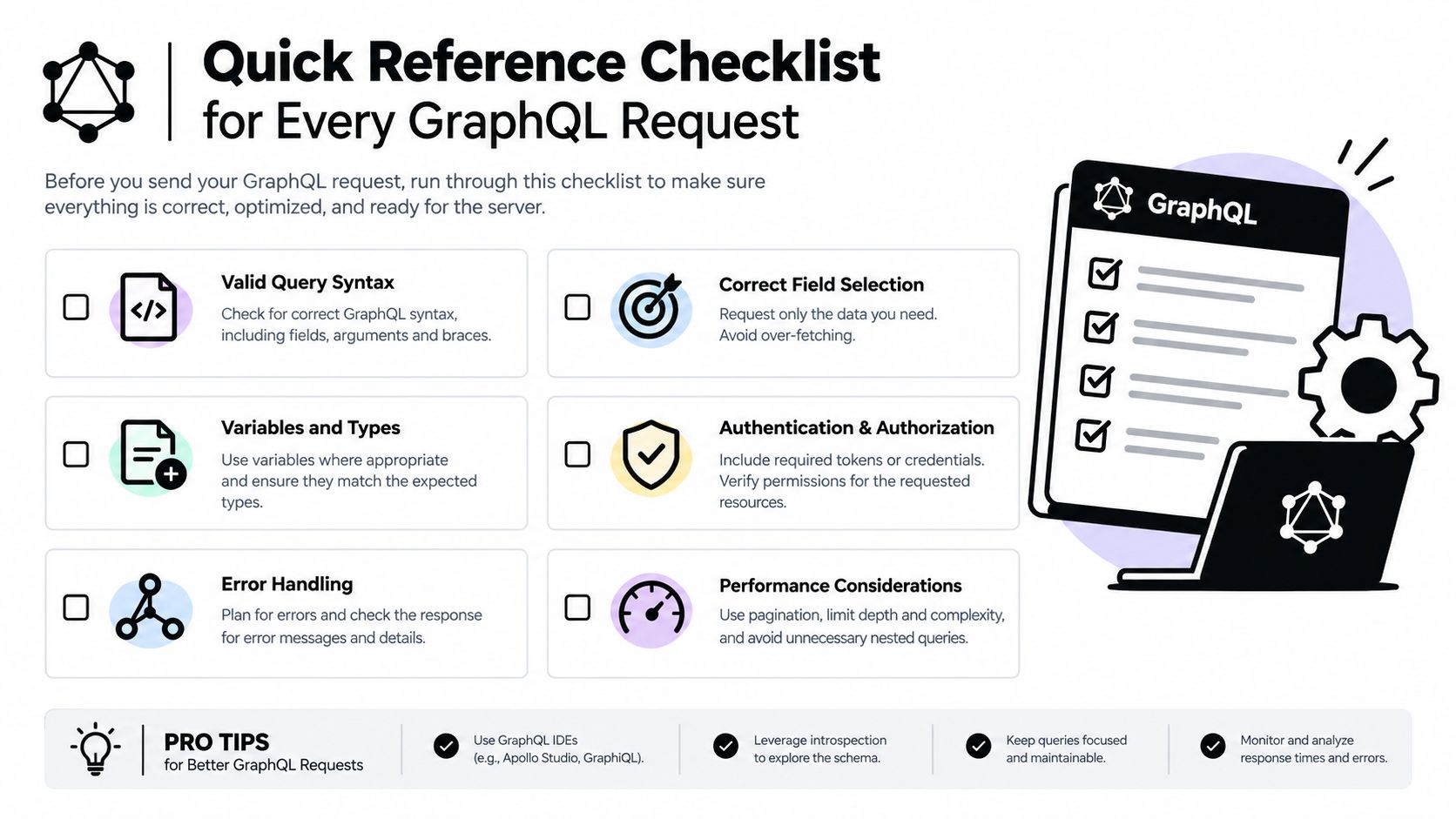
A shippable GraphQL request usually comes down to a short preflight check.
Envelope
- Endpoint URL: Confirm the actual GraphQL path.
- HTTP method: Use
POSTunless the API explicitly supports yourGETquery use case. - Headers: Set
Content-Type: application/json, plusAcceptand auth headers as needed.
Payload
- Query document: Keep it static when possible.
- Variables: Put runtime values in
variables, not string-interpolated into the query. - Operation name: Include it when documents contain multiple operations, and keep it for traceability even when optional.
- Extensions: Add only when your server or tooling expects them.
Runtime
- Authentication: Use
Authorization: Bearer <token>or the exact custom key header the API expects. - Pagination: Prefer cursors when the schema exposes them.
- Timeouts and retries: Treat reads and writes differently.
- Error handling: Inspect the
errorsarray even when HTTP status looks successful, and log machine-readable codes fromextensionswhen present.
Real estate apps tend to hit the exact GraphQL issues covered here: nested data, pagination, auth, and partial-error handling. RealtyAPI.io gives developers a real estate data layer with GraphQL, REST, and webhooks, so you can test the same request patterns in a domain where response shape and pagination matter. If you're building listing search, market monitoring, or property detail workflows, it's a practical place to put these request examples to work.