What Is Data Api
A data API is a controlled, machine-readable interface through which one software system requests, exchanges, or modifies structured data from another system. A property-search app can use one to find listings and retrieve details without connecting directly to a provider's database.
Your product team wants people to search properties across several platforms and compare listings, availability, prices, amenities, host details, and reviews. Each provider stores and organizes its information differently, so connecting your app directly to every database would create a tangle of fragile, privileged integrations. A data API offers a defined boundary: your app asks for permitted information in a known format, and the service returns a response it can process.
That boundary is useful, but it doesn't make the data accurate, secure, or dependable by itself. You still need to understand the interface, judge the quality of the information, and decide how your application will behave when requests fail or records change.
Why a Data API Matters in Real Estate
A traveler filters listings for two-bedroom apartments in Lisbon, picks one marked available, and reaches checkout before learning it was booked a week earlier. The app did everything right on the surface: the request was well formed, and the response was valid JSON. The availability field was stale.
That gap between syntactically correct data and dependable data is what makes the API decision matter in this domain. Every provider in a property product stores listings, prices, amenities, host details, and reviews in its own format, and connecting an app to each database would produce a tangle of fragile, privileged integrations. A data API draws a boundary instead: the provider defines which operations clients may call and how responses are shaped, so the same underlying data can serve a website, a mobile app, an analytics job, or an automated task through one controlled route.

MDN's primer on web API fundamentals explains how such defined request rules govern communication between systems. For a property-search product, the payoff is a reusable path to information rather than a custom database connection built for each feature or client.
The harder work starts after access works. A response can be perfectly valid and still carry an out-of-date price, an ambiguous availability window, or an amenity label that means something different on each provider. Evaluating an API means judging how requests are shaped, what returned fields mean, how access is controlled, and how the service behaves when it is slow or unreachable.
Developers who make sound choices here understand the interface, the protocol, the data contract, and the operational risks well enough to assess any API they encounter, whatever provider it comes from.
Understanding the Data API Concept
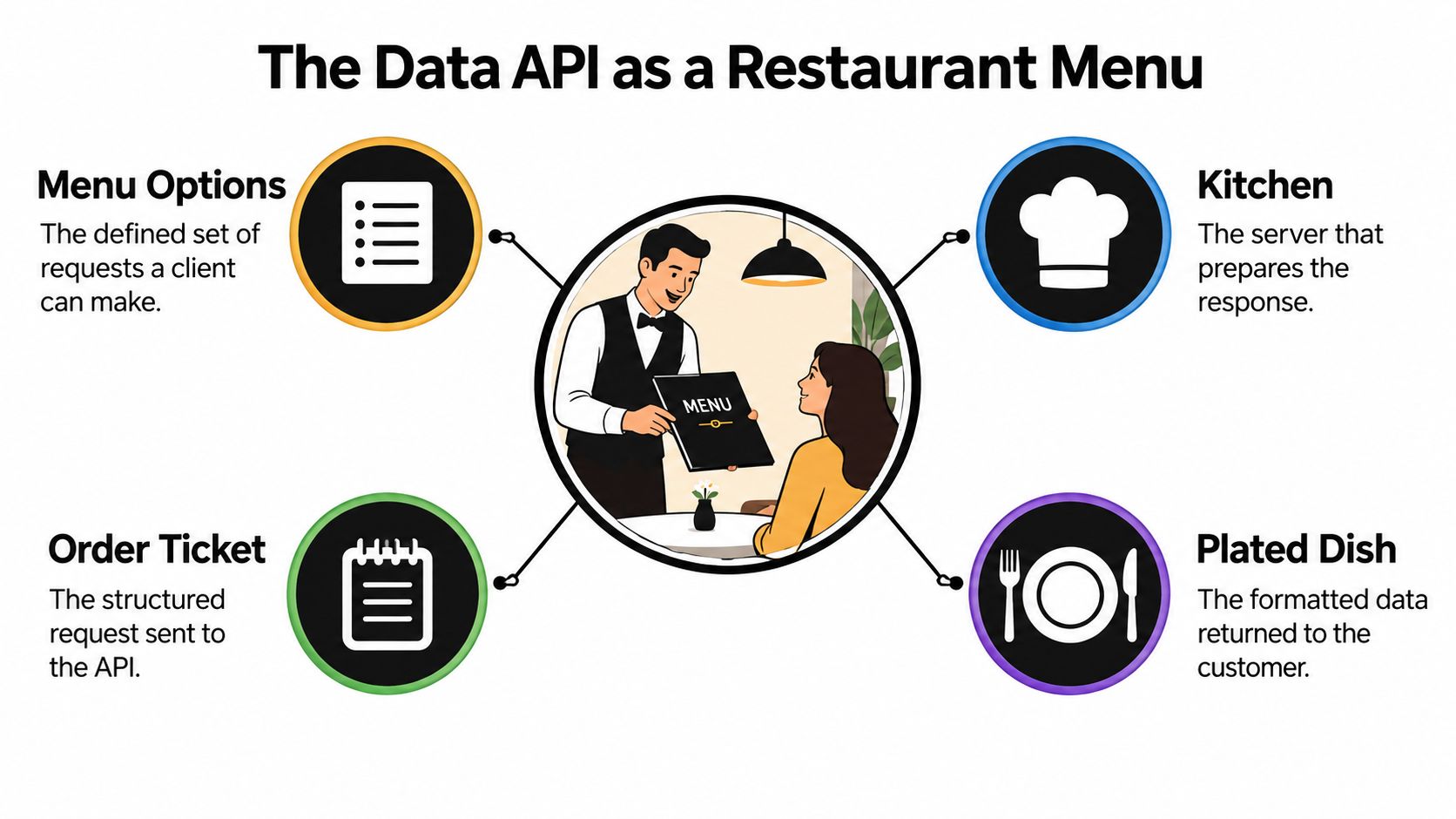
Think of a restaurant. You choose from a menu, place an order, and receive a prepared dish. You don't enter the kitchen, inspect its storage, or dictate how the cook organizes ingredients. The menu defines what you can ask for, while the kitchen handles how the request is fulfilled.
A data API plays a similar role between software systems. Its endpoints are like menu options: they identify actions the service permits. Parameters add details to an order, such as a destination or a preferred property feature. Authentication checks the client's identity, and the response format determines how the returned information is packaged. A stable property identifier lets the client ask for details about the same record later.
For example, a property-search app might send a request like this:
GET /properties?destination=Lisbon&guests=2
Authorization: Bearer <access-token>
That example illustrates a common request shape, not a provider-specific endpoint. The service might return structured data along these lines:
{
  "id": "property-123",
  "name": "Riverside apartment",
  "price": {
    "amount": 145,
    "currency": "EUR"
  },
  "amenities": ["Wi-Fi", "Kitchen"]
}
Here, JSON is the response format, not the API itself. The endpoint and parameters express what the app wants; the response contains the data the service permits it to return. An API isn't the database, the data itself, or the user interface. It's the governed contract that tells two software systems how to interact. OpenAPI describes that contract in terms of callable methods, input parameters, return values, and required data formats. The RealtyAPI introduction can help developers see how a real-estate data service documents its interface. For a related example of connecting software workflows, see this guide to real estate lead automation via API.
Keep this mental model in mind: the client places a permitted request, the service applies its rules, and the client receives a structured response. That's true whether the data concerns properties, orders, or customer records.
How Data APIs Evolved
A developer connecting two systems in the late 1990s faced a different problem than one today: machines could exchange data, but agreeing on how to exchange it took real effort. The standards from that period still shape the APIs developers work with now.
XML-RPC and SOAP 0.9 emerged in 1999 as part of a wider standardization effort involving companies including IBM, Microsoft, Sun, Oracle, and BEA. The World Wide Web Consortium later published SOAP 1.2 as a formal Recommendation on June 24, 2003, defining a standardized messaging framework for exchanging structured information over protocols such as HTTP. Together these milestones gave different systems a shared, machine-readable way to communicate. The cost was complexity: SOAP contracts describe operations in verbose XML, and producing a valid request often required tooling rather than a hand-written call.
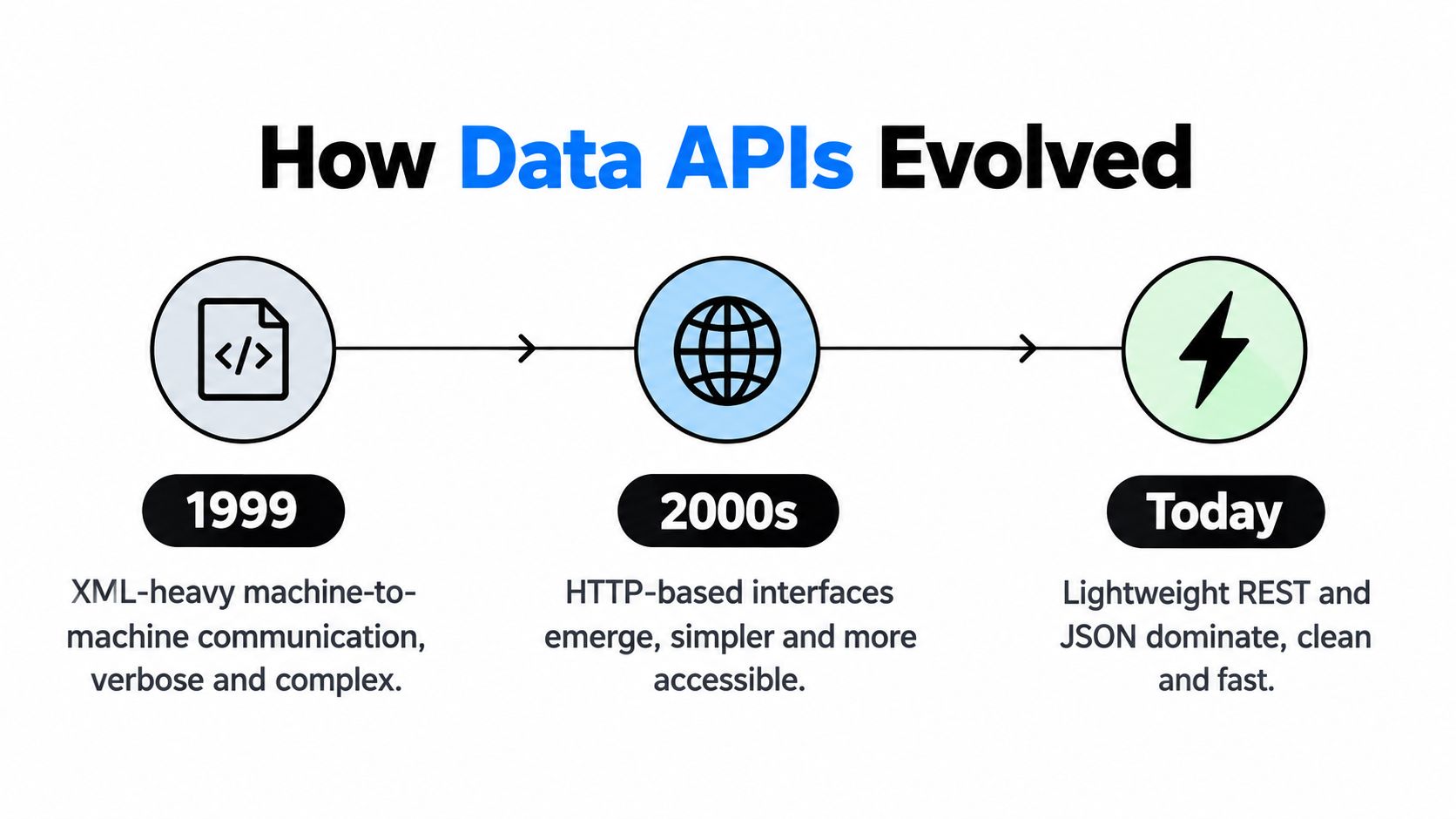
The dominant public API pattern later shifted toward REST, an architectural style built on standard HTTP behavior. Data becomes a resource addressed by a URL. A client uses GET to retrieve information or POST to submit it, and each request carries everything the service needs, with no stored session between calls.
That made APIs easier to work with in web and mobile applications, where HTTP and JSON already fit common development tools. It also explains the mixed environment developers inherit: SOAP persists in some enterprise systems while REST dominates public web APIs. A 2021 developer survey found that 61.6% of respondents relied on APIs more than they had in 2020, and REST remained the most popular API style, according to API usage survey findings.
The history matters for a practical reason. Each generation of standards made the request easier to write, yet none of them guaranteed the response would be accurate, current, or safe to act on. SOAP, REST, and JSON describe how data moves between systems. They say nothing about whether a property listing is still available, whether a price field uses the currency your app expects, or whether the provider authenticates callers correctly. Knowing how the interface evolved explains why modern APIs feel approachable, and why approachability is exactly where verification work begins.
Comparing REST, GraphQL, and Webhooks
REST, GraphQL, and webhooks address different communication needs. REST commonly gives each resource a URL and uses HTTP methods to retrieve or change it. GraphQL lets a client specify which fields it wants in a query. A webhook reverses the usual direction: instead of repeatedly asking whether something changed, a client provides a callback address and the service sends an event when a change occurs.
Those differences affect application design. REST's resource model can make common operations straightforward to understand and document. GraphQL can suit screens that need a custom selection of fields, such as a compact property card that uses a name, price, and thumbnail without pulling a large detail record. Webhooks can reduce repeated checking for events such as a listing becoming unavailable, but the receiving application must handle delivery failures and duplicate notifications carefully.
| Pattern | How It Communicates | Real Estate Fit | Key Consideration |
|---|---|---|---|
| REST | Client requests a resource through a URL and HTTP method | Searching listings or retrieving a property's details | Predictable resource patterns, but clients may receive more fields than a particular screen needs |
| GraphQL | Client sends a query describing the fields it needs | Building tailored cards, comparison views, or detail panels | Flexible response shape, with additional query and service complexity |
| Webhooks | Service sends an event to a client's callback URL | Notifying an app about an availability or price change | Requires careful handling of retries, delivery, and duplicate events |
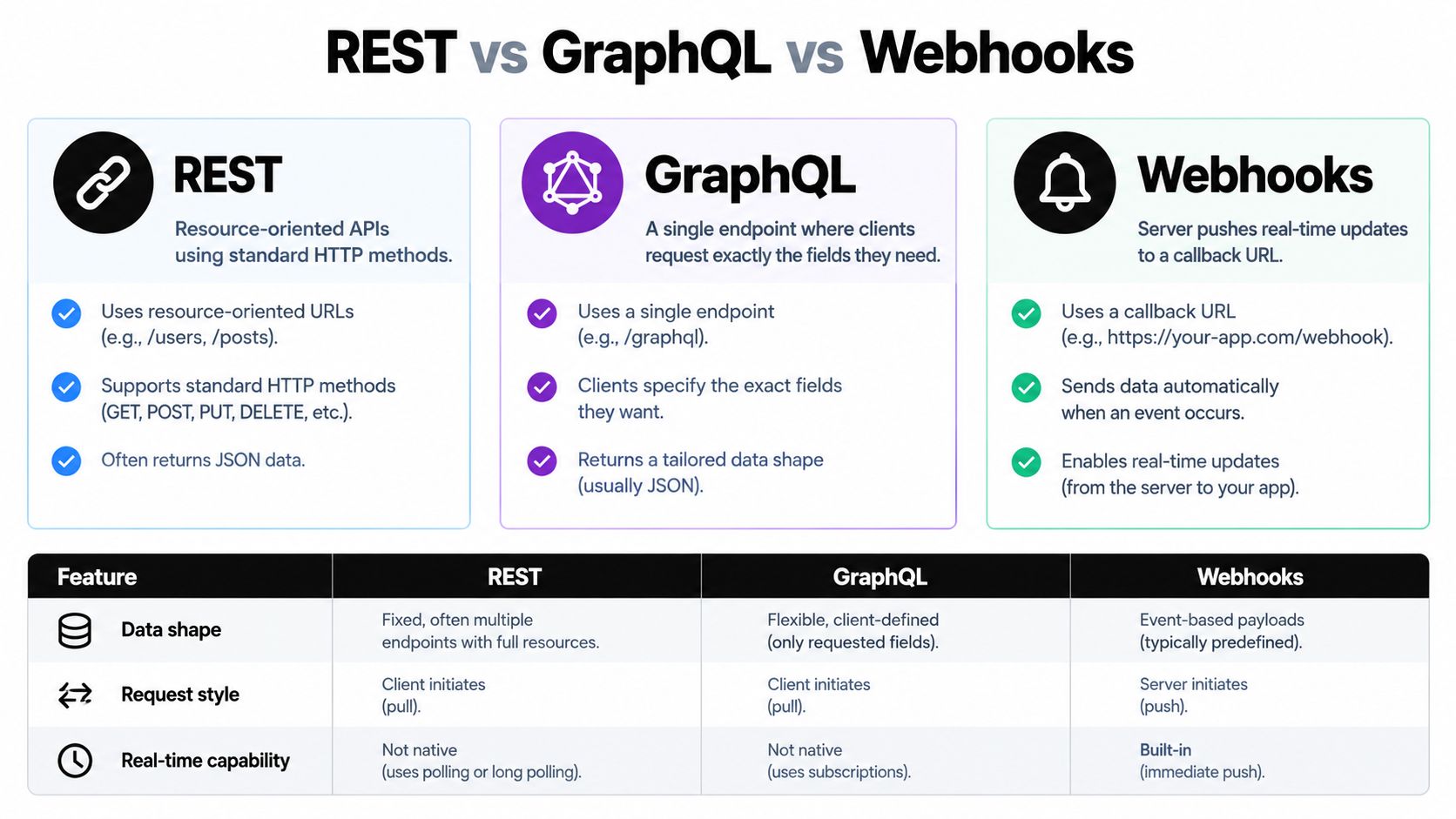
These approaches aren't interchangeable labels, and one product can use more than one. A search page might use REST to retrieve initial results, GraphQL for a view with a custom set of fields, and webhooks to update a saved listing after a change. The right choice depends on whether your client needs a familiar resource request, a customized data shape, or event-driven updates.
A practical decision is to start with the interaction, not the technology name. If the client needs to ask for property data on demand, a request-based API may fit. If the server needs to notify the client about changes, webhooks may fit better. If screens repeatedly need specific combinations of fields, test whether a query-based interface simplifies the work without making it harder to govern.
Using a Data API for Property Data
A traveler opens your app and types "Lisbon." Behind that single keystroke, the application sends a search request using a destination, coordinates, a place identifier, or a property URL, receives matching records, and renders a compact card for each result. Only when the traveler taps a listing does the app issue a second request for heavier details such as availability, reviews, amenities, host information, and accessibility attributes.
That two-step flow is the first real design decision a property integration forces on you: search and detail retrieval are separate jobs. RealtyAPI, for example, describes support for those search inputs and property-level fields in its property-data API overview. Keeping the search payload small, and fetching the full record only on demand, keeps list screens responsive and response sizes predictable.
A search card might need only a title, location, price, and availability status. A detail panel could request reviews, amenities, and host information. In illustrative pseudocode, not a provider-specific endpoint, the split looks like this:
GET /properties?destination=Lisbon
GET /properties/property-123
If the service supports GraphQL, a query can select the detail panel's fields directly instead of retrieving every field on the record. Developers evaluating a specific source can review the Zillow API documentation to see how one provider names its operations and response fields.
Design rule: Request fields for the screen or workflow you're building, not every field the service can return.
Updates need a different pattern. Rather than asking the service whether a price changed every few minutes, the app registers a webhook and reacts when the service reports a change in a listing's availability or price. The flow inverts: the service sends a message to the app. That convenience comes with homework, because the app now has to verify who sent the event, decide what to do with it, and cope when a delivery never arrives.
One honest caveat applies to all of this. A request that returns well-formed JSON proves the plumbing works; it says nothing about whether the price is current, the listing still exists, or each field means what you assume. Syntactically valid data is the floor, not the finish line. Treating search, detail retrieval, and event handling as distinct jobs makes it easier to control response size, spot stale records, and explain exactly what the app does with each piece of property data.
Integrating Data APIs Reliably
A working request proves only that the client can reach an endpoint. A production integration also needs to handle access control, changing records, slow services, and limits on how much it should request.
Start with authentication and authorization. Authentication establishes which client or user is making a request. Authorization determines which resources or operations that client can use. OAuth 2.0 scopes can restrict an access token to specific permissions, so a client's requested access should match what its workflow needs.
Next, design requests so they don't overload either system. Pagination limits how many records arrive in a response, while filters help clients avoid downloading irrelevant records. Use stable identifiers for follow-up requests, define timeouts, and plan how schema changes will be versioned so an updated service doesn't unexpectedly break an older app. OpenAPI documentation can make endpoints, parameters, responses, authentication, and schemas easier to inspect; this OpenAPI integration documentation is one place to examine that kind of contract.
When a service responds with HTTP 429, it means the client has exceeded a defined request limit. The server may include a Retry-After header indicating how long to wait before making another request, as described in the HTTP 429 reference. Treat that response as a signal to slow down, not as an invitation to repeat the same request immediately.
For other transient failures, bounded exponential backoff with jitter gives the service time to recover and spreads retry attempts over time. Stop retrying after a deadline or a defined maximum, and log correlation identifiers so you can trace a failure across systems. GET requests are normally safe to repeat; write operations need an idempotency key or equivalent protection so a retry doesn't create duplicate records.
Put these controls in your integration plan before deployment: limit result sizes, set timeouts, handle status codes deliberately, cap retries, and record enough context to investigate errors. Those choices protect the application and reduce unnecessary pressure on the upstream service.
Protecting Data and Testing Its Quality
A successful response isn't proof that you have dependable data. A property record can be valid JSON while mixing currencies, time zones, property types, availability windows, or definitions of bedrooms and amenities. Duplicate listings and stale prices can also create misleading comparisons even when the API reports no technical error.
Start by checking freshness and provenance. Look for timestamps that tell you when a record or field was updated, and keep source attribution so your team can investigate where information came from. Normalize fields for comparison, but preserve raw source values as well. That makes it possible to inspect the original information when a mapping rule changes or a provider's meaning differs from your own.
Monitor for missing fields and changes in their meaning. A missing review count may affect a ranking differently from a missing accessibility attribute. A change to an availability window can alter a search result even if the field name stays the same. Treat schemas and field definitions as part of the data contract, not as background details.
There's a security obligation too. Publicly available data isn't automatically unrestricted or risk-free to reuse. Protect credentials, authorize access to each object, avoid exposing unnecessary fields, set controls on broad searches, and log access. Document what data the application retains and how it uses that information.
The risk deserves attention: API security research reported that 57% of surveyed organizations experienced at least one data breach caused by API exploitation during the previous two years, while organizations tested an average of 38% of their APIs for vulnerabilities. For real-estate applications, risks can include revealing more through nested fields than intended, allowing enumeration through stable identifiers, or permitting unbounded search requests.
Review how the service represents failures as well as successful responses. A provider's documented status codes can help developers distinguish conditions that need a user-facing message from those that call for a controlled retry. The objective is not just to receive data. It's to know what that data represents and to handle it responsibly.
Choosing and Using the Right Data API
Choose an API by starting with the decision or task your product needs to support. A marketplace may need search results and listing details. An investment-analysis workflow may need consistent fields, traceable sources, and enough history to compare records. A travel app may care more about availability updates than about an extensive host profile.
Then check whether the service exposes the fields and sources you need, and whether its communication pattern fits how your app works. Read the API documentation and examine sample responses. OpenAPI can describe endpoints, methods, parameters, request bodies, responses, authentication methods, and schemas in machine-readable JSON or YAML, as explained in the OpenAPI specification structure guide.
Before committing to an integration, test four things:
- Inspect an endpoint: Confirm what request it accepts and what data it returns.
- Request filtered results: Check whether search filters and pagination match your product's needs.
- Examine the contract: Review field definitions, authentication, versioning, and the service's error behavior.
- Test change and failure handling: Find out how your client responds to an update, a missing field, a rate limit, or an unavailable service.
Accessible data is not necessarily dependable data. A useful API makes the contract clear, while a reliable application also checks the meaning, freshness, and safe use of every response.
RealtyAPI.io provides a unified real-estate data layer for searching property information and retrieving details through an API. Explore RealtyAPI.io to review its available data and documentation, then test whether its search and response patterns fit your application.