Universal Scraping APIs vs Traditional Scraping Tools vs Vertical APIs
Every "scraping API vs scraping tools" comparison we found this week ends the same way: the vendor's API wins, the open-source library is for people with time to burn, and nobody mentions that for a lot of jobs neither option is the right shape. If what you need is the price, beds, and status of 10,000 listings, a universal scraping API hands you 10,000 pages of markdown and a bill, and a Scrapy spider hands you 10,000 pages of HTML and a maintenance calendar. Both leave the actual work, turning pages into fields, on your desk.
This post compares the three options honestly: universal scraping APIs (Firecrawl, ScrapingBee, Zyte, Apify, Bright Data, ScraperAPI), traditional scraping tools (Scrapy, Playwright, Selenium, Puppeteer, BeautifulSoup, Crawlee), and vertical APIs that return typed fields for one domain, which is what RealtyAPI is. Pricing below was read from each vendor's live pricing page on August 22, 2026, and it will move, so treat the table as a snapshot and the method as the durable part. If you haven't yet decided whether to scrape at all, start with web scraping vs API; this post assumes you've decided you need data from sites that don't hand it out.
What a universal scraping API actually does
A universal scraping API takes a URL and gives you back the page, with the hard parts of fetching handled: a real browser when the page needs JavaScript, rotating proxies, CAPTCHA and bot-wall handling, and usually a cleaned output format (markdown, raw HTML, a screenshot). Firecrawl's POST /v2/scrape returns markdown by default and can also return HTML, links, screenshots, or a JSON object extracted by an LLM against your schema. ScrapingBee renders JavaScript by default and charges extra credits for premium or stealth proxies. Zyte prices each target site into one of five difficulty tiers and charges per successful response. Bright Data and Apify sell pre-built per-site scrapers on top of their general platforms. ScraperAPI meters credits by what you turn on (rendering, premium proxies, bot-protection bypass).
The word "universal" is doing real work in that paragraph. These products are universal about the fetch, not about the data. They'll get you the page from nearly any site. What's on the page, what the fields mean, whether "Price Cut $10,000" is a price or a delta, whether the listing is active or a stale cached render: that's yours to figure out, per site, and to keep figuring out when the site changes.
The exception worth naming is structured extraction. Firecrawl's JSON format, ScrapingBee's AI extraction, and Zyte's automatic extraction will try to pull fields for you, and for one-off jobs they're genuinely useful. They cost more per page (Firecrawl adds 4 credits on top of the 1-credit scrape for JSON output; ScrapingBee adds 5 credits per request for AI extraction), and the output schema is whatever the model decided that day. Zyte's automatic extraction covers generic types like product, article, and job posting; there's no "real estate listing" schema with a guaranteed beds field. For a pipeline that runs hourly and feeds a database, "the schema is whatever the model decided" is the kind of sentence that ends up in an incident report.
The three options, side by side
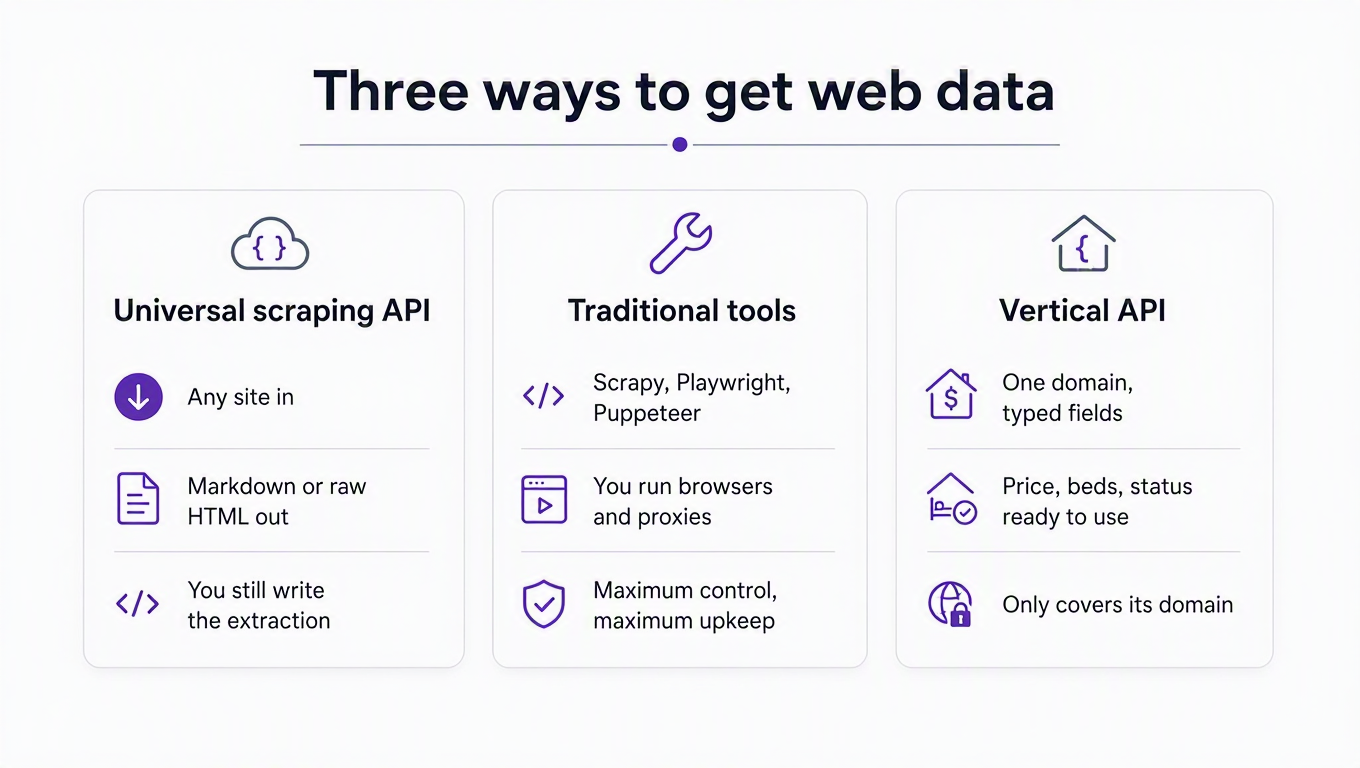
| Universal scraping API | Traditional tools (DIY) | Vertical API | |
|---|---|---|---|
| What you send | A URL (plus render/proxy options) | Nothing; you write the crawler | A query: an address, a search URL, a listing ID |
| What you get back | The page: markdown, HTML, screenshot, or a best-effort JSON extraction | Whatever your parser pulls out | Typed fields for that domain (price, beds, status, sold date) |
| Coverage | Nearly any public site | Anything you can reach and render | Only the sites and fields the vendor supports |
| Who handles site changes | Vendor (fetching); you (extraction) | You, for everything | Vendor, for everything |
| Pricing unit | Credits per page, weighted by rendering and proxy tier | Proxies per GB, compute, and engineer hours | Requests, where one request can return hundreds of records |
| Setup effort | Minutes to first page; days to a reliable parser per site | Days to first reliable spider; ongoing | Minutes to first typed record |
| Limitations | You own extraction and normalization; JSON modes cost extra and aren't schema-stable | You own blocking, proxies, rendering, legal review, and drift | Not universal: if the site or field isn't covered, you're back to one of the other two |
That last row is the honest one. A vertical API is a bet that your domain is narrow enough for someone else to have already done the extraction work. For listings on the major portals that bet pays; for your competitor's obscure property-management site it doesn't, and you'll want Firecrawl or Playwright in the toolbox regardless.
Where the work actually lands
The clearest way to compare the three is to walk the pipeline every listing-data project runs and ask who does each step.
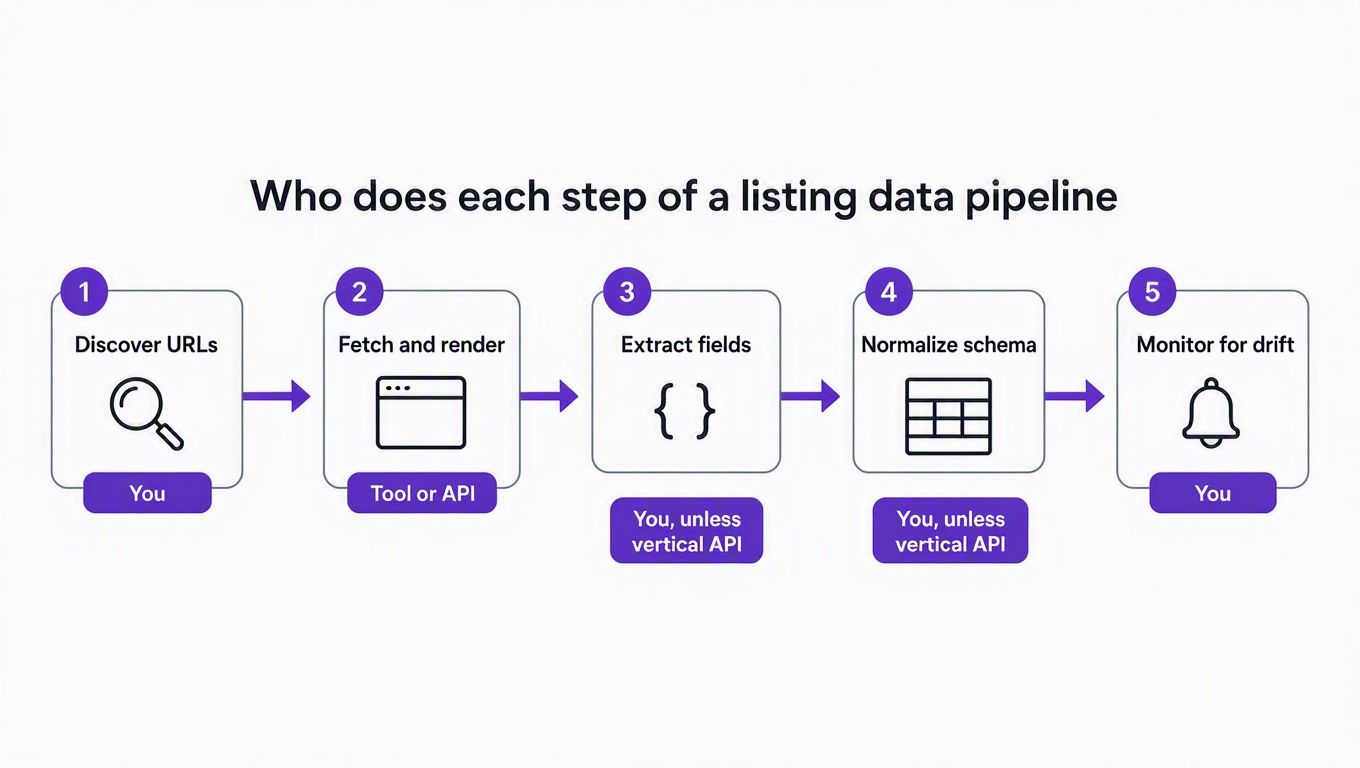
Discover URLs. Search pages, sitemaps, pagination. A universal API's crawl endpoint helps (Firecrawl's
/v2/crawlfollows links up to a limit you set), but deciding which 10,000 of a portal's millions of pages you care about is still a query you write. A vertical API collapses this step into a search call.Fetch and render. This is the step universal APIs were built for, and they're good at it. With DIY tools you're choosing between plain HTTP (Scrapy, Requests) and a real browser (Playwright, Puppeteer, Selenium), and the Scrapy docs are candid that some pages only show their data once a browser runs them, at which point you bolt on a headless browser and inherit its costs.
Extract fields. Here the universal API and the DIY spider converge: you write selectors, or you pay for an LLM extraction and validate its output. Either way it's per site, and it breaks when the site's markup moves.
Normalize the schema. "$749,900" vs
749900, "3 bd" vsbeds: 3, "Pending" vs "Under contract" vs "Contingent." Across five portals this step is bigger than extraction, and it's invisible in every vendor comparison because vendors stop at the page.Monitor for drift. Something has to notice when step 3 starts returning nulls. With a vertical API, the vendor's customers notice collectively and the vendor fixes it once. With everything else, you notice when your dashboard looks wrong. Ask me how I know.
Read the pipeline that way and the product categories stop looking like competitors. A universal scraping API replaces your proxy bill and your headless-browser fleet. A vertical API replaces those plus steps 3, 4, and most of 5. The DIY stack replaces nothing and costs only time, which is the right trade exactly when time is what you have and your target is something nobody else covers.
Pricing: the same job, three ways
Vendor pricing pages are built to be hard to compare, so here's one concrete job priced on each: fetch 10,000 listing pages in a month from a portal that needs a real browser and a decent proxy. All figures are list prices read on August 22, 2026, monthly billing unless noted; check the linked pages before you budget, because several of these have changed within the past year.
| Option | Unit cost that applies | Credits or records for 10,000 pages | Cheapest plan that fits | Monthly cost | What you still do |
|---|---|---|---|---|---|
| Firecrawl | 1 credit per scraped page; +4 credits per page for JSON output | 10,000 (markdown) or 50,000 (JSON) | Standard: 100,000 credits, 25 concurrent | $99 | Extraction (or validate the JSON), normalization, drift |
| ScrapingBee | 25 credits per request with JS rendering + premium proxy (75 with stealth proxy) | 250,000 (or 750,000 stealth) | Freelance: 250,000 credits (Startup, 1M credits, for stealth) | $49.99 (or $99.99) | Extraction, normalization, drift |
| Zyte API | Per successful response, by site tier: browser-rendered $1.01 to $16.08 per 1,000 on pay-as-you-go | 10,000 responses | Pay as you go ($100 spend limit) | $10 to $161 depending on which tier Zyte assigns the site | Extraction, normalization, drift |
| ScraperAPI | 10 credits with rendering; 25 with rendering + premium proxy | 100,000 to 250,000 | Hobby: 100,000 credits (Startup, 1M, if premium proxies are needed) | $49 (or $149) | Extraction, normalization, drift |
| Bright Data Web Scraper API | $1.50 per 1,000 records, pay as you go; first 5,000 records a month free | 10,000 records | Pay as you go | About $15 (pre-built scrapers return parsed fields for covered sites) | Normalization across sites, drift on uncovered sites |
| Apify (pre-built Actor) | Per-result pricing set by the Actor; the Apify-maintained Zillow search Actor lists "from $1.30 per 1,000 results" | 10,000 results | Free plan includes $5 of usage; Starter is $29 with $29 usage included | About $13 in Actor charges, inside a $29 Starter plan | Normalization across sites; trusting a third-party Actor's schema |
| DIY: Playwright + Crawlee + residential proxies | Proxies at $7 to $8 per GB (Apify's published residential rate), plus compute, plus hours | Depends entirely on page weight; at an assumed 2 MB per rendered page, 10,000 pages is 20 GB | n/a | $140 to $160 in proxy bandwidth alone, before servers or a single engineering hour | Everything |
| RealtyAPI (vertical) | 1 credit per request for most endpoints; a few cost 2 to 3 (details-by-address is 2) | 10,000 detail requests, or about 29 search requests if search fields are enough (Redfin search-by-URL returns up to 350 listings per call) | PRO: 20,000 requests | $20 now; $49 for new subscriptions from September 14, 2026, with existing subscribers keeping their price | Nothing per site; you only handle the sites we don't cover |
Three things jump out. First, universal APIs are priced per page and vertical APIs per request, and a request can carry 350 records, which is why the vertical column looks cheap: the job is 29 calls, not 10,000. Second, the pre-built scrapers on Apify and Bright Data are closer to vertical APIs than to universal ones, and they're priced accordingly; the trade is that you're trusting a per-site Actor's schema and maintenance cadence instead of a vendor's. Third, the DIY row has no plan column because its real cost is the engineer. The Apify and Web Scraping Club State of Web Scraping 2026 survey found 65.8% of practitioners increased proxy usage over the prior year and 58.3% saw proxy spending rise, driven by stronger anti-bot protections. That line only goes one way.
A note on the free tiers, since that's where most evaluations start: Firecrawl gives 1,000 credits a month with no card, ScrapingBee 1,000 credits, ScraperAPI 5,000 credits for a seven-day trial, Bright Data 5,000 records a month, Apify $5 of monthly usage, and Zyte $5 of credit in your first month. RealtyAPI's free plan is 250 requests a month. That sounds smaller until you remember a single search request returns up to 350 listings, so the free tier covers about 87,000 listing records a month if you never fetch details. Compare records, not requests. Yeah… it's a different unit.
Code: the same listing, two ways
Here's what the difference looks like in practice. Both snippets are Node 18+ with built-in fetch. The first asks Firecrawl for a listing page as markdown, using the request shape from Firecrawl's scrape reference. The second asks RealtyAPI for the Redfin search that contains it.
// 1. Universal scraping API: you get the page, then you parse it.
const fc = await fetch("https://api.firecrawl.dev/v2/scrape", {
  method: "POST",
  headers: {
    Authorization: `Bearer ${process.env.FIRECRAWL_KEY}`,
    "Content-Type": "application/json",
  },
  body: JSON.stringify({
    url: "https://www.redfin.com/NY/New-York/…/home/12345678",
    formats: ["markdown"],
    onlyMainContent: true,
  }),
});
if (!fc.ok) throw new Error(`Firecrawl ${fc.status}`);
const { data } = await fc.json();
// data.markdown is the rendered page as text. The price is in there somewhere.
// Your regex / selector / LLM prompt to pull "price", "beds", "status" starts here,
// and it is specific to this portal's layout.
// 2. Vertical API: you get the fields.
const url = new URL("https://redfin.realtyapi.io/search/byurl");
url.searchParams.set(
  "searchUrl",
  "https://www.redfin.com/zipcode/10002/filter/property-type=house,min-price=150k,max-price=2M"
);
url.searchParams.set("resultCount", "350");

const res = await fetch(url, {
  headers: { "x-realtyapi-key": process.env.REALTYAPI_KEY },
  signal: AbortSignal.timeout(30_000),
});
if (res.status === 401) throw new Error("Bad API key");
if (res.status === 402) throw new Error("Out of credits");
if (!res.ok) throw new Error(`Upstream ${res.status}`);

const body = await res.json();
for (const r of body.searchResults ?? []) {
  const h = r.homeData;
  console.log(h.propertyId, Number(h.priceInfo?.amount), h.beds, h.baths,
    h.sqftInfo?.amount, h.addressInfo?.formattedStreetLine);
}
console.log("credits remaining:", res.headers.get("x-credits-remaining"));
Expected output from the second call, for a search that currently matches five houses:
119901522 525000 3 2 1710 123 Example St
118650655 749900 4 2.25 2755 45 Sample Ave
…
credits remaining: 249
The first snippet isn't wrong, and for a site we don't cover it's exactly what we'd write. It just ends where the work begins. The second ends where the work ends. Our search-by-URL guide covers which filters each portal honors, and the monitoring post turns the second snippet into a change-detection loop in about sixty more lines.
When each option is the right call
Pick a universal scraping API when
The target isn't covered by any vertical API, and you need it rendered, unblocked, and delivered without running browsers yourself. This is the common case for niche sites, and it's where Firecrawl, ScrapingBee, Zyte, and ScraperAPI earn their fees.
The job is one-off or exploratory: "pull these 300 pages into markdown so I can read them" is a perfect fit, and the LLM-extraction modes are handy for a first pass at unfamiliar data.
You're feeding an LLM, not a database. Markdown of the page is the right artifact for a retrieval system; typed fields are the right artifact for a product.
Pick traditional tools when
You have engineers who already know the stack and a target that doesn't fight back. Scrapy 2.18 and Playwright 1.62 (current as of this writing) are excellent, free, and yours to control. Our guides to Python web crawling and Selenium with Python are the starting points.
Data volume is high enough that per-page API pricing hurts and you can amortize the maintenance. Note that the same survey above found 46.7% of teams rely exclusively on internal code; those teams aren't wrong, they've just made the build-vs-buy call with a different cost of engineering time.
You need behavior no API exposes: logging in, multi-step interactions, custom fingerprinting. Crawlee's session management and fingerprint generation are built for exactly this.
Pick a vertical API when
The fields you need are the fields everyone in your domain needs, and a vendor covers your sites. In real estate that's listings, details, sold comps, rent estimates, agent data, and market trends across the major portals; the docs list what we return per platform.
The pipeline runs on a schedule and feeds a product. The thing you're buying isn't the fetch, it's the guarantee that
priceInfo.amountis still there next Tuesday.Legal posture matters to your customers. A vendor that publishes how it sources data (here's ours) is easier to put in a vendor-review questionnaire than a headless browser fleet. The general landscape is in our scraping legality guide.
Here's a useful walkthrough of the universal-vs-DIY side of this decision, comparing a Playwright and Crawlee build against Firecrawl for an AI retrieval pipeline:
Our take: the unit of pricing tells you the product
If you remember one thing from the tables, make it this: look at what the vendor charges for, because that's what they've actually built. Universal scraping APIs charge per page, weighted by how hard the page was to fetch, because fetching is the product. DIY tools charge in proxy gigabytes and engineer hours because nothing is the product. Vertical APIs charge per request that returns typed records because the records are the product.
That's also why the "which is best" framing is wrong. Most teams we talk to run two of the three: a vertical API for the 80% of fields that come from the major portals, and either a universal API or a Playwright script for the long tail. The teams that struggle are the ones that picked one tool and tried to make it do all five pipeline steps. A universal API asked to be a schema is a slow database. A vertical API asked to scrape an arbitrary site is the wrong tool, and we'll tell you so before you buy.
Where we fall short, plainly: if you need a site we don't cover, we're no help, and our coverage is listings-shaped. We don't return page markdown, we don't crawl arbitrary domains, and we won't render your competitor's blog. For that, the universal vendors above are good at what they do, and their free tiers are a fine way to find out which one you like.
Key takeaways
Universal scraping APIs solve fetching, not data. They remove proxies, rendering, and bot walls from your plate and leave extraction, normalization, and drift on it. Budget for the parser, not just the credits.
Price the job, not the plan. For 10,000 browser-rendered pages a month, list prices ran from about $13 (a pre-built Apify Actor) to $161 (Zyte's hardest tier) on August 22, 2026, and every one of those still leaves you writing the extraction.
Compare records, not requests. A vertical API call can return 350 listings, which turns a 10,000-page job into 29 requests. Any comparison that counts pages on one side and requests on the other is measuring different things.
Pre-built scrapers on universal platforms are a middle category. Apify Actors and Bright Data's per-site scrapers return parsed fields for covered sites at per-result prices; you inherit that scraper's schema and maintenance, which is fine for exploration and risky for production.
Run two tools, not one. A vertical API for the portals, a universal API or Playwright for the long tail. The failure mode is forcing either one to be the other.
If your long tail is real estate, the fastest way to see which of your fields a vertical API already covers is to run one search against the portal you care about on the free plan (250 requests a month, no card) and diff the response against your current parser's output. The fields that match are the parser code you get to delete.