Understanding Heat Maps: How to Read Them Without Errors

A broker opens a city property map and notices a deep red district. It looks like the hottest market, so she starts shortlisting properties there. Then she checks the legend: red means more listings, not higher prices or stronger buyer demand.
That small correction changes the decision. Understanding heat maps starts with separating what catches your eye from what the map actually measures.
What a Heat Map Shows and How to Read One
A heat map turns numbers into colors across cells, geographic areas, or a continuous surface. The color communicates magnitude; the legend tells you what that magnitude means. Without the legend, a red patch is just a red patch.
Think of a weather map. You can recognize a warm region at a glance, but you need the scale to know the temperature. Property heat maps work similarly, except the underlying measure might be asking price, occupancy, rental yield, or listing volume.
A heat map shows where values are high relative to the rest of the map, not how high they are.
Exact values belong in labels, tooltips, and the underlying table. The visual pattern helps you decide where to investigate.
The illustration captures the moment when checking the legend matters most.

Read the definition before the pattern
Use this reading routine before interpreting any hotspot:
- What metric and unit does the legend name? Median asking price per square metre answers a different question from total listing count.
- What time period does the data cover? A current snapshot and a historical average aren't interchangeable.
- Are the values raw counts or rates? A large count may reflect a large market rather than unusually intense activity.
- What is the area unit? A postcode, grid cell, and search radius describe different geographic groupings.
- Do grey or blank areas mean zero, or no data? An unobserved market isn't necessarily an inactive one.
Only then look for clusters, gradual transitions, and isolated spikes. A cluster suggests neighboring locations share a pattern; a gradient suggests values change across space. An isolated spike deserves a closer look at the records behind it.
For relocation decisions, city context matters too. Resources such as ReloMaps can help you research cities before moving, so a property-map pattern sits alongside the practical question of where you'd really want to live.
Say you're comparing Lisbon neighborhoods. On an asking-price map, a red district might indicate expensive homes. Switch the metric to active listings, and the same red district might indicate abundant supply. Neither map alone tells you whether those homes sell quickly, suit your budget, or offer an attractive investment.
Heat Map Types and When Each One Fits
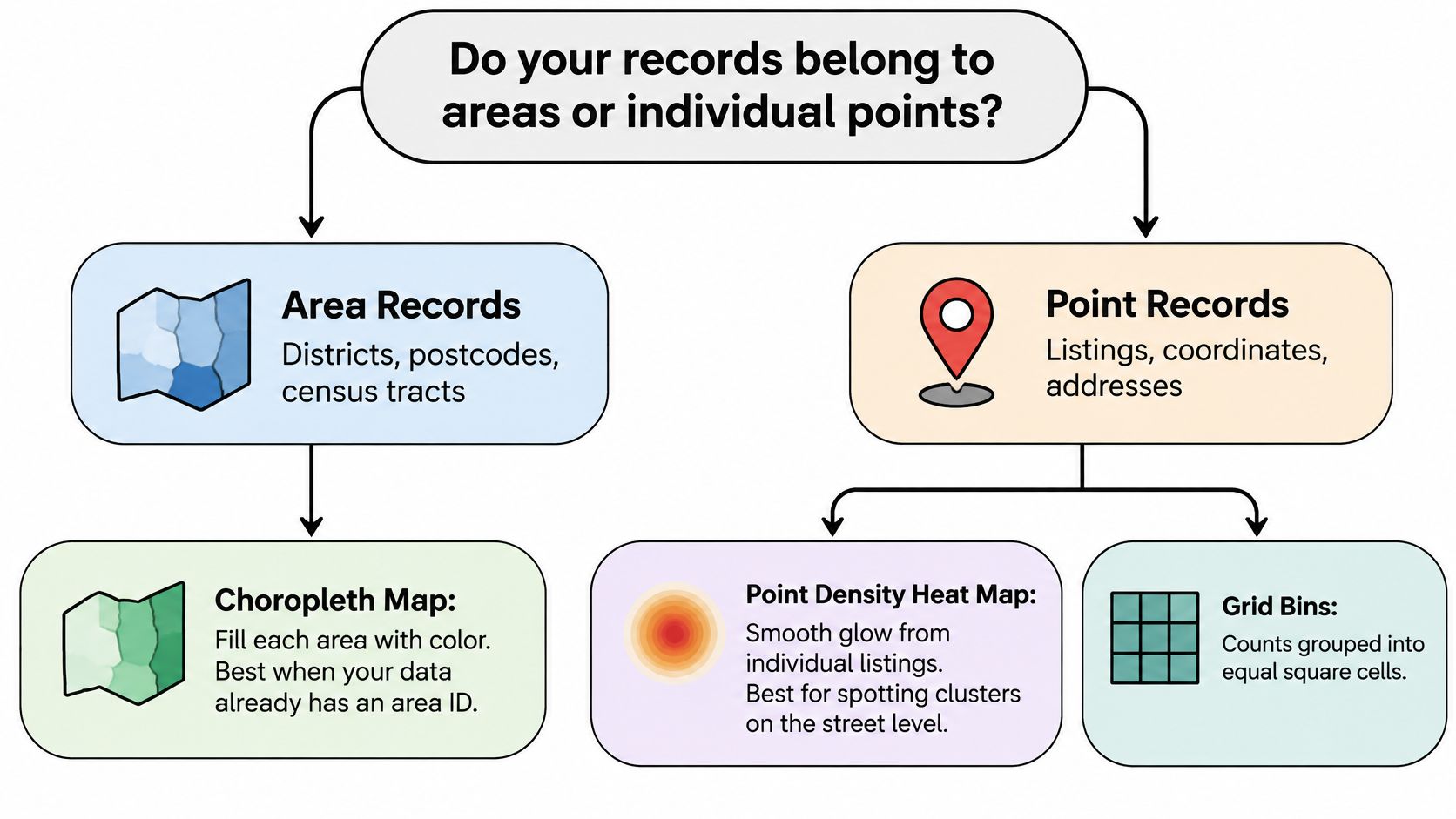
Start with the records: do they already belong to areas such as districts or postcodes, or are they individual points such as listings with coordinates?
That distinction narrows your choices. Area records usually suit a boundary-based map. Point records allow density surfaces, individual point rendering, or aggregation into regular grid cells.
This decision map makes the starting choice visible.
Match the display to the question
A choropleth fills each geographic polygon with an aggregated value. It's useful when your question follows official boundaries, such as comparing district-level asking prices. Although people often call it a heat map, its flat, boundary-defined areas differ from a smooth density surface.
A kernel density heat map, or KDE, estimates concentration around point locations. Rather than assigning a hard edge to every neighborhood, it produces a continuous surface. That suits exploratory questions about where transactions cluster, but the smooth appearance shouldn't be mistaken for a directly observed measurement.
Heat map types compared for real estate data
| Type | What the Color Represents | Best Real Estate Use | Main Risk |
|---|---|---|---|
| Choropleth | One aggregated value per polygon, such as median price per m² | Comparing districts or postcodes against official boundaries | Large polygons dominate the eye regardless of data volume |
| Kernel density (KDE) | Weighted concentration of points across a moving window | Finding listing or transaction clusters and submarkets | Output is an estimate that shifts with bandwidth |
| Point heatmap | Density of individual points, optionally weighted by price or availability | Exploring listings interactively in a web map | Appearance changes with zoom level |
| Matrix heat map | Value in each row and column pair, such as neighborhood by month | Comparing many metrics across many areas on one dashboard | Cell order can imply patterns that depend on sorting |
Geographic patterns aren't the only useful patterns
A point heatmap works well for interactive exploration because users can move between a city overview and individual streets. Its glowing patches can be visually persuasive, so the interface needs clear controls and recoverable values.
A matrix heat map removes geography entirely. Put neighborhoods in rows and months in columns, and you can inspect seasonal patterns without navigating a map. Put metrics in columns instead, and an analyst can compare pricing, occupancy, and supply side by side.
Choose a choropleth for official-area comparisons, KDE for cluster discovery, and a point heatmap for web-map exploration. Use a matrix when comparing neighborhoods across time or metrics matters more than their physical location. Regular grid bins offer another practical option when you want equal-sized geographic cells rather than administrative boundaries.
Choosing a Color Scale and Normalization
Does the metric have a meaningful midpoint? That's the first color-design decision, not whether red looks more compelling than purple.
Use a sequential scale for values that run from low to high, such as median rent or occupancy. Use a diverging scale for meaningful departures around a reference, such as a neighborhood's price change relative to the city median.
Choose colors that preserve differences
The Visualizing.org heat-map guide recommends perceptually uniform palettes such as Viridis, Cividis, and Magma, and warns that rainbow, jet, HSV, and spectral ramps can create false boundaries and uneven emphasis. In practice, prominent yellow or cyan bands can make a smooth change look like a sudden market divide.
Continuous scales help users compare nearby values. Binned scales sacrifice that precision but can work when categories have an operational meaning, such as defined affordability bands. Don't invent bands just to make the map look more varied.
Linear mapping assigns equal visual steps to equal numeric differences. Logarithmic mapping can make heavily skewed prices easier to inspect, but users must know that equal color steps represent proportional rather than equal absolute changes. A capped scale also needs an explicit label because otherwise the most extreme markets become visually indistinguishable.
Scale and palette by real estate metric
| Metric Mapped | Scale Type | Suggested Palette | Midpoint or Normalization Rule |
|---|---|---|---|
| Median asking price per m² | Sequential | Viridis | No midpoint; use logarithmic mapping if prices are heavily skewed |
| Price change vs city median (%) | Diverging | Blue-white-red | Neutral color fixed at zero difference from the city change |
| Rental yield (%) | Sequential | Magma | Cap the scale at a stated range and label the cap |
| Raw listing count | Sequential | Viridis | Avoid as the main measure; divide by area or existing stock |
| Occupancy rate (%) | Sequential | Cividis | Use one fixed domain across all compared cities |
| Forecast error vs actual | Diverging | Blue-white-red | Zero means no error; neutral color centered on zero |
| Affordability band | Binned | Viridis, six or fewer bins | Thresholds must carry a defined meaning such as income share |
Normalize before comparing markets
Normalization asks what the value should be compared against. Listings per square kilometre describe spatial supply intensity; listings relative to existing housing stock describe turnover or availability differently. Booked nights divided by available nights describes occupancy rather than market size.
Practical rule: Choose the denominator that matches the decision, then choose the colors.
Keep identical numeric domains and legends across comparable maps. Automatically stretching each city's colors from its local minimum to maximum can make very different markets look equally intense.
Accessibility also affects interpretation. Avoid red-green pairs, check the display in grayscale, and provide exact values on hover or tap. Give missing observations their own visual treatment so users don't confuse absent evidence with a measured zero.
Statistical Pitfalls That Make Hotspots Lie
A sharply defined hotspot can look convincing until you redraw the boundaries. The listings haven't moved, but the apparent concentration has. That's a warning about aggregation, not evidence that the market changed.
The modifiable areal unit problem, or MAUP, describes this sensitivity to geographic grouping. Postcodes, hexagonal cells, and circular catchments combine neighboring records differently. Before reporting a pattern, compare at least two boundary schemes while keeping the metric and time window fixed.
Separate market activity from collection coverage
A listings feed describes what its provider captured. If a platform has strong coverage of short-term rentals in tourist centers, its map may emphasize those areas even when your real question concerns residential demand.
Geocoding introduces another filter. Central addresses may match cleanly while rural properties, new developments, or incomplete addresses fail. If you map only successful matches without auditing the failures, you can mistake easier address matching for stronger activity.
Bandwidth adds a further choice. The UCGIS kernel-density guidance explains that a small search radius preserves local detail but amplifies sampling noise, while a large radius smooths noise and can merge distinct submarkets; a few hundred metres may suit walkability analysis, whereas a multi-kilometre radius may suit citywide pricing trends.
Test the settings behind the surface
Change the radius while holding the records constant. Then change the boundaries while holding the calculation constant. These checks help isolate whether the apparent hotspot comes from the observations or your chosen representation.
Pitfalls, what they look like and how to check them
| Pitfall | What It Looks Like | Check or Fix |
|---|---|---|
| MAUP (boundary choice) | A hotspot appears in one zoning and vanishes in another | Compare at least two boundary schemes before reporting |
| Sampling bias | One platform's segment dominates the hot area | Document the source and compare with an independent count |
| Bandwidth too small | Speckled hotspots that flicker when the map is redrawn | Test a larger radius and keep the one that matches the decision scale |
| Bandwidth too large | Two distinct neighborhoods merge into one blob | Test a smaller radius and check submarket boundaries |
| Sparse cells | In a hypothetical cell, just two or three observations produce an extreme color | Set a minimum sample count and grey out cells below it |
| Geocoding density | Central addresses look hotter than equally active outer areas | Check geocoding match rates by zone |
| Color read as significance | A red area treated as a proven difference | Report counts, intervals, or a test result beside the map |
Set sample rules before inspecting the most attractive result. If you relax the threshold only for an interesting neighborhood, you're changing the evidence standard to preserve the story.
Color doesn't establish statistical significance. A large-looking difference may be unstable when the sample is thin, and a modest-looking difference may be consistent across a substantial dataset.
If a hotspot disappears when you change the radius or boundaries, treat it as a probable artifact until independent evidence supports it.
Preparing Real Estate Data Before You Map It
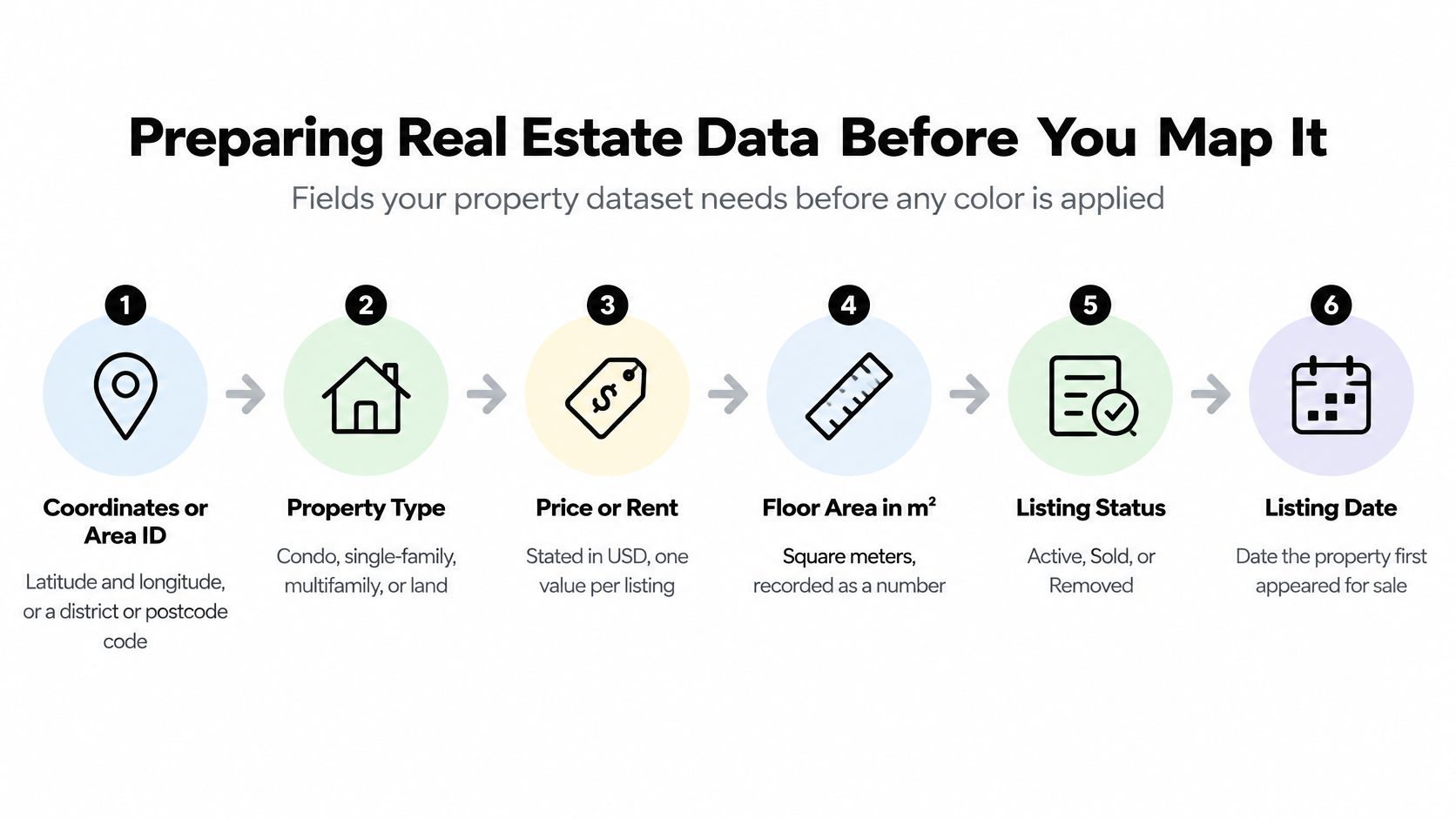
Before applying color, assemble coordinates or an area ID, property type, price or rent, floor area in m², listing status, a timestamp, the source platform, and a unique record ID. Keep currency, rental frequency, and area definitions explicit too.
These fields make it possible to distinguish an active apartment listing from a removed land listing rather than blending incompatible records into a neighborhood average.
Use the field checklist to inspect the dataset before calculating any surface.
Build a repeatable preparation routine
Remove duplicate properties. Match records using normalized addresses, floor area, price, and listing characteristics, not platform IDs alone. Preserve uncertain matches for review so neighboring apartments aren't accidentally merged.
Validate coordinates against the intended geography and count failed geocoding records by zone. Check latitude-longitude order and obvious misplaced points; otherwise an address error can become a false cluster.
Define the denominator. Attach the relevant housing stock, household count, land area, or available-unit exposure before calculating rates. A denominator from a different geography or period produces a polished but inconsistent comparison.
Flag outliers instead of deleting them without notice. For example, a hypothetical screening rule could flag price-per-m² values below the 1st percentile or above the 99th percentile for review; genuine luxury properties should remain distinguishable from currency or floor-area errors.
Fix the time window and snapshot date. Decide whether you're mapping properties active at a moment or listings observed during a period. Mixing those definitions can count removed inventory alongside current availability.
Keep missing values separate from zero. A property without a reported rent shouldn't become a rent-free property in the calculation.
Aggregate using the intended method. Assign points to grid cells or polygons, or calculate a density surface with the chosen bandwidth. A polygon-based property search can help define a retrieval area, but query coverage and analysis boundaries still need separate documentation.
Normalize, apply the selected scale, and save the settings. Keep the cleaning rules and aggregation configuration with the output so another analyst can reproduce it.
Save the evidence with the layer
The metadata should travel with the map, not remain in an analyst's notebook. Include the metric, unit, period, source, boundary version, radius where relevant, sample counts, denominator definition, and missing-value treatment.
Also preserve the cleaned input snapshot and the excluded-record log. If a district changes color after an update, those records let you distinguish a market change from a processing change.
For a visual companion to the mapping workflow, use the embedded video.
Pricing, Demand and Rental Yield Heat Maps
Say a property rents for €1,800 monthly and costs €360,000. In this hypothetical example, annual rent is €21,600, and annual rent divided by purchase price, multiplied by 100, gives a 6.0% gross rental yield.
That color is a summary symbol. Gross yield leaves out vacancy, maintenance, financing, taxes, and transaction costs, so a red area on a gross-yield map shows a stronger rent-to-price relationship inside the chosen formula, while the net investment question remains open.
Give each decision its own metric
A pricing map might show median asking price per m² by district. Publish the minimum sample rule beside it, and suppress segments that do not meet it rather than letting a thin luxury sample define the district.
For occupancy, divide booked nights by available nights, retaining availability at unit level. Dividing by total listings answers a different question and ignores how long each unit could have been booked.
A housing-value series can supply price context, while rent needs listing-derived observations. Keep their geographies, periods, and unit types separate before combining them in a yield cell.
Real estate heat map metrics and their denominators
| Use Case | Metric and Formula | Denominator | Watch For |
|---|---|---|---|
| Pricing | Median asking price per m² | Floor area of listed units | Thin samples in luxury or new-build segments |
| Demand and occupancy | Booked nights ÷ available nights | Available nights per unit | Platform coverage that hides off-platform stock |
| Rental yield | Annual rent ÷ purchase price, expressed as a percentage | Purchase price, with the same unit type on both sides | Rent and price drawn from different samples |
| Listing supply | Active listings per km² | Residential land area in km² | Bursts from a single new-build project |
| Price momentum | Current median minus prior-year median, divided by prior-year median, expressed as a percentage | Prior-year median | Shifts in property mix that move the median without price change |
| Value-weighted demand | Sum of sale value per cell | Total market value in the area when expressing a share | Expensive outliers dominating the cell |
Distinguish concentration from performance
A supply map identifies where inventory concentrates. A momentum map needs additional care: if more large homes enter the sample, the median can rise without comparable properties becoming more expensive.
The ArcGIS high-density mapping guidance explains that point surfaces can incorporate numeric weights and change appearance with scale, appearing hotter when zoomed out and colder when zoomed in. Restrict display to a minimum and maximum zoom where the density interpretation remains meaningful.
A sale-value-weighted map shows where money concentrates; a transaction-count map shows where sales occur. Neither is automatically buyer demand. On pricing, occupancy, and yield maps, red can mean expensive, frequently booked, or relatively high gross return. Before trusting the hot spot, read the legend, name the denominator, check which records qualified, and confirm the zoom still matches the question.
Building a Web Heat Map from API Data
Build the data pipeline before tuning the glow. A fast renderer can't correct an incomplete query, inconsistent snapshot, or aggregation that changes unpredictably during navigation.
Start by defining the geographic query and the metric contract. The contract should specify what each returned cell means, which records qualify, and what the frontend must display alongside the color.
Retrieve completely and aggregate deliberately
Query the intended area. Use coordinates, a bounding box, or a supported polygon query. Retrieve every page before aggregating, and distinguish an empty result from an incomplete or failed response.
Store each pull with its retrieval timestamp and source identifiers. Deduplicate cross-platform properties while retaining source provenance, so updates don't erase the history needed to explain a changed result.
Aggregate server-side. Produce grid cells or hexagons for each zoom band, carrying the numeric value, sample count, missing-data flag, and relevant denominator. Keep the statistical bandwidth separate from the visual point radius.
Choose the browser payload through device testing. Raw points can suit a modest exploratory dataset; send pre-aggregated cells or vector tiles when drawing or interaction slows. Don't treat a universal point-count threshold as a substitute for profiling.
A map-layer endpoint can be part of retrieval, but inspect the response schema and coverage before assuming it represents a complete analytical layer. The application should know whether it received individual listings, clusters, or already aggregated values.
Keep interaction stable and inspectable
Set the valid zoom range explicitly and hide the density layer outside it. Users shouldn't receive a plausible-looking surface where your chosen interpretation no longer holds.
Debounce pan and zoom events so navigation doesn't trigger a request for every movement. Cancel stale requests, cache stable area queries, and include filters, snapshot, and aggregation version in the cache key. Where change notifications are available, refresh affected records and cells rather than rebuilding unrelated areas.
REST or GraphQL can support retrieval, while webhooks can support incremental updates. Python suits preparation and validation jobs; JavaScript suits browser interaction and API integration. Choose the interface around the team's workflow rather than changing the metric to fit a convenient response.
Before release, check the application against a compact acceptance list:
- Server aggregation: The client receives an appropriate representation for its zoom band.
- Stated zoom range: The layer disappears where its interpretation stops being valid.
- Exact tooltips: Users can recover values, units, and sample counts.
- Complete legend: The metric and scale are named.
- Fallback table: Users can inspect the evidence without relying on color.
Confirm the Reading Before You Act
A heat map is a visual summary, not a measurement tool. The Nature Methods heat-map guidance supports using color to inspect patterns rather than treating appearance as precise numeric evidence.
Use this final checklist before a hotspot influences a decision.
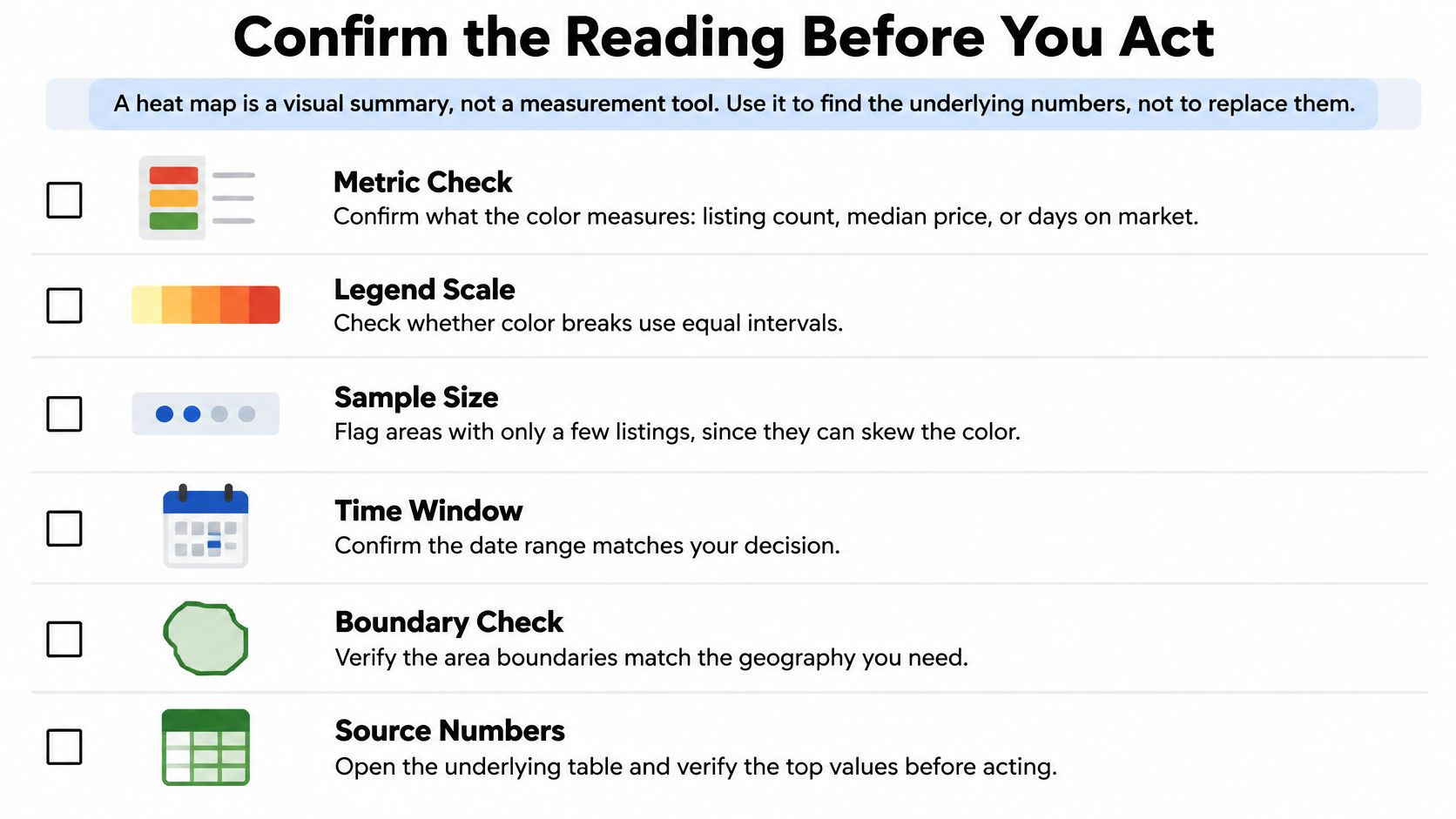
- Definition: Confirm metric, unit, period, denominator, and area unit.
- Stability: Test alternative radii and boundaries; enforce the sample minimum.
- Readability: Separate missing data from zero, verify zoom, and check grayscale.
Then export the cell table and inspect the top five values directly. Compare the leading hotspots with an independent indicator, such as recorded sales or an appropriate rental-market trend series.
If you're building, start with one city and a two-map prototype using different boundary schemes. Investigate patterns that survive both rather than choosing whichever map looks strongest.
State the decision explicitly: selecting neighborhoods for further rental analysis, for example. Then name what's still needed before acting, whether that's the underlying table, an independent source, or a larger sample.
RealtyAPI.io offers unified access to publicly available property listings, pricing trends, and market signals through REST, GraphQL, and webhooks, with Python and JavaScript examples for implementation. Visit RealtyAPI.io to open an account and build a city-level prototype that pairs a heat map with inspectable values, documented settings, and a comparison table.