How to Track Property Listing Changes Without Code
You save a house on Friday. By Monday the price has dropped $15,000 and the listing says Pending. The portal probably sent you something, buried among a dozen "homes you might like" emails, and it only covered the one site where you clicked the heart.
That is fine when you are one buyer watching three homes. It falls apart when you are an agent keeping an eye on a street's competing listings, an investor waiting for a specific price, or a team tracking a few hundred properties across Zillow, Realtor.com and Redfin at once.
So we built Watchlist, a new tab in the RealtyAPI dashboard. You pick a property, choose which details you care about, and set how often we should check. When something changes, you get one email with the before and after. No code, no spreadsheets, no scripts on a timer.
This guide covers what Watchlist tracks, how to set it up in about a minute, how the alert rules work, and exactly what it costs.
What Watchlist does
- Watches single properties on Zillow, Realtor.com and Redfin. Search by address, paste the listing link, or paste a whole list of up to 1,000 links or addresses at once.
- Tracks the fields you choose: price, status, the portal's value estimate, open houses, HOA fees, taxes, listing agent, photo count and more. Up to 20 fields per property.
- Checks on your schedule: every hour, 6 hours, 12 hours, day, 3 days, week, or any number of days up to 180.
- Emails you only when it matters. Alert on any change, or on a rule such as "price drops below $400,000" or "status becomes Pending".
- Keeps a history of every value it has seen, including changes that did not trigger an email.
- Bills only successful checks. Each check costs 2 credits from the credits you already have. A check that fails is never charged.
Who it is for
Most of our customers are developers who call the RealtyAPI endpoints from their own code. Watchlist is for everyone else, and for developers who would rather not maintain one more scheduled job.
- Agents watching competing listings in their farm area, or the homes their buyers keep sending them. A price cut or a switch to Pending is a reason to pick up the phone.
- Investors and flippers waiting for a number. Set "price drops below" at your offer price and forget about it until it happens.
- Buyers tracking a shortlist across portals, not just the one where they saved it.
- Landlords and property managers watching value and rent estimates on their own portfolio, or tax assessed values ahead of an appeal.
- Developers and analysts who need change alerts for a list of properties and do not want to build a price drop alert system from scratch.
How to set it up
Step 1: Open the Watchlist tab
Sign in (or create a free account) and open Watchlist, the second tab in the dashboard, right after Overview. Click Watch your first property.
Step 2: Find the property
Pick the source (Zillow, Realtor.com or Redfin), then either type the address and choose it from the suggestions, or paste the listing link. We load the listing straight away so you can see its current price, status and other values before you save anything.
Have a list? Switch to bulk mode and paste up to 1,000 lines, one link or address per line. Typed addresses are matched to the right listing on the first check. Duplicates are spotted and set aside, and any address we cannot find is parked without charging you.
Searching and the preview use your API credits the same way the API Playground does, 1 credit per lookup.
Step 3: Choose what to watch
Price and Status are selected for you. Add anything else from the list of fields for that portal. Each selected field gets its own rule, covered in the next section.
Step 4: Choose how often, and for how long
Pick a schedule: every hour, 6 hours, 12 hours, daily, every 3 days, weekly, or a custom number of days. Then pick how long to keep watching: 30 days, 90 days, until you stop it, or a custom period up to 365 days. When the period ends, the property pauses itself so it never keeps billing after you have lost interest.
The form shows the cost live as you choose, for example "48 credits a day, about 1,440 a month" for an hourly check. Save, and the first check runs immediately. That first check records the starting values. From then on, every check compares against the last one.
What you can watch
Every portal names its data differently, so each one has its own list of plain-English fields. Here are the highlights.
| Field | Zillow | Realtor.com | Redfin |
|---|---|---|---|
| Price and status | Yes | Yes | Yes |
| Value estimate | Zestimate and Rent Zestimate | Estimated value | Redfin Estimate |
| Open houses | Open house scheduled | Number of open houses | Number of open houses |
| Deal signals | Pending / contingent type | Status | Likely under contract, Coming soon, Hot home |
| Costs and taxes | HOA fee, annual tax, tax assessed value | HOA fee, annual tax, tax assessed value | Monthly HOA dues |
| Price details | Price per sqft, last sold price | Price per sqft, last price change, last sold price and date | Estimated sale range |
| Listing details | Beds, baths, living area, lot size, photos, description, MLS number | Beds, baths, living area, lot size, photos, description, MLS number | Beds, baths, living area, lot size, description |
| People | Listing agent, brokerage | Listing agent, brokerage | Listing agent, brokerage |
Fields that change on their own every day, like days on market or view counts, are left out on purpose. Watching them would send you an email every morning that tells you nothing.
For developers: if the field you need is not on the list, add a custom field by its JSON path in the portal's detail response, for example photos.0.url. You can add up to 10 custom fields per property, and the form shows the current value at that path so you know it is right before you save.
Alert rules: when you get an email
Each watched field has a rule. The options depend on the kind of field:
- Changes in any way: the default. Any new value sends an email.
- Drops below a number: for price, estimates and fees.
- Goes above a number: useful for tax assessed values or estimates.
- Becomes exactly: "status becomes Pending", or "open house scheduled becomes Yes".
- Contains: for text such as the listing description, for example "contains price reduced" or "contains as-is".
Rules fire once, when the value crosses into the condition. If you set "price drops below $400,000" and the price goes from $410,000 to $395,000, you get an email. If it then drops again to $389,000, you do not get a second one for the same rule, because it was already below $400,000. If the price goes back above $400,000 and later drops below it again, you are alerted again.
Changes that do not meet a rule are still saved in the property's history, marked "no email, rule not met". Nothing is lost, you just are not interrupted by it.
If several fields change in the same check, you get one email listing all of them, not one email per field.
What the alert looks like
Each email shows the address, the photo of the property when the portal has one, and a simple table: what changed, the old value, the new value, and the rule that triggered it. There is a link straight to the listing and one to your watchlist.
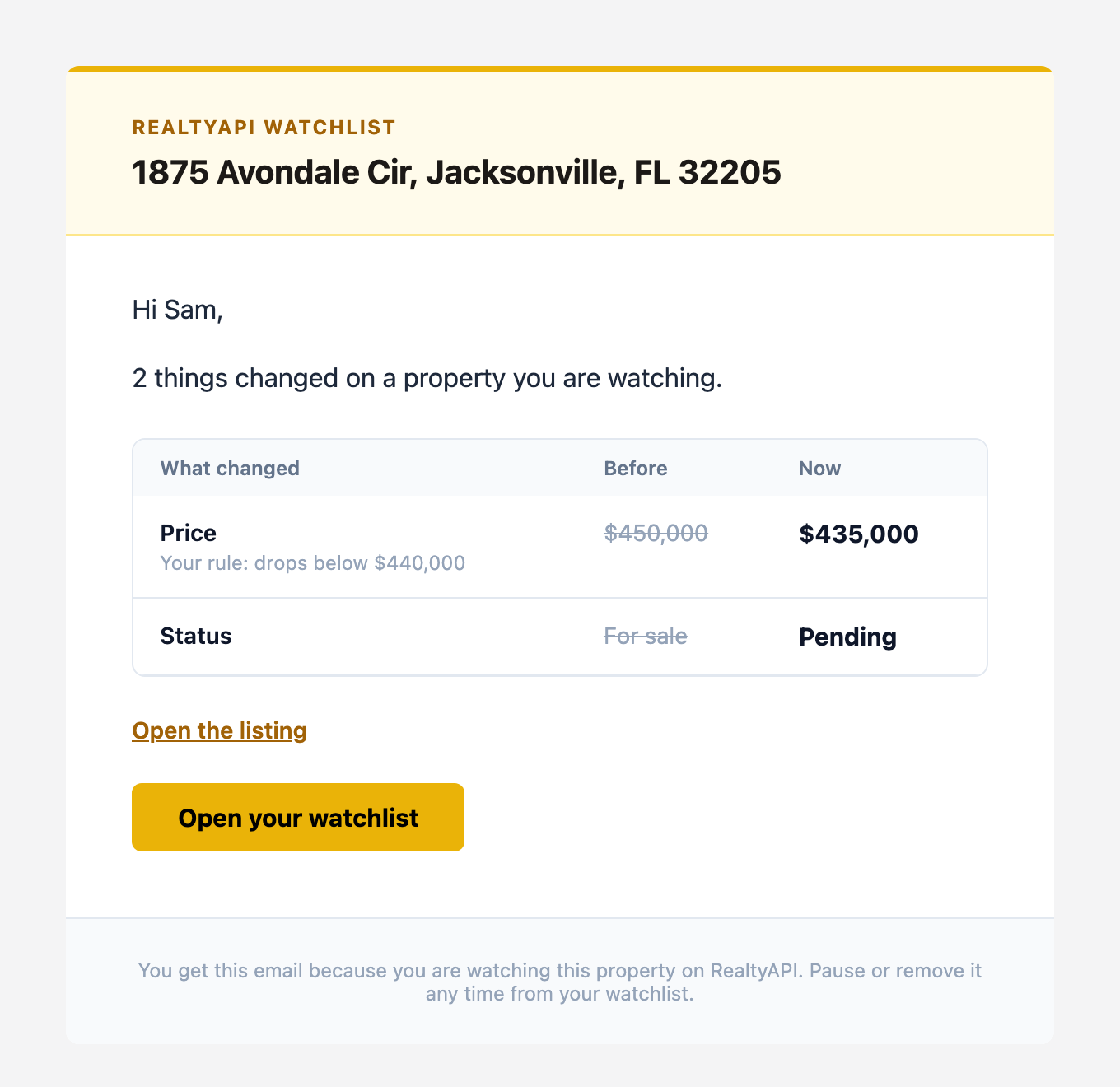
Your watchlist in the dashboard shows the same thing for every property: current values, when it was last checked, when the next check is due, and the full history of changes. There is also a Check now button when you do not want to wait for the schedule.
What it costs
Watchlist uses the credits you already have on your plan. There is no separate subscription.
- 2 credits per successful check, on any portal and any schedule.
- Failed checks are free. If the portal does not return real data, you are not charged. That includes an error, an empty answer, or a listing we could not load.
- The number of fields you watch does not change the price. One check reads all of them.
Here is what one property costs on each schedule:
| Schedule | Checks per day | Credits per day | Credits per 30 days |
|---|---|---|---|
| Every hour | 24 | 48 | 1,440 |
| Every 6 hours | 4 | 8 | 240 |
| Every 12 hours | 2 | 4 | 120 |
| Daily | 1 | 2 | 60 |
| Every 3 days | 0.33 | 0.67 | 20 |
| Weekly | 0.14 | 0.29 | about 9 |
And how many properties each plan can watch at the time of writing:
| Plan | Properties | Fastest schedule |
|---|---|---|
| Free | 5 | Daily |
| PRO and one-time credits | 250 | Hourly |
| ULTRA | 1,000 | Hourly |
| MEGA | 5,000 | Hourly |
A quick sanity check: the free plan includes 250 credits a month, which covers 4 properties checked daily for a whole month. Fifty properties checked every 6 hours is about 12,000 credits a month, comfortably inside PRO. See current pricing for plan prices and credit amounts.
Which schedule should you pick?
Daily is right for most people. Listing changes reach the portals from the MLS with a delay of their own, often a few hours, so checking every few minutes would not get you the news any sooner. Use hourly for the handful of properties where hearing a few hours earlier really matters, such as a home you plan to offer on the moment it drops. Use every 3 days or weekly for long-term watching of values and taxes.
What happens when something goes wrong
Watchlist is built to stop quietly rather than surprise you with a bill.
- Out of credits: the whole watchlist pauses, you get one email (not one per property), and nothing is checked or charged. Add credits or upgrade, then click Resume all.
- A listing keeps failing: after 5 failed checks in a row, that property pauses itself and you get an email. None of those failed checks were charged.
- The watch period ends: the property pauses. You can extend it from the edit panel with "Keep watching for".
- No active API key: checks are billed to your account through your key, so if you delete every key the watchlist pauses until you create one.
Watchlist or the API?
If you want an email when a known list of properties changes, use Watchlist. It is the fastest way from "I want to know" to getting the alert.
Build on the API instead when you need something Watchlist does not do yet:
- Webhooks, Slack or SMS. Watchlist sends email today. Our n8n node can call any RealtyAPI endpoint on a schedule and send the result wherever you like.
- Whole areas, not single homes. "Tell me about every new listing in this ZIP code" is a search job. We compare the approaches in monitoring API vs scheduled scraping.
- Analysis, not alerts. If you are studying how prices move across a market, start with how to interpret changes in price.
Frequently asked questions
Which portals does Watchlist support?
Zillow, Realtor.com and Redfin, which cover listings across the United States. More sources are on the way.
Can I watch a home that is not for sale?
Yes. Address search includes off-market homes, and values like the Zestimate, Redfin Estimate or tax assessed value keep changing whether or not the home is listed.
How quickly will I hear about a change?
Within one schedule interval of the change showing up on the portal. On an hourly schedule that means within about an hour of the portal updating.
Do I need to know how to code?
No. Everything is done in the dashboard with search boxes and dropdowns. Custom JSON path fields are there for developers, but you never need them.
Can my team see the watchlist?
Yes. Teammates you invite to your workspace share its watchlist and credits, and the alert for each property goes to the person who added it.
Can I stop watching a property?
Any time. Pause it, resume it, change its fields or schedule, or remove it along with its history. Removing a property stops all billing for it immediately.
Try it
Watchlist is live for every account, including the free plan. Open your watchlist and add your first property. It takes about a minute, and the first check runs as soon as you save.