Throughput Measurement: A Practical Guide for APIs

Your platform team publishes a triumphant update: the API now handles 50,000 requests per second. Six weeks later, support tickets pile up. Users report timeouts during ordinary traffic, and nobody can explain why the dashboard still looks healthy.
That situation is common because throughput measurement often starts and ends with one impressive number. A better approach treats throughput as a decision tool. You measure completed work, pair it with latency and errors, break it down by workload, and then use the result to decide whether you need more capacity, a different architecture, or better monitoring.
Why Throughput Numbers Lie and What to Measure Instead
A headline RPS figure can hide almost everything that matters to a user. A fast cache may absorb most requests while one database-backed endpoint queues work, consumes connection pools, and returns slowly. The aggregate dashboard stays green because the easy traffic dominates the average.
Start by defining what the system completed. Throughput is completed work per unit of time, not requests that arrived, threads that started, or messages that entered a queue. Then attach the context needed to interpret it:
- Throughput: How much work finished during the observation window.
- Latency: How long each completed request took, preferably shown across p50, p95, and p99.
- Error rate: How much requested work failed.
- Workload shape: Which endpoints, payload sizes, cache states, and concurrency levels produced the result.
- Duration: Whether the system sustained the rate or only reached it during a short burst.
Practical rule: A throughput number without latency and error context is a capacity claim, not a user-experience measurement.
Break the result down by endpoint, operation, tenant, and response class where those dimensions matter. A single aggregate value can conceal a slow search operation behind fast health checks, or make retries look like successful demand. A semantic model can help keep those definitions consistent across dashboards, and this semantic metrics layer guide provides useful context for organizing shared metric meaning.
The questions worth answering are concrete. What unit represents useful work? Is the reported rate a peak or a sustained value? Does higher concurrency improve completed work or merely create a longer queue? Which bottleneck appears first, CPU, storage, network, dependencies, or client behavior? Good throughput measurement answers those questions instead of decorating a dashboard with a large numeral.
What Throughput Actually Means
Think about airport security. Throughput is the number of passengers cleared per minute. Latency is the time one passenger spends waiting and moving through the checkpoint. The airport can clear many passengers overall while your individual wait remains unpleasant, especially if arrivals come in bursts or one screening lane slows down.
The engineering definition is just as practical: throughput is completed work per unit of time under a defined workload. The unit should match the work being delivered.
- RPS, or requests per second: An HTTP API might complete a measured number of property-search requests during each second.
- TPS, or transactions per second: A database might commit a measured number of orders or account updates per second.
- QPS, or queries per second: A search service might finish a measured number of index queries per second.
- bps, or bits per second: A network link reports how many bits it transfers per second.
Network throughput is standardized around bits per second, with decimal prefixes such as kbit/s, Mbit/s, and Gbit/s. A practical conversion is 1 byte per second equals 8 bits per second, as documented in ETSI's throughput and data-rate reference. The history matters because networking moved from telegraph links measured in mere tens of bits per second to Ethernet's first generation at 2.94 Mbit/s in 1973, followed by 10 Mbit/s, 100 Mbit/s, and 1 Gbit/s as physical-layer technology advanced. Standards bodies including ISO, IEC, IEEE, ITU, and IETF formalized these units, making comparisons possible across systems.
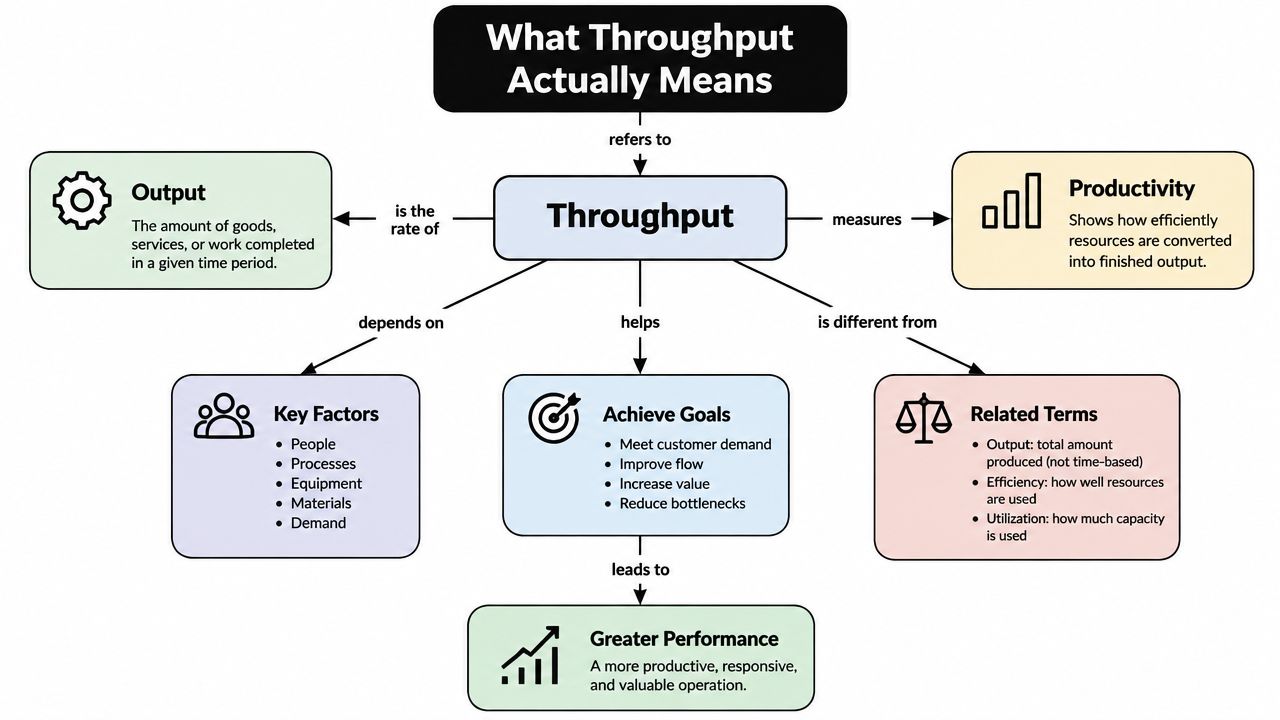
Unit choice changes your capacity reasoning. Doubling network bps doesn't necessarily double API RPS when payload sizes vary. Likewise, doubling request rate may not double useful work if retries, cache hits, or partial failures dominate. Carry this definition forward: throughput is the rate of successfully completed, defined work, measured under a workload you can describe and reproduce.
Throughput vs Latency and Other Common Metrics
Throughput and latency describe different axes. A service could process 10,000 RPS with 5 ms latency, or 10,000 RPS with 2,000 ms latency. The throughput is identical, but the second result describes a very different experience for a caller. Those example values are useful as a mental model, not as a universal performance target.
Concurrency adds another layer. It describes how much work is in flight at the same time. Error rate tells you whether the system completed the work correctly, while goodput narrows the view to useful, successful output rather than every attempted or retried operation.
| Metric | Definition | Unit | What It Tells You |
|---|---|---|---|
| Throughput | Completed work during a time interval | RPS, TPS, QPS, bps, or domain-specific units | How much work the system delivers |
| Latency | Time taken by an operation | Milliseconds or seconds | How quickly an individual operation completes |
| Concurrency | Work in flight at once | Requests, tasks, sessions, or workers | How much simultaneous demand the system carries |
| Error rate | Work that fails or produces an invalid result | Percentage or ratio | Whether apparent capacity is reliable |
| Goodput | Useful completed output after failures, retries, and non-value work | Domain-specific rate | How much value reaches the consumer |
For a simple mental model, Little's Law connects concurrency, throughput, and latency:
concurrency = throughput × latency
The relationship doesn't tell you why a service is slow, but it helps expose trade-offs. If throughput stays flat while latency rises, additional concurrency may be creating a queue rather than increasing productive capacity. If concurrency falls because clients time out, a dashboard might show lower load while the user experience gets worse.
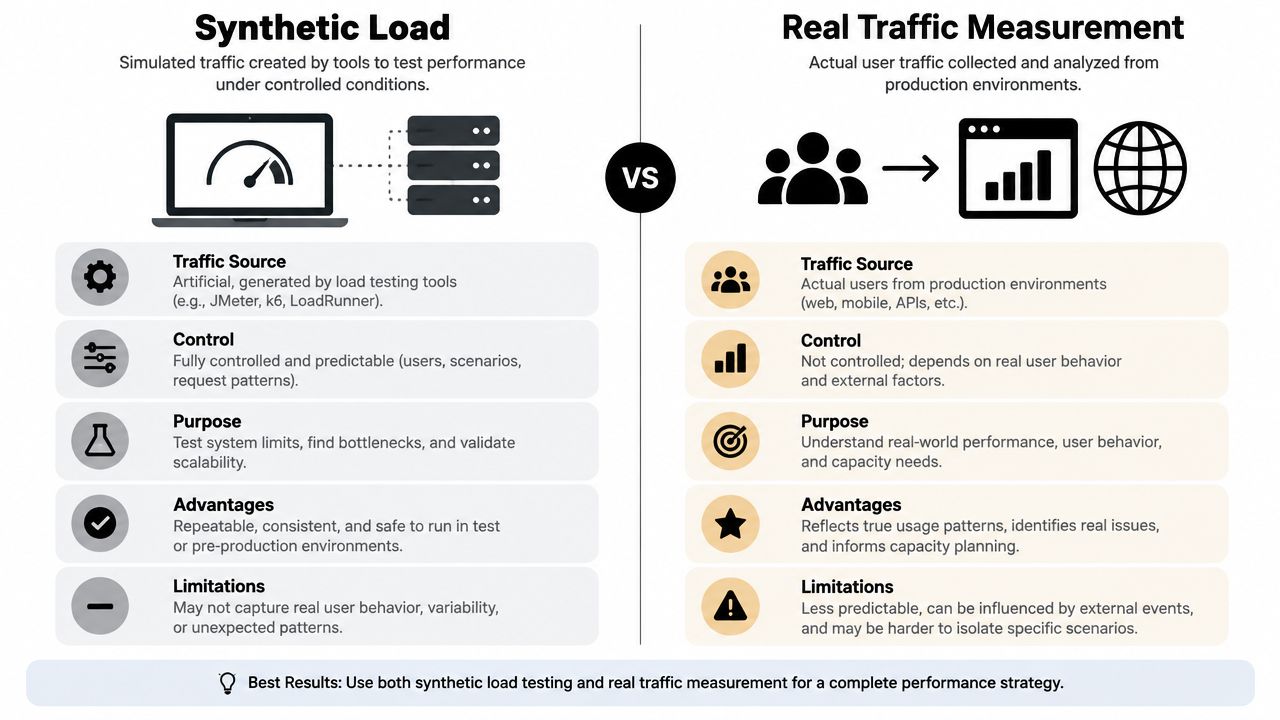
Compare measurement methods carefully. A synthetic test gives controlled workload and repeatability, but it may miss real traffic mix and dependency behavior. Real-traffic telemetry captures actual callers and failure patterns, but changing production conditions can make comparisons harder. Use both when the decision requires both a clean baseline and evidence of user impact.
Use goodput when the question is value, not activity.
For user-facing APIs, report throughput alongside latency percentiles and error rate. For inference systems, request rate may be too coarse when output lengths vary and batching is involved. Token-based throughput, often expressed as TPS, can describe delivered model output more meaningfully than request-based RPS in that situation, as discussed in this throughput calculator guidance.
Synthetic Load vs Real Traffic Measurement
Synthetic load and real traffic answer different questions. A scripted generator sends predictable requests, payloads, and arrival patterns. Production telemetry records the messy mixture that your users create.
Synthetic testing is valuable when you need a repeatable experiment. Tools such as k6, JMeter, Gatling, Locust, and Vegeta can exercise an endpoint with controlled ramping and stable scenarios. That makes them useful for establishing a baseline, comparing releases, planning capacity, and gating a change in CI. Guidance on automated performance tests in CI is particularly relevant when you want performance checks to run as part of delivery rather than only before a major launch.
Synthetic scripts also create blind spots. They may not reproduce cache warm-up, third-party API quirks, real payload sizes, retry storms, or the long tail of slow clients. A script that sends one tidy request shape can make a service look healthier than it is.
Real-traffic measurement uses APM data, ingress logs, or service-mesh telemetry. It reveals endpoint mix, bursty concurrency, client timeouts, dependency failures, and cascades that emerge only under operational conditions. It can also expose traffic that your test author never thought to model. Sampled requests are often enough for observation, while targeted traces help investigate a particular path.
Match the method to the decision
Use synthetic load for capacity planning, SLA validation, release comparison, and CI checks. Use real traffic for tuning, incident investigation, and finding production-only behavior. A benchmark tool gives you a focused answer about one operation. A load-testing platform models journeys and ramp curves. An APM or observability system shows what happened in the deployed service.
If you need to inspect an API interaction before building a generator, an API playground can help you understand request and response shapes. The best setup uses synthetic traffic for repeatability and real traffic for truth.
Tools and Instrumentation for Measuring Throughput
Choose instrumentation according to the question, not the length of a vendor feature list. A local benchmark can tell you whether one handler regressed. A distributed load test can explore service capacity. Production telemetry can show whether users encounter the same behavior.
| Category | Examples | Best For | Blind Spots |
|---|---|---|---|
| Benchmark tools | wrk, hey, ab, Vegeta | Quick endpoint checks and micro-benchmarks | Simplified workload and limited dependency realism |
| Load-testing platforms | k6, JMeter, Gatling, Locust, Taurus | Release validation and capacity planning | Scripts may omit production-only behavior |
| APM and observability | Datadog, New Relic, Dynatrace, Grafana with Prometheus, OpenTelemetry | Production throughput, latency, errors, and saturation | Telemetry cost, sampling, and incomplete instrumentation |
Benchmark tools are fast and intentionally narrow. Run them against one endpoint with a known payload, then inspect requests per second and latency percentiles. Don't treat the result as system capacity if the test bypasses authentication, caching, downstream services, or realistic data access.
Load-testing platforms let you model user journeys, ramp demand, and distribute generators. A database benchmark should separate throughput from latency, increase load gradually from roughly 10% of the target, and include both stress-tool and real-workload phases so CPU, disk I/O, and network contention appear under sustained demand, as described in database throughput benchmark guidance.
Production observability closes the loop. Instrument request completion, endpoint labels, status classes, dependency timing, queue depth, and resource saturation. OpenTelemetry can provide consistent traces and metrics across services, while Grafana and Prometheus can display the relationship between demand and system limits. If you're comparing vendors or platforms, this guide can help you find performance testing software without turning selection into feature shopping.
A service with rate limits needs a test that respects those controls. Review the documented rate-limit behavior before interpreting rejected requests as infrastructure capacity. A result is only honest when you can state what the generator sent, what the server completed, how long it ran, and what constrained the path.
Reading Throughput Results Without Fooling Yourself
A load test reports a high rate, but users still see timeouts. Meanwhile, a queue grows, errors trigger retries, and CPU remains near its limit. The headline number is accurate, yet it does not describe useful system capacity.
Separate the measurements that dashboards often combine:
- Peak rate: A short burst the system reached. It may depend on queueing, load shedding, or failed requests.
- Sustained rate: The level it can maintain throughout the workload window.
- Useful rate: Completed work that succeeds and delivers value to the caller.
Choose the unit that matches the work. RPS suits request handling, TPS suits completed transactions, and goodput suits valid bytes, records, or events delivered. A high aggregate RPS can hide one slow endpoint or a dependency that serves only a small but important share of requests.
Concurrency makes this harder to read. Adding clients may raise completed requests temporarily, while latency climbs faster than throughput. Once tail latency causes timeouts and retries, extra demand increases pressure on the original bottleneck instead of producing useful work.
Plot throughput against offered load, not only elapsed time. Mark the point where more demand stops producing proportional completed work. That flattening is the practical knee of the curve. Overlay p95 or p99 latency, error rate, queue depth, and saturation. Flat throughput with a rising tail means the system is under stress, even when the headline rate appears stable.
Apply the result to the workload
Use the result to choose an action. A real-time service may need concurrency limits or capacity at the point where tail latency rises. A batch system should be judged by steady-state useful work during its processing window. A software delivery team should count completed delivery work while checking stability and rework, rather than rewarding activity alone.
Throughput also applies beyond network rates. The DORA metrics history describes deployment frequency and deployment lead time as measures of delivery throughput, while separating speed from stability. It later added deployment rework rate as a proxy for unplanned work. The lesson is practical: a faster system can still perform poorly when its output requires retries, repair, or rework.
Choosing the Right Throughput Target for Your Workload
Start with the workload's promise to its users. A human-facing API needs enough completed requests to meet demand while keeping tail latency within its service objective. A batch pipeline needs enough steady-state processing to finish within its scheduled window. An event system needs acknowledged, useful processing, not merely messages pulled from a broker.
| Workload Type | Primary Target | Guardrail Metric | Common Mistake |
|---|---|---|---|
| Real-time API | Successful requests at the required traffic level | Tail latency and error rate | Chasing peak RPS while users wait |
| Batch or analytics | Steady work completed during the processing window | Resource contention and completion time | Optimizing short bursts instead of the full run |
| Message delivery | Successfully processed and acknowledged events | Queue depth, retries, and failures | Counting consumption before acknowledgment |
| Software delivery | Completed delivery work with stable outcomes | Lead time, recovery, and rework | Rewarding activity without measuring quality |
For a real-time endpoint, set the target at the rate that satisfies the service objective, not the maximum rate reached in a short test. For batch work, test neighboring workloads as well as the pipeline itself. A job that finishes quickly by starving other services may improve one chart while damaging the platform.
Goodput becomes the right target when failed, duplicated, or unacknowledged work inflates raw throughput. Categorize delivery throughput by work type when possible, such as feature work, defects, maintenance, and rework. A single aggregate number can hide where the team spends its time.
Cost can break a tie. If an architecture doubles throughput but charges per invocation or consumes substantially more infrastructure, the higher rate may not be the better operating point. Review the RealtyAPI.io pricing model when estimating the cost behavior of an API-dependent workload, and include successful calls, retries, and rejected requests in the calculation.
Choose the smallest target that meets the SLO, then measure against that target consistently.
Review the target after meaningful changes, not only after incidents. Keep the workload definition, success criteria, and resource assumptions versioned with the service so a future benchmark remains comparable.
Monitoring Throughput Over Time and Final Takeaways
A throughput result matters only when it remains comparable. Record the workload, success criteria, dependency state, and infrastructure assumptions with each run. Compare like with like, then alert on meaningful changes rather than every fluctuation. A sudden drop in successful work deserves attention even when aggregate requests per second still look healthy.
Review weekly charts alongside deployments, dependency updates, database changes, and infrastructure modifications. Place throughput beside matching latency and error-rate panels. A service can preserve its request rate while retries, slow queries, or rejected work make the user experience worse. Check endpoint-level results too, because an aggregate number can hide the queue or route that has become the bottleneck.
Keep the measurement system honest with durable habits:
- Rotate synthetic scenarios: A fixed script can warm caches or skip paths that real users exercise.
- Sample production requests: Capture representative behavior without logging every request.
- Version benchmark definitions: Store payloads, concurrency, duration, success criteria, and environment assumptions alongside code.
- Rerun baselines after changes: Repeat comparisons after infrastructure, runtime, database, or dependency updates.
- Inspect endpoint detail: Use aggregate data for capacity planning, then use endpoint data to find where work stalls.
External dependencies need their own context. A RealtyAPI.io status page can show whether an API involved in the measured path is experiencing an incident. Check dependency health, retries, rate limits, and client behavior before assigning a slowdown to your service.
Throughput is a decision input, not a score to maximize. A result may justify adding capacity, redesigning a queue, changing concurrency, adjusting a cache strategy, or rejecting a misleading benchmark. Before the next run, ask: What decision will this number change?
RealtyAPI.io provides a unified API for real estate data, with REST, GraphQL, and webhooks for teams building search, market monitoring, and listing experiences. Use its endpoint documentation and operational signals in a realistic throughput test, then visit RealtyAPI.io to get an API key and evaluate the workload with your own instrumentation.