Inventory Turnover Metrics Explained with Examples
A property manager can have two very different inventory problems in the same week. One group of homes receives strong inquiries, gets booked or sold, and quickly returns cash to the business. Another group remains live for months, consumes marketing attention, and ties up capital without producing a result. The listings look similar in a portfolio view, but their inventory turnover metrics tell a different operational story.
That same pattern appears in retail. Fast-moving stock keeps cash circulating, while slow-moving items occupy shelf space and may eventually require discounts. Real estate inventory behaves differently from packaged goods, yet the underlying question is similar: how quickly does available inventory become productive revenue, and is that speed appropriate for the business model?

Introduction to Inventory Turnover Metrics That Actually Matter
A warehouse manager sees slow stock as boxes that occupy space. A retailer sees it as money that can't be used for new products. A real estate operator sees it as homes, apartments, lots, or short-term rental listings that remain available while acquisition, maintenance, marketing, and financing costs continue.
Inventory turnover gives each of these situations a common operating lens. It measures the relationship between the inventory consumed or sold and the average inventory held during a period. The result is a rate that helps teams compare movement over time, identify segments that need attention, and connect operational activity with cash conversion.
For a retail business, the inventory item might be a laptop, sofa, or grocery product. For a brokerage, it might be an active listing. For a rental marketplace, it could be an available unit or bookable property. A development company might treat completed lots or unsold homes as inventory, provided the accounting treatment and cost basis are defined consistently.
The important point isn't to force real estate into a retail template. Property has longer decision cycles, higher values, location-specific demand, and availability requirements that make a simple “higher is better” interpretation unsafe. Instead, the metric helps operators ask better questions:
- Which listings are moving quickly?
- Which locations or price bands are absorbing inventory slowly?
- How much capital remains tied up in inactive or underperforming stock?
- Does faster movement come from healthy demand, lower pricing, or reduced availability?
The practical path starts with the basic meaning and formula, then moves into companion measures, category benchmarks, worked real estate examples, and API-supported dashboard tracking. Once listings are segmented by location, property type, price band, or listing age, the ratio becomes more useful than a single portfolio-wide figure.
Operating principle: A turnover rate is a speedometer, not a destination. The right speed depends on the road, the vehicle, and the risk of running out of fuel.
What Inventory Turnover Metrics Really Measure
Inventory turnover counts how many times average stock is sold and replaced during a chosen period. In retail, that stock might be laptops or sofas. In a real estate business, it can be active listings, available rental units, or completed homes awaiting sale. The calculation is similar, but the operating meaning depends on how the business defines inventory (Corporate Finance Institute explains the metric in these terms).
A higher figure generally means inventory moves faster and less capital remains tied up. A lower figure may reflect weak demand, excess stock, or a deliberate choice to keep more availability. For property businesses, speed alone does not determine performance. Location, price, property type, listing age, and transaction cycle all affect what a reasonable turnover rate looks like.
Build the formula from the business activity
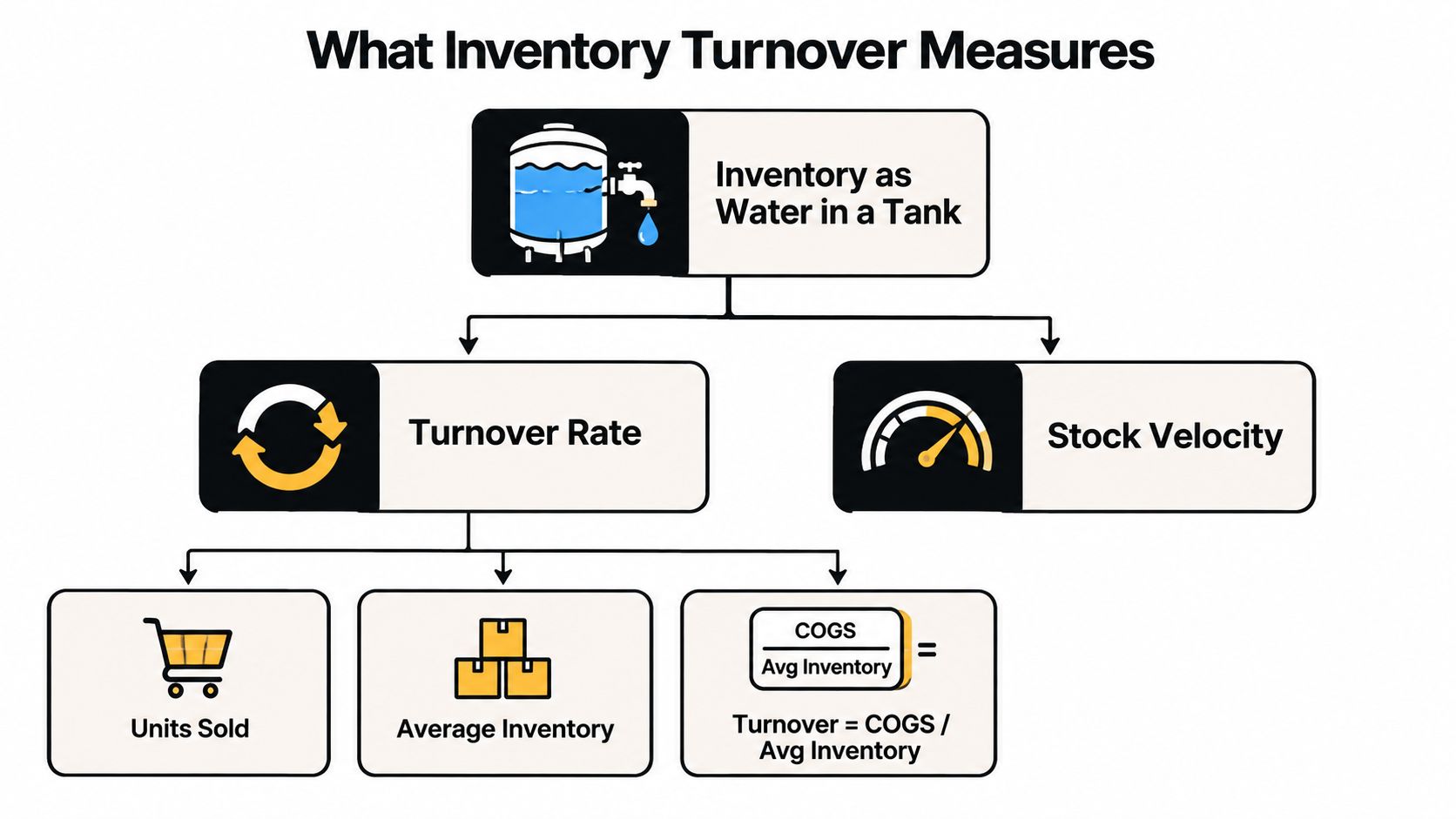
The standard financial calculation uses cost rather than selling price:
Inventory turnover = COGS ÷ average inventory
COGS means the cost of goods sold during the period. Average inventory is usually calculated as:
Average inventory = (beginning inventory + ending inventory) ÷ 2
Investopedia's explanation of inventory turnover documents this approach. Average inventory gives a more representative base than the ending balance alone, which may reflect an unusually high or low stock position.
Suppose a business records $50,000 in COGS and holds $10,000 in average inventory. Its turnover is 5.0x, calculated by dividing $50,000 by $10,000. The business therefore moved stock equal to its average inventory five times during the period.
The time-based companion measure is:
Days of inventory on hand = 365 ÷ inventory turnover
A 5.0x turnover corresponds to about 73 days of inventory, while a 10.0x turnover corresponds to about 36.5 days, as described in the Business Development Bank of Canada's inventory turnover glossary. As turnover rises, the average time that cash remains in stock falls.
Real estate requires a clear operating definition. A brokerage might compare homes sold with average active listings to study absorption. A property owner might use property-level costs and completed transactions. These measures are not automatically equivalent to financial inventory turnover, so record the numerator, denominator, period, cost basis, and segment before comparing results.
Vacancy and changeover costs belong in a related operating view. Teams can use a tool for calculating co-living turnover expenses, then decide whether those costs belong in inventory analysis or a separate property operations dashboard.
Key Variants and Companion Metrics You Should Track Together
A turnover ratio answers how quickly inventory moves. It does not show whether the movement protects margin, serves customers, or applies to the right group of listings. Pair the ratio with companion measures so a property portfolio is not judged by one blurred average.
Start with the numerator. COGS-based turnover matches cost of goods sold with inventory recorded at cost, making it suitable for financial analysis. Sales-based turnover uses revenue and supports commercial reporting, but different margins can make comparisons misleading. Keep both views in separate trend lines.
The time window changes the question. Annualized turnover helps compare periods or businesses, while monthly and quarterly views reveal seasonality and recent operating changes. Short windows can trigger alerts, though uneven transactions may make them volatile.
A practical comparison
| Metric Variant | Formula | Best Use Case |
|---|---|---|
| COGS-based turnover | COGS ÷ average inventory | Financial inventory productivity |
| Sales-based turnover | Sales ÷ average inventory | Revenue movement and commercial reporting |
| Annualized turnover | Period turnover converted to an annual basis | Peer or long-term comparison |
| Period turnover | Period COGS ÷ period average inventory | Operational monitoring |
| SKU-level turnover | SKU COGS ÷ SKU average inventory | Replenishment and slow-stock decisions |
| Category-level turnover | Category COGS ÷ category average inventory | Assortment and purchasing decisions |
| Days inventory outstanding | 365 ÷ turnover | Cash tied up in inventory |
For the time view, days inventory outstanding converts turnover into an easier cash-timing story. As noted earlier, DIO is approximately 365 divided by turnover, so a faster ratio represents fewer days tied up in inventory.
Pair movement with service and profitability. Fill rate shows how often demand can be fulfilled, stockout rate shows lost availability, and gross margin indicates whether sales create worthwhile economics. For property listings, track booking fulfillment, unavailable dates, cancellation exposure, and contribution margin per listing. A 4x turnover with a 92% fill rate supports a different decision from 4x turnover with a 78% fill rate, even though the headline ratio matches.
Adjusted turnover can provide a clearer productivity view when margin structure, capital intensity, or unusual sales changes affect the basic ratio, as discussed in the Management Science research on adjusted inventory turnover.
Real estate teams should segment these measures by property type, market, price band, and listing status rather than averaging every listing together. A live listings feed from an API can refresh active, pending, sold, and withdrawn groups, helping analysts compare turnover with service outcomes as inventory changes.
Forecasting tools also need the same discipline. Guidance on how to optimize stock with AI is most useful when models monitor profitability and fulfillment alongside movement speed.
Benchmarks and What Good Turnover Looks Like by Category
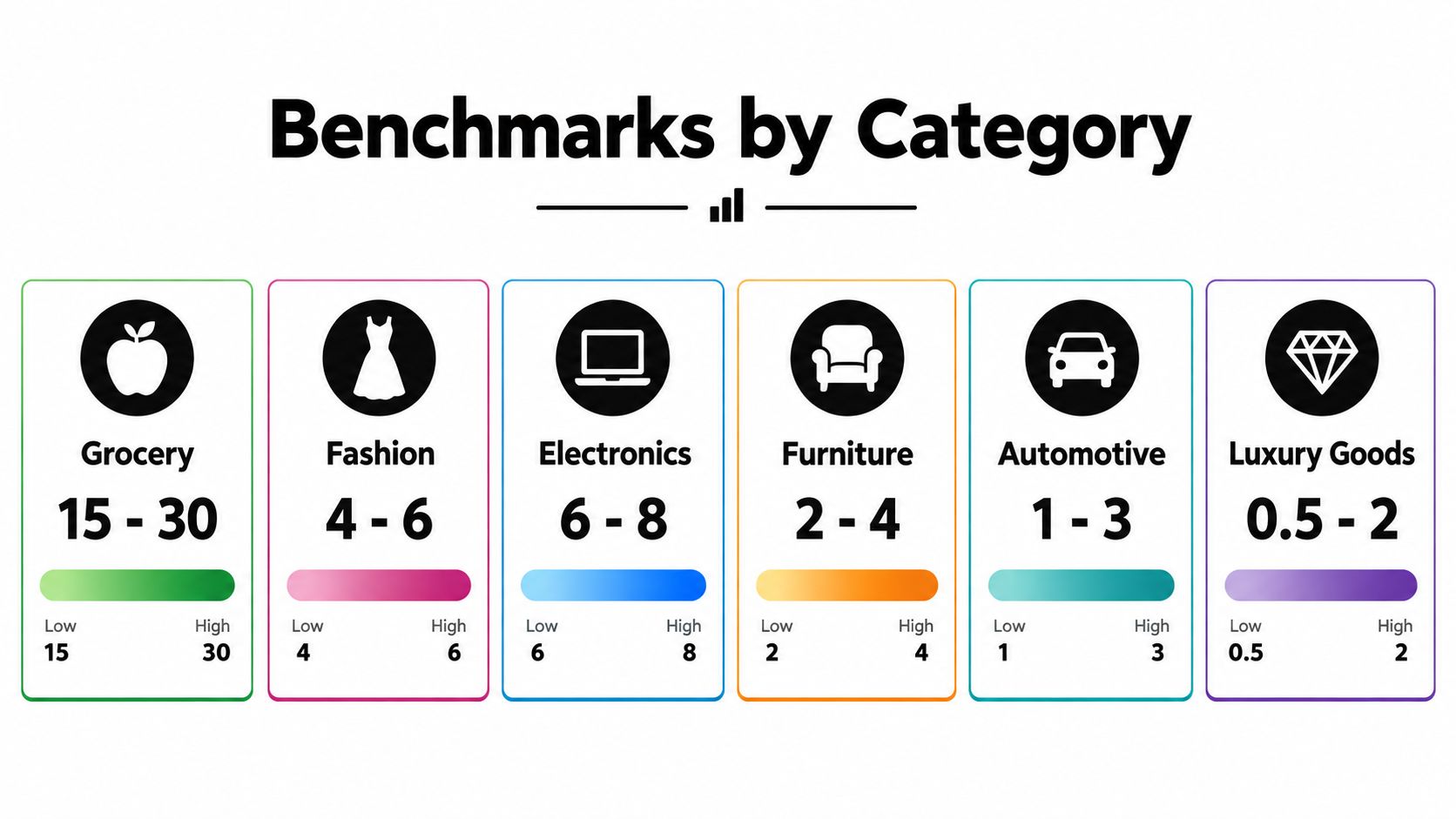
There isn't one universal good turnover rate. Grocery products have short shelf lives and frequent purchases, while furniture and specialized auto parts may remain available for longer because customers expect breadth and replenishment can take time.
The benchmark ranges show the structural difference. Grocery and convenience retail often run around 12x to 20x, fashion and apparel commonly sit around 2x to 6x, and aftermarket auto parts can be near 1.3x to 1.6x because those businesses carry slower-moving assortments and broader SKU depth (Retail Ops Toolkit provides these category comparisons).
Why the category changes the answer
A 3x turnover might be weak for grocery, where demand moves quickly and shelf-life risk is high. The same 3x turnover can be reasonable for fashion or furniture, depending on assortment, seasonality, margins, and the cost of running out of a particular item.
Other cited ranges reinforce the point. Manufacturing sources place many manufacturers around 4x to 8x, process industries such as chemicals and food around 8x to 12x, and high-mix electronics around 5x to 9x. Retail categories can run higher, with grocery and convenience formats often around 12x to 20x and fast fashion around 12x to 15x, as summarized by VendeePro's inventory turnover explanation.
| Category | Cited turnover range | Main interpretation |
|---|---|---|
| Grocery and convenience | 12x to 20x | High velocity and shelf-life pressure |
| Fashion and apparel | 2x to 6x | Seasonal demand and markdown exposure |
| Furniture | 2x to 4x | Longer holding periods and larger items |
| Electronics | 4.5x to 8x | Product cycles and mixed demand |
| Aftermarket auto parts | 1.3x to 1.6x | Broad SKU depth and slower movement |
The best benchmark for a real estate operator is usually a matched peer group, not a retail category. Compare similar locations, property types, price bands, and service promises. A portfolio of luxury homes shouldn't be judged against high-velocity rental units, just as a market with long replenishment cycles shouldn't be forced to imitate a convenience store.
For live market context, a team can pair internal turnover with Redfin housing market trends data. That comparison can reveal whether slow movement reflects weak execution or a broader change in local supply and demand.
Practical rule: Set targets by category economics first, then improve the process inside that boundary. Don't reward speed that creates stockouts, poor service, or unprofitable sales.
Practical Examples and Sample Calculations for Real Estate Inventory
Start with a familiar retail example. A store records $10,000 in COGS, beginning inventory of $3,000, and ending inventory of $1,000. Average inventory is $2,000, so turnover is 5.0x, calculated as $10,000 divided by $2,000. Using the companion formula, the average holding time is about 73 days, because inventory days equal 365 divided by turnover (Omni Calculator shows this inverse calculation).
The same logic can describe listing movement, but the unit of analysis must be stated. Consider a real estate agency that sells 12 homes during a period and maintains an average of 3.75 active listings. A listing-based turnover proxy is 3.2 turns, calculated as 12 divided by 3.75. That result suggests each average listing position was replaced about 3.2 times during the period, but it isn't automatically the same as financial inventory turnover because the numerator and denominator are counts rather than COGS and inventory value.
Segment the property portfolio before acting
A portfolio average can hide the decision you need to make. Divide listings into useful operating groups.
- Location: Compare neighborhoods or service areas to find local absorption differences.
- Property type: Separate apartments, detached homes, developments, and short-term rentals.
- Price band: A high-value segment may move more slowly while still producing attractive margins.
- Listing age: Isolate newly listed, established, and stale inventory.
- Availability status: Distinguish active, reserved, booked, paused, and unavailable properties.
Suppose two neighborhoods each contribute to the same portfolio average. One has listings that sell quickly but limited availability, while the other contains older listings that remain active with few qualified inquiries. The correct response isn't necessarily to raise the portfolio-wide target. The first group may need replenishment or service protection, while the second may need better pricing, presentation, channel placement, or assortment review.
For rental and short-term property operations, use booking or occupancy outcomes as the movement signal and define the holding denominator consistently. For development, track completed unsold units separately from land or work in progress, because those assets have different economic meanings.
Market history can add context to internal results. For example, Zestimate history and home value data can help analysts compare listing movement with changes in local property values, provided they document the data source and matching period.
How to Implement Tracking and Build a Turnover Dashboard With API Data
A useful dashboard starts with a data dictionary, not a chart. Define what counts as inventory, what event counts as movement, which costs belong in COGS, and how beginning, ending, and average balances are recorded. Without those rules, a polished dashboard can compare incompatible figures.
Create a repeatable data flow
Use a consistent pipeline:
- Collect inventory snapshots. Store active listings, available units, reserved properties, and other relevant statuses at a fixed cadence.
- Record movement events. Capture sold, booked, leased, withdrawn, and relisted events with timestamps.
- Add financial fields. For financial turnover, join cost and revenue data from accounting or property-management systems.
- Calculate averages consistently. Use beginning and ending balances for a simple view, or more frequent snapshots when inventory changes sharply.
- Segment before aggregation. Keep location, property type, price band, and listing age available as dashboard filters.
- Set operational alerts. Flag segments where days on hand rises, movement falls, or availability drops below the required service level.
RealtyAPI.io can provide public listings, pricing trends, availability signals, and market data through a unified data layer. Its documented integration options include REST, GraphQL, and webhooks, which can feed scheduled snapshots or event-driven workflows into a warehouse or dashboard. Review the RealtyAPI.io integrations documentation when deciding how the data should enter your existing stack.
Design the dashboard around decisions
A manager shouldn't need to interpret a dozen unrelated charts. Put the decision signals together:
- Turnover by segment, with the selected period clearly visible.
- Days of inventory, so the rate becomes a time-based operating measure.
- Active and newly listed inventory, to distinguish supply growth from weak absorption.
- Listing-age distribution, highlighting inventory that needs intervention.
- Fill rate or availability, protecting customers from overly aggressive reductions.
- Gross margin or contribution margin, preventing discount-led movement from looking automatically positive.
- Trend alerts, showing whether a change is isolated or broad across the portfolio.
Refresh frequency should follow the business rhythm. A highly active marketplace may need frequent updates, while a development portfolio may gain more from stable monthly or quarterly comparisons. The goal is consistency, traceability, and fast identification of segments where the operating response is clear.
Making Smarter Decisions With Inventory Turnover Metrics
A rental listing can turn quickly because demand is strong, because its price was cut, or because comparable listings were removed. The ratio records movement, not the reason behind it. Faster turnover may free working capital, yet it can also reduce margin, worsen customer experience, or create availability gaps.
Property inventory also serves as a buffer. An operator may keep broader availability to handle supplier volatility, disruption, long lead times, or the cost of missing a booking opportunity. Holding more listings can therefore support resilience, even when it lowers the reported turnover rate.
Use a short review checklist:
- Compare like with like. Match property type, location, price band, and service requirements.
- Check the time basis. Compare consistent periods instead of one snapshot.
- Pair speed with outcomes. Review days on hand, fill rate, availability, and gross margin.
- Investigate the cause. Separate healthy demand from discount-led movement or reduced inventory.
- Protect resilience. Consider lead times and disruption risk before cutting safety availability.
- Use adjusted analysis where possible. The Management Science study on adjusted inventory turnover, discussed earlier, shows why margin, capital intensity, and sales surprises can distort the plain ratio.
For property teams, segment listings by location, type, price band, and age, then connect turnover with pricing, availability, and cost data. A rental property calculator can support reviews of holding costs and property-level returns.
RealtyAPI.io provides a unified API for public listings, pricing trends, availability, reviews, and market signals. Its REST, GraphQL, and webhook integrations can feed dashboards that track turnover across the property segments most relevant to the business. Visit RealtyAPI.io to get an API key and test the data with ready-made code snippets.