Google Maps Places API Guide 2026: Limits and Migration
The most expensive Google Maps Places API call you'll make is often the one that looks cheapest on paper, because a single extra field in your field mask can lift the whole request into a higher billing tier. That's the counterintuitive shift in Places API (New). You're no longer paying mainly for how many calls you send. You're paying for how you shape each call, whether you close an Autocomplete session correctly, and whether you understand what you're allowed to keep afterward. Get those three decisions right and the API is predictable. Get them wrong and you'll debug the invoice before you debug the code.
Endpoints at a Glance
Start by separating discovery from enrichment. The Google Place Details documentation describes five principal capabilities in Places API (New), namely Place Details, Place Photo, Nearby Search, Text Search, and Autocomplete. Two endpoints find candidates, one enriches a chosen place, one fetches media, and one powers typing.
Places API endpoints by task
| Endpoint | Input | Returns | Typical use |
|---|---|---|---|
| Place Details | Place ID | Address, phone number, rating, reviews | Enrich a known location |
| Place Photo | Photo reference from Place Details | Photo image | Show a venue photo in the interface |
| Nearby Search | Coordinates and radius | Places near the point | Map discovery around a property |
| Text Search | Free-text query | Matching places, paginated | Find places by name or category |
| Autocomplete | Partial text and session token | Place predictions | Search-as-you-type input |
Which call comes first
Text Search fits when a user gives you a name, category, or address fragment such as coffee shops in Austin. Nearby Search fits when you already hold coordinates, for example from a map pin or a property listing, and you need venues around that point. Both return candidates you can enrich later, so don't ask them for every display field on the first pass.
Place Details is the hub. You pass a place ID and receive structured facts about that one location. Place Photo is never your first call because it needs a photo reference that comes from a Place Details response. Autocomplete belongs inside a search box, where each keystroke refines predictions until the user picks one.
Pick your first endpoint from the input you actually have, not from the data you eventually want to show.
All five run under one Google Cloud project and one set of credentials. That sounds like setup trivia, but it's operationally important. Quotas, billing, and session validity all tie back to that project, so splitting calls across projects to organize teams can break assumptions you didn't know you were making.
Place IDs and Field Masks Explained
A place ID is the durable thread through the whole API. Names change, addresses get reformatted, and coordinates drift between providers. The identifier stays tied to the same real-world location across search, Autocomplete, detail retrieval, and Google Maps links, which is why it works as your join key between a user's search intent and your own property or venue record.
Why the field mask is not optional
According to the Google Places data fields guide, Place Details (New), Text Search (New), and Nearby Search (New) require a field mask containing at least one requested field, and an omitted or empty mask returns an error. You send that mask in the X-Goog-FieldMask header. This isn't boilerplate. It's you declaring, field by field, what you're willing to pay for.
The same guide organizes fields into four pricing tiers, namely Basic, Contact, Atmosphere, and Accessibility. Response design therefore controls both payload size and billing exposure. A lean mask returns a lean response and keeps you in a lean tier.
Field tiers and what they change
| Tier | Example fields | Effect on the request |
|---|---|---|
| Basic | displayName, formattedAddress, location, types | Lowest-cost tier for name and position; a sound default for lists and maps |
| Contact | nationalPhoneNumber, websiteUri | Adds contact details; including one field lifts the whole request to this tier |
| Atmosphere | rating, userRatingCount, reviews | Adds user feedback; request it only when the interface displays it |
| Accessibility | accessibilityOptions | Adds accessibility attributes; request it only for accessibility-focused interfaces |
The highest tier wins
Say your list view needs displayName and formattedAddress. That mask sits in Basic. Now add rating because a designer wants stars next to each result. The request doesn't get a small surcharge for one field. The whole request is billed at the highest tier present in the mask, so every list item now costs Atmosphere money whether the user reads the stars or not.
I would treat the field mask as part of your interface contract. For each screen, write down the fields that screen renders, and build one mask per screen. A shared, generous mask reused everywhere is convenient for developers and expensive for everyone else.
Practical rule: If a field isn't rendered, logged for a named purpose, or used in a decision, it doesn't belong in the mask.
There's a second benefit. Narrow masks keep payloads small, which helps latency on mobile connections and makes response fixtures easier to read in tests. When a response breaks, you'll spot the missing field faster in a 6-field object than in a 40-field one.
How to Make Your First Places API Request
Your first integration should prove three things, namely that your key works, that your mask returns what you expect, and that you can page through results. A single Text Search call covers all three.
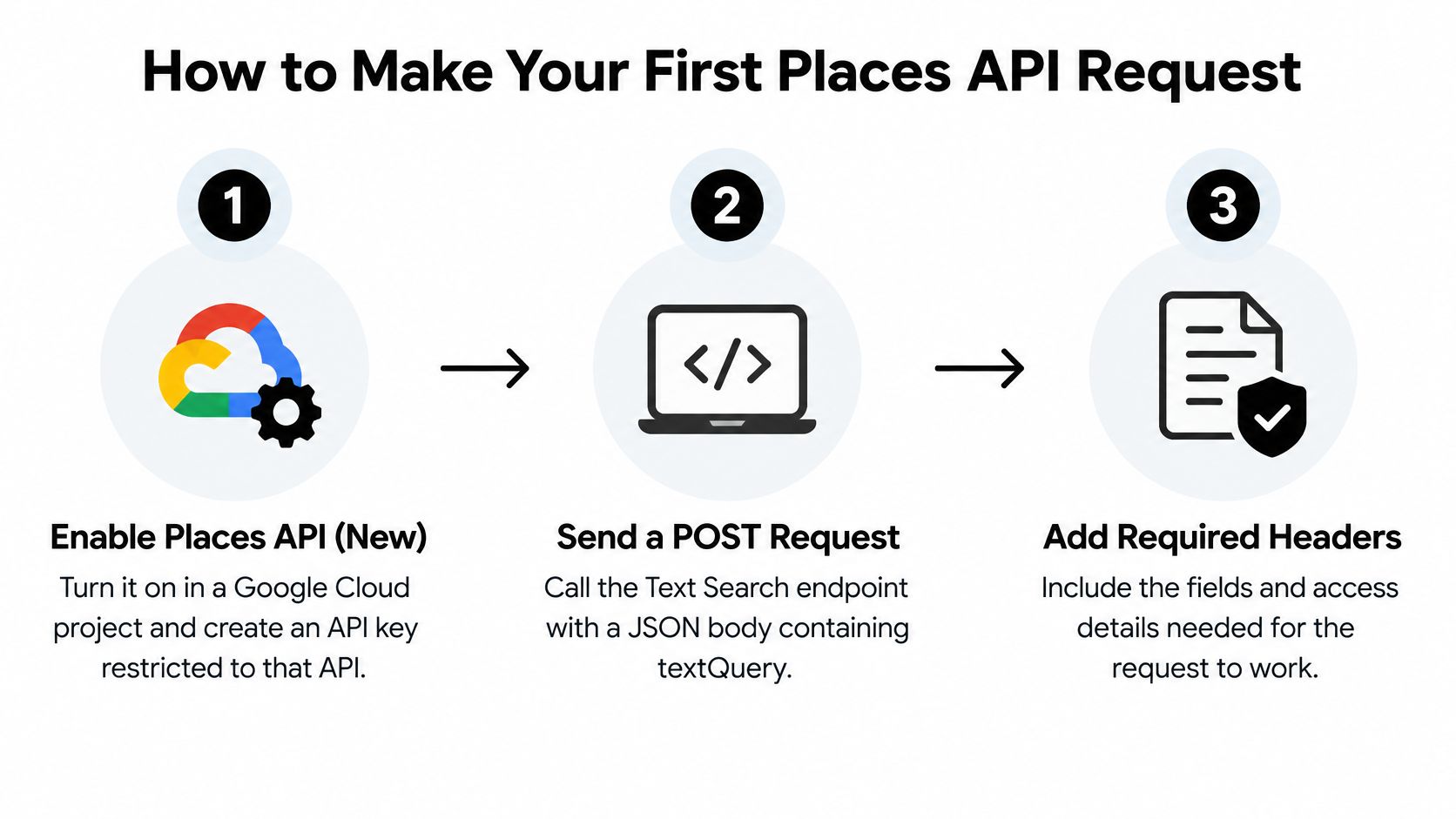
- Enable and restrict. Turn on Places API (New) in a Google Cloud project and create an API key restricted to that API. An unrestricted key that leaks from a client or a repo can run up charges across every enabled service, so restriction is a billing control, not just hygiene.
- Send a POST with a JSON body. Call the Text Search endpoint with textQuery in the body and your key in the X-Goog-Api-Key header. Keep the query realistic, using the phrasing your users will naturally type.
- Add a minimal field mask. Send X-Goog-FieldMask naming only what you'll display, such as places.id, places.displayName, and places.formattedAddress. Starting narrow gives you a baseline you can widen deliberately.
- Read the places array. Each entry's id is the place ID to store as your join key. Everything else in the entry exists only because your mask asked for it.
- Page only when you must. Check for a next-page token and repeat the request with it, keeping your original search parameters intact.
- Test with real queries. Run a sample of production-shaped searches, record page counts and response sizes, then widen the mask only where a screen needs more.
Here's the shape of that first call, with the endpoint left as a placeholder for your own configuration:
curl -X POST "
Pagination has a hard ceiling
The Places API RPC reference sets a hard page-size ceiling of 20 results for Text Search, coerces values above 20 down to 20, and defaults an omitted or zero page size to 20. When more results exist, the response carries a next-page token, and your follow-up request must preserve the original parameters except for page_token, page_size, and max_result_count. A healthy final page is a JSON object with a places list and no next-page token.
One adjacent concern is address quality. If your flow ends in shipping, checkout, or field visits, pairing place lookup with address validation helps reduce survey shipping errors and similar downstream failures caused by malformed input. Places tells you what a location is. Validation tells you whether the address will survive contact with reality.
How Autocomplete Session Tokens Work
Autocomplete looks like a simple dropdown, but Google treats it as a tokenized query-to-selection session. If you implement it as a stream of independent keystroke calls, you'll pay for it as a stream of independent keystroke calls.
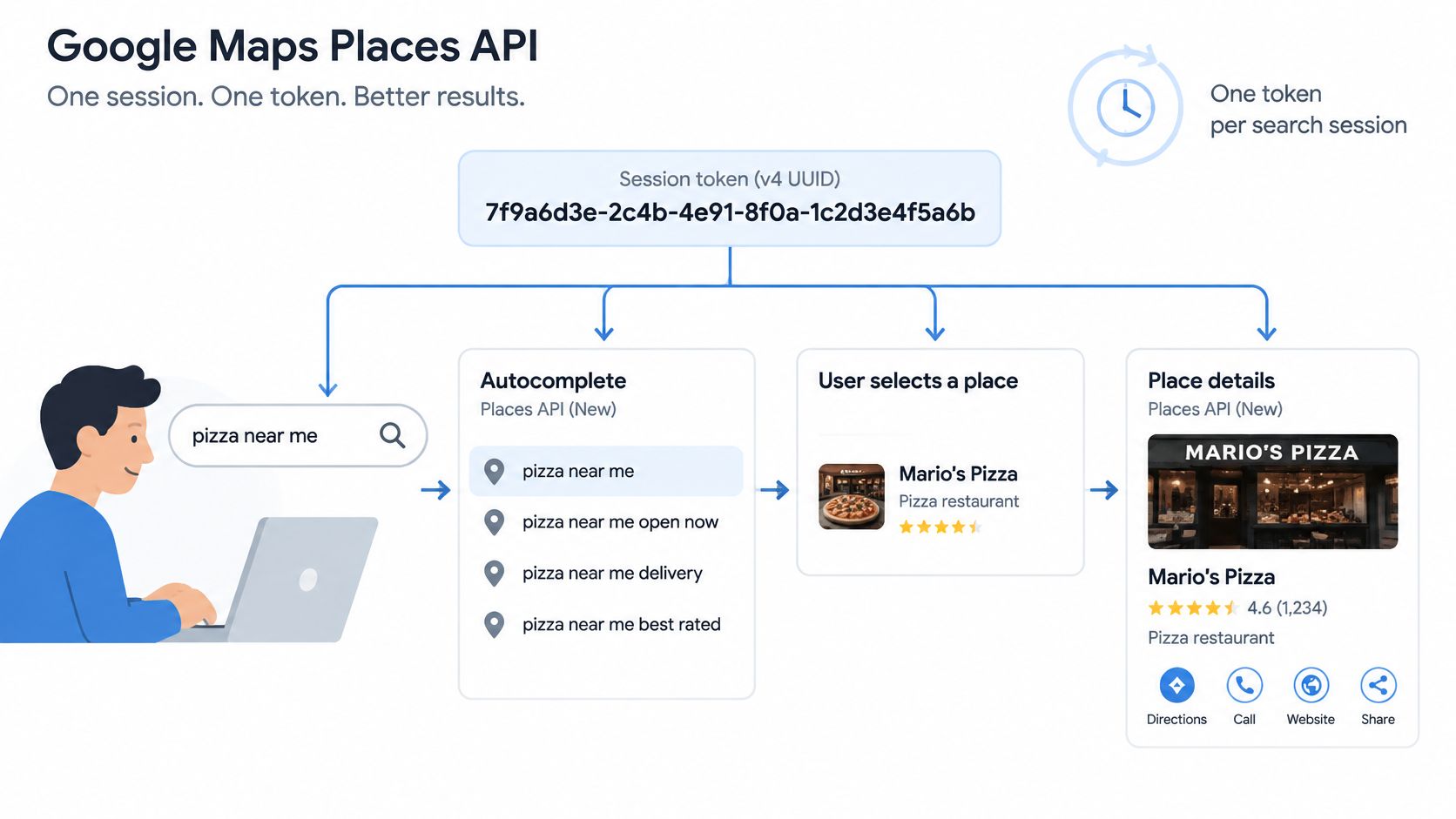
The Google session tokens guide specifies a fresh, URL- and filename-safe token per user search session, with a maximum length of 36 ASCII characters, and recommends a version-4 UUID. You reuse that token across the session's Autocomplete requests, then pass it to the single Place Details (New) or Address Validation request that completes the selection. After completion the token becomes invalid.
One session, walked through
Say a user types "Elm Ro" into a property search box. Your client generates one UUID on focus, then sends three debounced Autocomplete calls as the text grows, each carrying the same token. The user clicks "Elm Row" from the predictions. Your client sends one Place Details call with that same token, receives the resolved place, and discards the token. The next search starts with a fresh one.
Two constraints matter here. Every request in the session must use credentials from the same Google Cloud project, so a mobile app and a backend using different projects will break the linkage. And the completion call is singular. A retry strategy that fires two Place Details calls against one token is a bug, not resilience.
Where teams lose money
- Omitting the token: Each request is billed individually instead of as a linked session, so a busy search box multiplies cost per keystroke.
- Reusing a token: A token cached in local storage and recycled across searches or users fails the same way, and it's harder to spot in code review.
- Skipping debounce: Firing on every keypress sends calls for text the user has already typed past, which wastes quota even inside a valid session.
- Calling after selection: If your component keeps requesting predictions after the user picks a result, you're paying for a dropdown nobody sees.
Generate the token when the search starts, keep it only for that interaction, and delete it the moment the selection completes.
What Places API Requests Cost and Limit
A Places budget can rise faster than its search count suggests. The Google Maps Platform FAQ says Google does not impose a maximum daily request limit by default. Usage is primarily controlled through queries per minute (QPM) quotas. Those quotas limit bursts, not daily spend, so billing still depends on which requests your application makes and which fields it asks Google to return.
Cost drivers and controls
| Driver | How it raises spend | Control |
|---|---|---|
| Field mask tier | The highest tier in the mask sets the billed SKU | Request only fields the interface displays |
| Autocomplete without session token | Each keystroke is billed separately | Use one token for the interaction and debounce input |
| Text Search pagination | Each page is a separate request | Stop when the interface has enough results |
| Per-minute quota (QPM) | Limits bursts, not daily spend | Set Cloud quotas and budget alerts |
A worked example
A discovery feature makes 10,000 Text Search searches per day, and the interface fetches three pages for each search. That creates 30,000 requests before any Place Details calls. A forecast that counts searches rather than pages underestimates request volume by a factor of three.
Set Google Cloud quotas to control per-minute usage, and place budget alerts below the spend level that would cause problems. Review usage by SKU tier so changes to field masks show up in your cost reports. A mask that adds higher-tier fields can raise the cost of a high-volume endpoint, even when the number of searches stays the same.
Apply the same discipline to your own API surface. Document every usage guardrail you enforce so client teams can design against limits instead of discovering them. For products that meter customer usage, subscription usage caps for Vue offers an example of how caps can help prevent one customer from consuming an entire shared Places budget.
Check Google's current pricing page for SKU rates rather than hardcoding figures into a spreadsheet. Rates can change, so a forecast built on stale prices can mislead. Track request counts and SKU mix together: the first shows how much you call the API, while the second shows what those calls cost.
Moving from Legacy Places API Without Billing Surprises
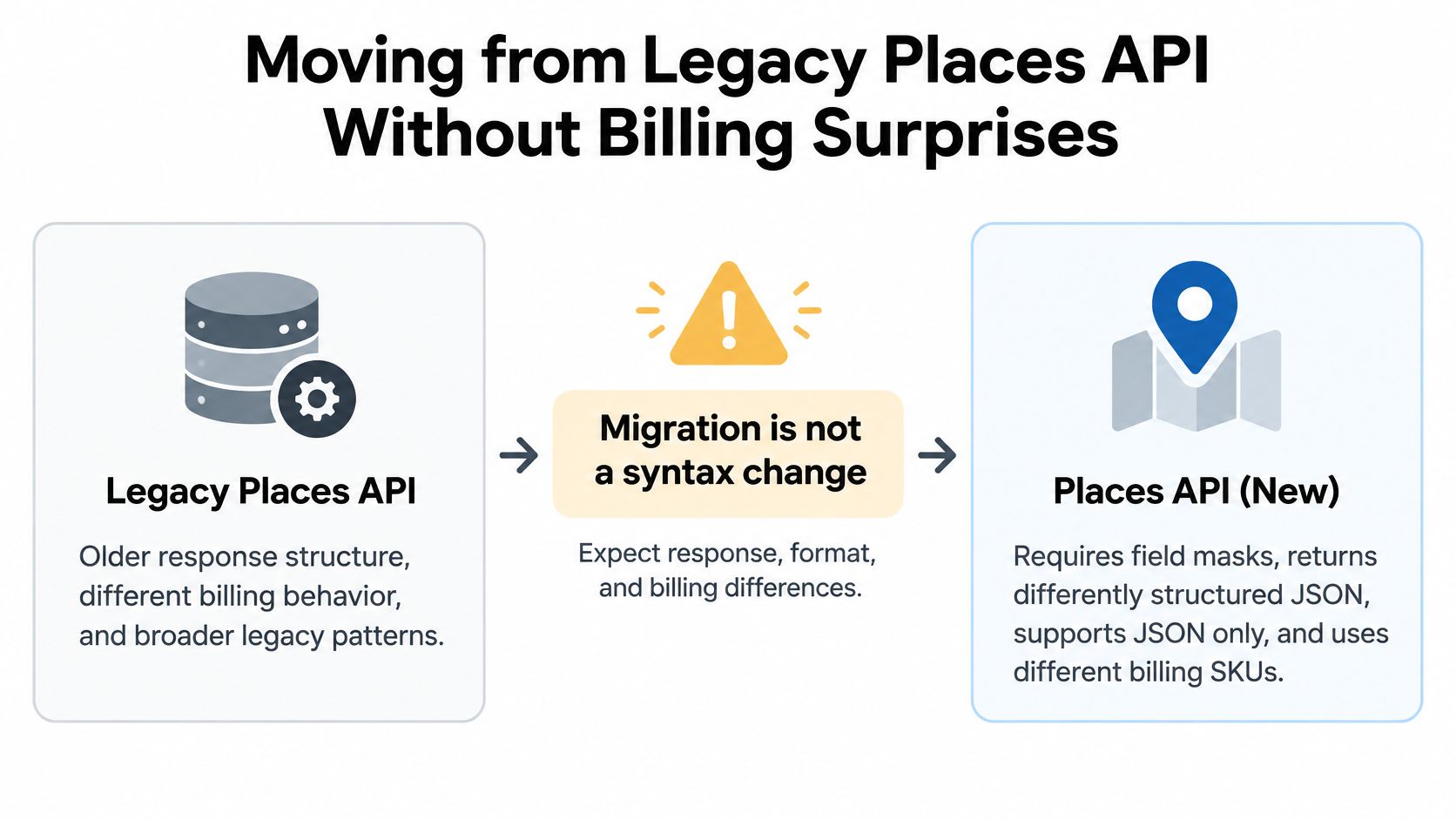
The common assumption is that migration means updating URLs and renaming a few fields. It doesn't. The Google migration overview describes an API that requires field masks, returns differently structured data, supports JSON only, and uses different billing SKUs, with an additional EEA-related change effective July 8, 2025. That's a data contract change and a pricing change wearing a refactor's clothes.
Legacy and new Places API compared
| Aspect | Places API (Legacy) | Places API (New) |
|---|---|---|
| Field selection | Fields returned by default | Field mask required on key methods |
| Response format | Legacy response structure | Different structure, JSON only |
| Billing | Base SKU plus category add-ons | One SKU set by the highest tier in the mask |
| Migration risk | Stable but being phased toward new features | Requires fixture tests and worst-case cost estimate |
The sequence that prevents surprises
Inventory first. List every legacy field your application reads, including the ones a reporting job touches at night. Fields nobody reads shouldn't survive the move, because each one you carry into a mask can raise the tier.
Map each field to its new equivalent, then build request fixtures for representative queries, including your highest-volume search, your widest mask, and your deepest pagination. Compare the new responses against the old ones for completeness and structure, and measure latency and cache effects under the same fixtures. Skipping fixtures means your first real comparison happens in production.
Estimate worst-case spend before rollout. Price every migrated call at the highest tier its mask contains, multiply by peak volume, and compare that against your current bill. If the number surprises you in a spreadsheet, it would have surprised you more on an invoice. While you model this, it's worth comparing how other providers present their tiers, for example in the RealtyAPI pricing documentation, to sanity check your own forecasting format.
Modernizing an integration can raise your costs unless field selection is treated as an architecture decision, not a refactoring detail.
Time the production switch near the beginning of a billing month, which reduces exposure to unfavorable transition-month pricing. Keep the legacy path available as a fallback until response completeness and spend both match your fixture predictions. Roll out to a slice of traffic first. A migration that can't be reversed in minutes isn't finished, whatever the code looks like.
Caching and Storage Rules You Must Follow
The standard performance advice for any API is to cache responses. With Places content, that advice can put you in breach. Google prohibits pre-fetching and storing Places content beyond permitted exceptions, so a cache layer copied from another integration is a compliance risk, not an optimization.
The Google Maps service terms state that place IDs are exempt from caching restrictions and may be stored indefinitely, while latitude and longitude returned through the Places API may be cached for no more than 30 consecutive calendar days, after which they must be deleted. The terms also prohibit bulk downloading or independently storing business names, addresses, or user reviews.
What you can store and for how long
| Data | Storage rule | Practical handling |
|---|---|---|
| Place IDs | May be stored indefinitely | Keep as the join key to your records |
| Latitude and longitude from Places | Cache for no more than 30 consecutive days, then delete | Refresh or delete after 30 days |
| Business names, addresses, user reviews | No bulk download or independent storage | Fetch at display time |
| Durable property or venue records | Not built from restricted Places content | Store in a separate first-party or licensed dataset |
A storage decision you can defend
Separate transient display data from durable records at the schema level. Store the place ID against your listing or venue row. When a page renders, fetch the volatile attributes, such as rating, opening status, or phone number, at display time and discard them after rendering. Don't build a searchable external index from restricted content, and don't let an analytics pipeline persist review text into a warehouse unnoticed.
Say a property app shows nearby venues with ratings. The compliant design saves only the venue's place ID with the listing record, then fetches the rating live when the listing page renders. The noncompliant design syncs venue names and ratings into your database nightly to save API calls. The second design is cheaper per page view and indefensible in an audit.
If you cache coordinates, build the 30-day deletion into the system, with a timestamp column and a scheduled purge job, not a comment in the code saying someone should clean up later. Durable property records belong in a first-party or properly licensed dataset that you control under its own terms.
When a Real Estate Data API Fits Better
Places API answers what is at a location and who operates it. Property records answer different questions: what a property sold for, how long it has been listed, and how prices are changing in a neighborhood. Choosing the right source for each job avoids fragile workarounds.
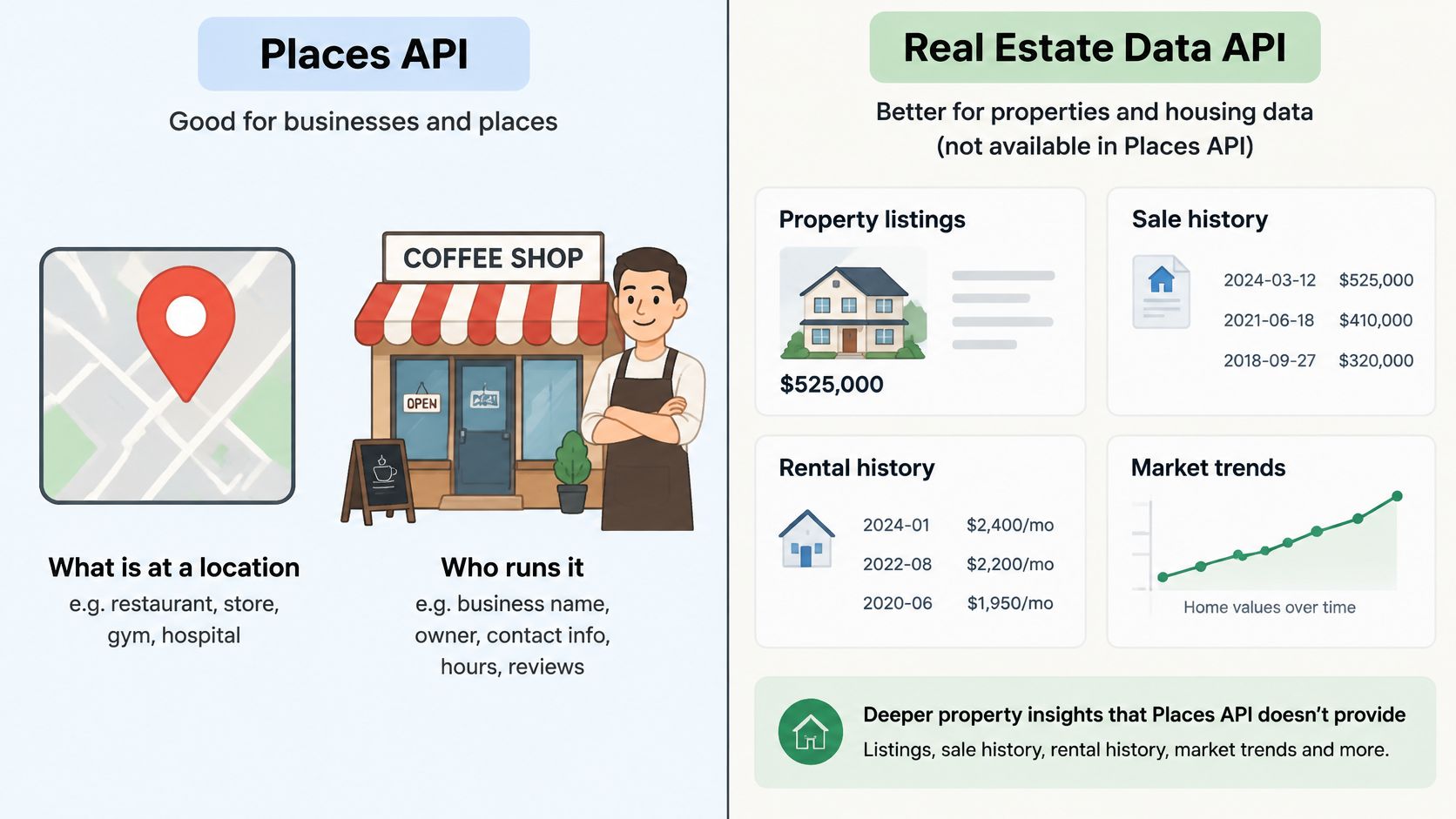
Places API and a real estate data API compared
| Criterion | Google Places API | Real estate data API |
|---|---|---|
| Core records | Businesses and points of interest | Property listings and market data |
| Identifier | Place ID | Provider-specific location or listing identifiers |
| Typical use | Venue lookup and map interfaces | Property search and market monitoring |
| Storage constraints | Google data-use rules apply | Governed by the provider's terms |
A three-way decision rule
Choose Places API for venue details, map context, and searches around a location. Choose a real estate data API for listings, pricing history, or market signals, such as those displayed in a Chicago suburbs home value map. Combine both when a listing page needs nearby venue context alongside a property record. Keep the datasets separate and apply the terms for each source.
The distinction is practical: Places can supply nearby coffee shops and schools at page render time, while a property data provider supplies listing or market records. RealtyAPI offers Zoopla property details through endpoints such as /details/byid, and its other endpoints can be combined with /sold-prices to build a real estate data layer spanning multiple providers. Its Zoopla property details endpoint is one example of a property-data lookup. Treat public-source property data as a separate dataset from Places content, with each source managed under its own terms.
| Need | Suitable source |
|---|---|
| Nearby venues, ratings, and place lookup | Places API |
| Property details, listing searches, or market data | Real estate data API |
| Property record with live nearby context | Both, kept as separate datasets |
A map view illustrates the boundary: Places can locate businesses near a property, but it does not provide that property's sale history. A real estate data API can provide property information, but should not be treated as a substitute for venue lookup.
Public-source data may be incomplete or out of date. Check the returned property details against your use case, and follow the provider's terms for how the data can be used and stored.
Start a Test Integration This Week
- Pick one endpoint that matches your first feature, usually Text Search or Autocomplete, and resist wiring up all five.
- Create a restricted API key and set a per-minute quota plus a budget alert before any traffic flows.
- Run 50 real queries with a minimal field mask, recording page counts, tiers requested, and response size for each.
- Estimate worst-case monthly spend from those numbers at peak volume, and compare it against the budget you'd approve.
- Check your data model against the storage rules and mark which fields you'll store and which you'll refresh at display time.
- Test a property data source alongside it if you need listings, keeping those records separate from restricted Places content.
You can rehearse the property side in the RealtyAPI API Playground, since an API Playground lets users test endpoints interactively without writing client code first. RealtyAPI's other endpoints can be combined with /sold-prices to build a real estate data layer that spans multiple providers through a single integration.
Aim for one measurable result by Friday, namely a test run whose actual request count and tier mix stay inside your estimate.
If your product needs listing records, sold prices, and market signals to sit alongside live place lookup, RealtyAPI.io gives you that property data layer through one developer-first API while Places handles the map context at render time. Grab a key, run your first property queries in the playground, and ship the combined integration with a cost model you can defend.