cURL to Python for Real Estate APIs: Step-by-Step

You've copied a listing search from browser DevTools, pasted the cURL command into a converter, and run the Python output. It returns JSON without an error. Then you notice the script has fewer properties than the browser, or every page contains the same listings.
That's the distinction that matters when moving cURL to Python: converting syntax doesn't prove that you've reproduced the request. A production client needs the right filters, authentication, pagination, and failure handling, plus a way to verify that the returned properties match the search.
Curl Flags and Their Python Equivalents
Start with the URL and query string. City, price ceiling, bedrooms, and pagination belong in a params dictionary rather than a hand-built URL string. Requests handles encoding, while you retain a readable record of the filters.
Then translate each meaningful flag separately. The curl.to conversion guide recommends preserving request semantics, including headers, authentication, bodies, cookies, and repeated parameters, rather than trusting generated code blindly.
Curl flags and their Python equivalents
| Curl input | Python requests argument | Note |
|---|---|---|
| URL and query string | requests.get(url, params=...) |
Move filters into a params dict so encoding is handled. |
-X POST or --request POST |
method='POST' or requests.request('POST', ...) |
Preserve the intended method rather than relying on the default. |
-H 'Name: value' |
headers={'Name': 'value'} |
Use one dict key per header; drop browser-only headers. |
-d with JSON payload |
json=payload |
Pass a dict; json.dumps inside json= double-encodes the body. |
-d form or raw body |
data=... |
Use a dict for form fields and bytes or a string for raw content. |
--data-urlencode |
data={...} |
Requests encodes form values for you. |
-G with -d |
params=... |
Send the data as query parameters instead of a request body. |
-u user:password |
auth=(user, password) |
Load credentials from environment variables. |
-b 'name=value' |
cookies={...} |
Browser-copied cookies are often stale and usually shouldn't be retained. |
-L |
allow_redirects=True |
Ordinary Requests calls follow redirects by default; inspect the resulting method. |
-m 10 or --max-time 10 |
timeout=(3.05, 10) |
Requests has no default timeout; this tuple isn't equivalent to cURL's total-time limit. |
-F name=@file |
files={'name': open(path, 'rb')} |
Open the file in binary mode and close it with a context manager. |
--compressed |
Accept-Encoding header |
Requests decodes gzip and deflate automatically; don't blindly copy extra encodings. |
-k or --insecure |
verify=False |
Avoid this translation; fix certificate trust instead. |
-o file |
Write response.content to a file |
Python must explicitly write the response bytes. |
Preserve meaning, not just spelling
A dictionary can't represent duplicate keys directly. If the API accepts repeated query parameters, use a list of key-value tuples or dictionary values containing lists. Likewise, preserve binary payloads as bytes rather than decoding and rebuilding them.
Practical rule: A generated snippet is a translation baseline, not a security review or an equivalence test.
For a documented starting request, use the API Playground reference rather than reconstructing endpoint parameters from memory. Keep the flag table available while adapting the walkthrough, particularly for uploads, output files, or authentication modes beyond an API key.
Clean and Convert a Browser-Copied Real Estate Call
A browser-copied listing request can look complete and still carry browser state, hidden assumptions, or filters that do not match the API's expected inputs. Conversion is only the first step: a 200 OK confirms an HTTP response, not that listing results are current, complete, or shaped as your application expects.
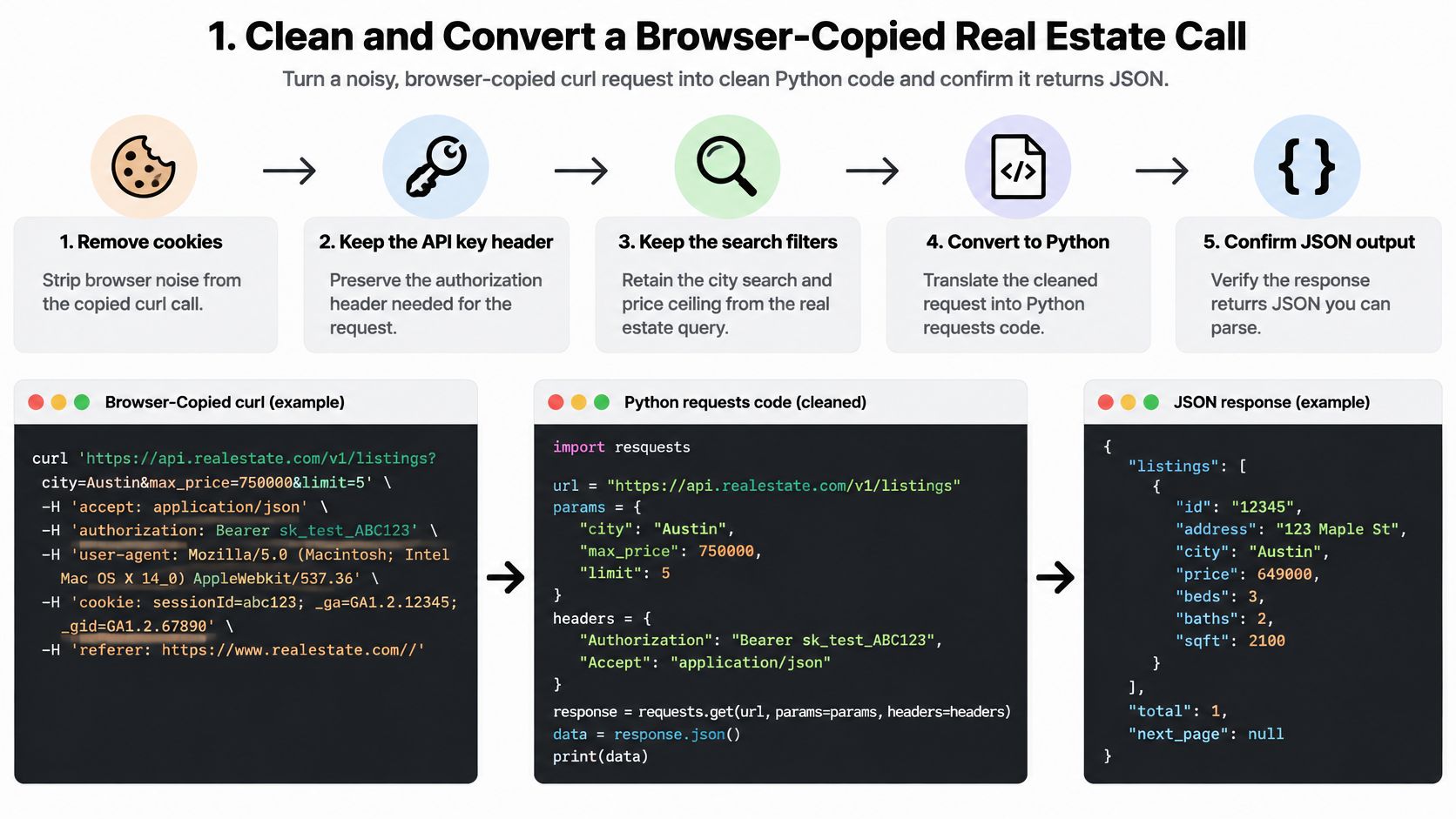
The ScreenshotOne cURL-to-Python guide discusses portability and security issues in captured commands, including credentials, browser-specific headers, and shell constructs. Redact credentials before sharing a command or pasting it into a hosted converter.
Remove browser state first
Remove cookies, Origin, Referer, sec-ch-*, sec-fetch-*, and accept-language unless the API documentation requires them. Drop manually copied Brotli or zstd negotiation unless your Python client supports the selected encoding.
Split commands containing multiple requests into separate operations. Resolve local-file inputs deliberately, and do not execute an untrusted command with shell substitutions or pipelines just to inspect it.
Move the key into the environment. Read it with
os.environand preserve the API's documented header. For RealtyAPI, that header isx-realtyapi-key. A hard-coded key can enter source control even if you later remove it.Separate filters from the endpoint. Put filters such as destination, price ceiling, and page in
paramsonly when the endpoint documents those inputs. Build query parameters with the client rather than concatenating strings, which can mishandle spaces, ampersands, or repeated filters.Use a session for shared configuration. Add authentication and content-negotiation headers to a reusable
requests.Session. Keep the method from the documented request. A POST search should not become GET just because a converter's example uses GET.Serialize JSON once. For a JSON POST endpoint, pass the Python object through
json=payload. Do not add a body to a GET request unless the endpoint documents one.Set connection and read limits. For this example,
timeout=(3.05, 20)gives Requests explicit connection and read timeouts. It is not a total wall-clock limit.Check status and payload. Call
raise_for_status()before consuming the response, then parse JSON and validate the expected fields and types. A successful parse does not prove that the returned listings are complete or useful for the requested search.
An adaptable Python script
Install Requests with python -m pip install requests. Set LISTING_SEARCH_URL to the documented endpoint and REALTYAPI_KEY to your key. The filter names and results field below are illustrative, not a claimed provider schema.
import os
import requests

url = os.environ["LISTING_SEARCH_URL"]
params = {"city": "Austin", "max_price": 500000, "page": 1}

with requests.Session() as session:
    session.headers.update({
        "x-realtyapi-key": os.environ["REALTYAPI_KEY"],
        "Accept": "application/json",
    })
    response = session.get(url, params=params, timeout=(3.05, 20))
    print("HTTP", response.status_code)
    response.raise_for_status()

    try:
        payload = response.json()
    except requests.exceptions.JSONDecodeError as exc:
        raise RuntimeError("Expected a JSON response") from exc

    results = payload["results"]
    if not isinstance(results, list):
        raise TypeError("Expected results to be a list")
    print("Results:", len(results))
For an address-based search, check the documented inputs for the address-search route. Do not assume that city-search parameters apply. RealtyAPI sends requests to the provider subdomain and uses the x-realtyapi-key header; set the endpoint and parameters to match the documented operation. Its requests fetch live source data rather than serving cached results, but still validate the response's fields and listing content before relying on it. Never silence a certificate error with verify=False.
If listing data feeds a property visualization workflow, keep mapping transformations separate from the HTTP client so each can be tested independently. Mapping automation for venue operations teams offers related context for downstream mapping workflows.
Choosing Between requests, httpx and aiohttp
The request's meaning stays the same across libraries: endpoint, filters, headers, and payload. Choose the client for the surrounding application, not because a different library might rescue an incorrect conversion.
Python HTTP libraries compared for API calls
| Library | Style | Async support | HTTP/2 | Best fit |
|---|---|---|---|---|
| requests | Synchronous | No | No | Scripts, notebooks and simple sync clients |
| httpx | Sync and async | Yes | Optional with the http2 extra | Shared sync and async code, modern clients |
| aiohttp | Asynchronous | Yes | No | High-concurrency listing pipelines inside async services |
Keep Requests for a notebook, scheduled synchronous job, or a team that already maintains a synchronous client. Its straightforward control flow makes individual failures easy to inspect.
Choose HTTPX when you need synchronous and asynchronous client interfaces, or optional HTTP/2 support. Choose aiohttp when the application already runs an asynchronous event loop and coordinates many listing-page fetches.
The same GET in each client
These examples reuse the same url, headers, and params variables. Timeout configuration is explicit in each, but the timeout APIs aren't interchangeable.
Requests
import requests

with requests.Session() as session:
    response = session.get(
        url, headers=headers, params=params, timeout=(3.05, 20)
    )
    response.raise_for_status()
    payload = response.json()
HTTPX
import httpx

with httpx.Client(timeout=httpx.Timeout(20, connect=3.05)) as client:
    response = client.get(url, headers=headers, params=params)
    response.raise_for_status()
    payload = response.json()
aiohttp, inside an asynchronous function:
import aiohttp

timeout = aiohttp.ClientTimeout(
    total=None, sock_connect=3.05, sock_read=20
)
async with aiohttp.ClientSession(timeout=timeout) as session:
    async with session.get(
        url, headers=headers, params=params
    ) as response:
        response.raise_for_status()
        payload = await response.json()
Headers and filters transfer directly. JSON request objects remain Python objects, although response parsing and resource management change with the client.
Switching to async doesn't fix missing filters, expired credentials, or the wrong endpoint. Validate the request before optimizing its execution.
Paginating Real Estate Results in Python
A converted search call usually represents one page, not a complete property dataset. Before writing a loop, identify the documented pagination contract: page numbers, a next cursor, a total_pages field, or another explicit continuation signal.
API2Cart's guide to reliable data pagination provides useful context for separating pagination strategies. Don't infer that a short page means completion if the API supplies a more authoritative continuation field.
Keep the search stable
Use the same location, price, sorting, and availability filters throughout a retrieval run. Changing filters between requests can skip or duplicate listings, and an expired cursor should trigger a documented restart strategy rather than endless resubmission.
For an illustrative page-number API, suppose the response contains results, page_size, total_count, and total_pages, with an id on each listing. Adapt these names to the actual schema; session and url come from your initialized client.
import os
import time

listings, seen_first = [], set()
for page in range(1, int(os.environ["MAX_SEARCH_PAGES"]) + 1):
    params = {"city": "Austin", "max_price": 500000, "page": page}
    response = session.get(url, params=params, timeout=(3.05, 20))
    response.raise_for_status()
    data = response.json()
    batch = data["results"]
    page_size, total_count = data["page_size"], data["total_count"]
    if not batch or batch[0]["id"] in seen_first:
        break
    seen_first.add(batch[0]["id"])
    listings.extend(batch)
    if page >= data["total_pages"]:
        break
    time.sleep(float(os.environ["PAGE_PAUSE_SECONDS"]))
The configured page cap is a safety boundary, not evidence that you've collected everything. Treat a repeated first listing ID as a warning requiring investigation, since the server may be ignoring your page parameter.
- Check completeness: Compare collected unique IDs with the response's documented total semantics.
- Keep pagination structured: Put the page or cursor in
params, not an interpolated URL. - Respect the endpoint policy: Consult the rate-limit documentation and configure pacing accordingly.
Add concurrency only after the sequential loop handles failures and proves it can terminate correctly.
Timeouts and Retries That Keep Listing Calls Stable
Requests doesn't supply a default timeout or automatic retries. The Requests documentation explains that explicit timeouts are necessary and that read timing measures socket inactivity, not the total duration of downloading a response.
In timeout=(3.05, 20), the first component controls connection waiting and the second controls read inactivity. For a listing export with an overall completion deadline, enforce a separate job-level deadline; the tuple alone won't provide it.
Retry decisions by failure type
| Failure | Retry? | Action |
|---|---|---|
| Connect timeout | Yes | Retry with exponential backoff and jitter. |
| Read timeout on GET | Yes, capped | Retry within the attempt limit and log each attempt. |
| Read timeout on POST | Only with an idempotency key | Check server state before resending. |
| 429 Too Many Requests | Yes | Wait for the Retry-After value before the next attempt. |
| 401 or 403 | No | Refresh or fix the API key, not the request. |
Classify the failure before resending
Use a reusable Session and configure a bounded retry policy. A practical starting policy is a small attempt budget, such as three to five attempts, with exponential backoff and jitter, adjusted to your application's deadline.
A connection timeout is different from a read timeout after sending a write. With a POST, the server may already have completed the operation before the client loses its response. If the endpoint doesn't support idempotency keys, reconcile server state rather than automatically resending.
For a throttled response, honor Retry-After when present, including its supported date or delay representation. Retry selected transient server failures, but don't retry every error indiscriminately. Authentication and permission errors need credential or access-policy changes.
Operational safeguard: A retry should consume an explicit budget, not create an unbounded second workload.
Record attempt count, status code, latency, and request correlation ID for each attempt. Keep credentials and raw listing payloads out of routine logs; a sanitized endpoint identifier and error category are usually more useful for diagnosing transport failures.
Finally, bound worker counts even when the provider allows more concurrency. If every worker retries together, your own client can create a traffic spike, exhaust its connection pool, or overwhelm downstream storage.
Validating the Converted Call Before You Ship
A 200 response doesn't prove the conversion is correct. It proves that the destination returned a successful HTTP response, not that your script requested the intended location, preserved its body, or retrieved every matching listing.
The HasData guide to cURL in Python describes conversion pitfalls including POST-to-GET behavior across 301/302 redirects and double-serialized JSON. Both can leave you with valid-looking code that sends a materially different request.
Use this checklist against the working cURL request and the Python equivalent.
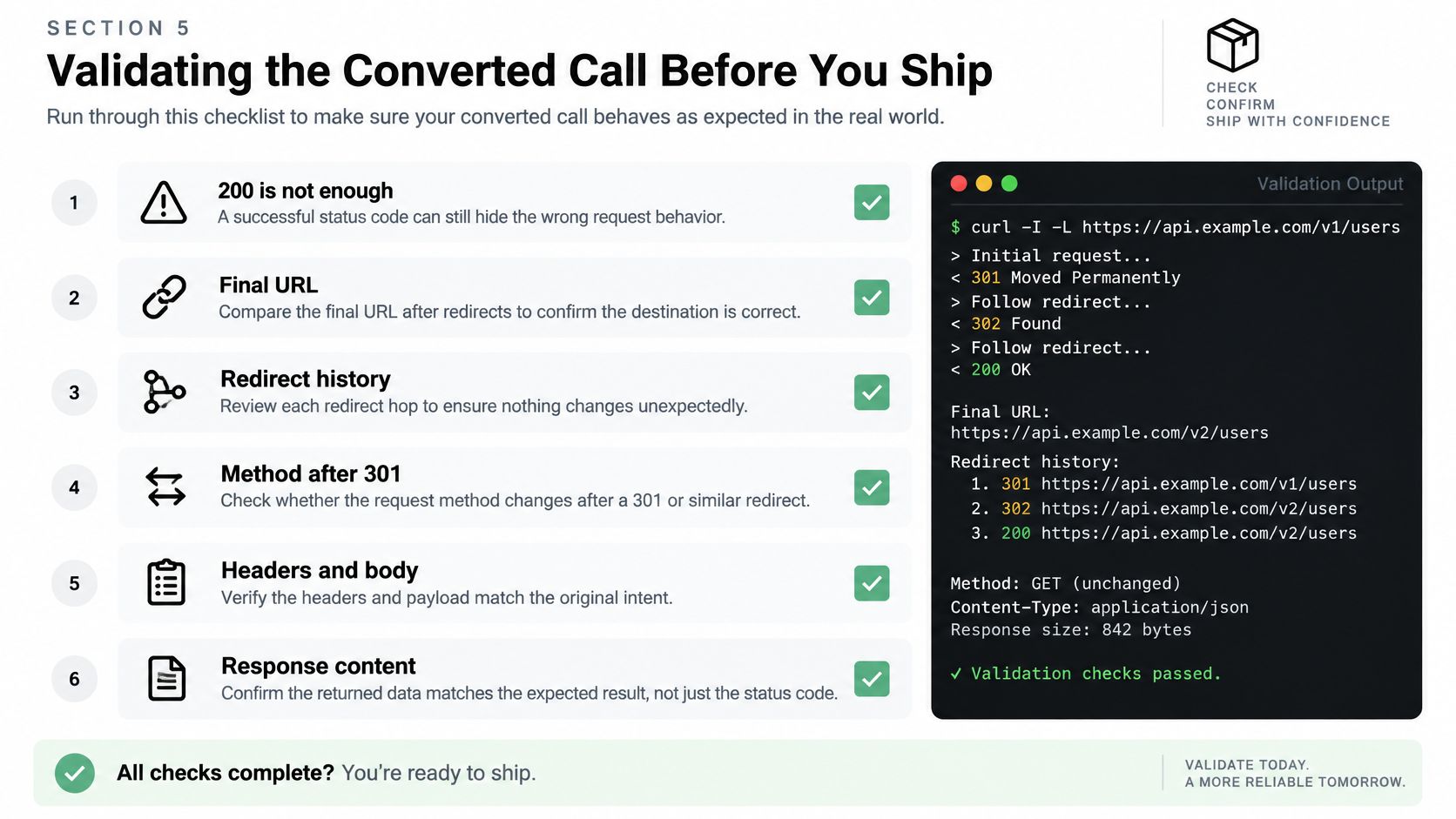
Inspect the request the server actually received
Compare response.url, response.history, response.request.method, and response.request.body. Inspect each redirect hop, not just the final destination, particularly when a body-bearing request changes method.
Use a trusted request inspector, controlled echo endpoint, or server-side tracing to check content type, body bytes, and server-visible authentication. Never send production secrets to a public echo service. Confirm the body is a JSON object rather than a JSON string containing serialized JSON.
Check response headers and content encoding as well. A response may contain a login page, an unexpected representation, or a body that doesn't satisfy the endpoint's schema despite a successful status. Interpret the result using the status-code documentation, tied to the final URL rather than the originally typed one.
Rerun the test with a fresh session. A client that works only with yesterday's browser cookies hasn't demonstrated a portable API integration.
Validate the listings, not just the transport
Compare the result count and first listing ID with the browser or dashboard using identical filters and as close a retrieval time as practical. Listing availability can change between requests, so investigate discrepancies rather than assuming either response is authoritative.
- Unexpected empty results: Verify location encoding, price units, availability filters, and response schema.
- The same page twice: Confirm the pagination parameter or cursor changes and the server recognizes it.
- A 405 after a redirect: Inspect the final method and the destination's allowed methods.
- Apparently stale properties: Check source timestamps when available and confirm that you're comparing the same search and retrieval window.
For broader test planning, AskYourQA's WebSocket and gRPC testing examples offer context when a property application uses protocols beyond REST. Keep those protocol-specific checks separate from validating this HTTP conversion.
The accompanying video is another reference for the conversion workflow.
Before shipping, require one deliberately printed, non-sensitive record from a live call, confirmed redirects, a status checked against the final URL, and applied retry rules. Don't promote the client because a generated snippet ran without raising an exception.
For that live test, our Free plan gives 250 requests per month with no credit card required, and our API Playground lets you test endpoints interactively before moving the request into code. Our code samples are available in 11 languages: cURL, Python, JavaScript, TypeScript, Go, PHP, Ruby, Java, C#, Swift and R.
RealtyAPI.io offers a standard REST API for building property-search and real estate data workflows with Python. Visit RealtyAPI.io, test a documented request, and compare its Python equivalent against the live response before adding pagination or background jobs.