10 Accessibility Features Examples for Property Listings
A renter filters for a ground-floor unit, finds a listing marked “accessible,” and books a viewing. At the property, there's a step at the back door. The bathroom has a shower curb. The label was technically present, but it didn't answer the questions that determined whether the home was usable.
That failure starts in the data model. Vague terms such as “wheelchair accessible” or “step-free” hide the measurements, locations, evidence, and limitations people need before they travel, apply, or book. Accessibility is also a substantial product requirement. The World Health Organization estimates that 1.3 billion people, or 16% of the global population, experience significant disability.
The following accessibility features examples treat every feature as a listing API field. Each one needs a defined value, a source, a verification state, and a usable interface. That approach helps developers build property search and booking products that expose real information instead of turning incomplete claims into false certainty.
1. Step-Free Access
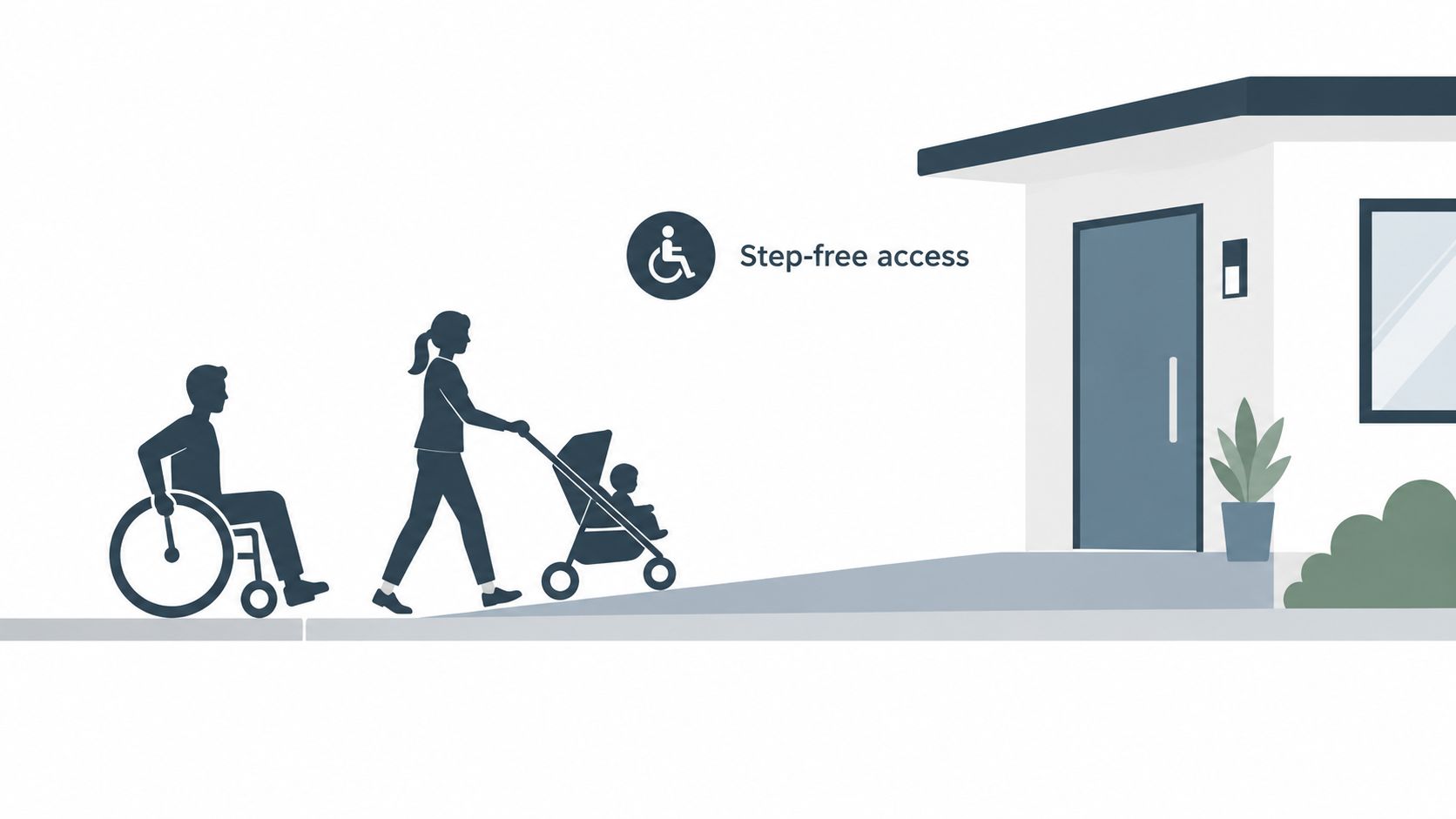
Step-free access means a person can reach and move through a property without stairs or steps. That includes the route from the street or parking area, the building entrance, and transitions between rooms. A single step can block a wheelchair user, someone using a walker, or a parent with a stroller.
A listing API should not collapse this into one step_free_access boolean. Store separate fields such as entrance_step_free, parking_to_entrance_step_free, and interior_route_step_free. Add source_type, verified_at, and confidence so a consuming app can distinguish a measured feature from a host description or an inference from photographs.
Normalize the language, preserve the evidence
Terms such as “no steps,” “ground level,” and “single story” should map to controlled values, but they shouldn't erase the original wording. “Single story” may describe the home while saying nothing about the route from the sidewalk. “Ground floor” may still involve an entrance threshold.
Use the field as a normal search option, not a hidden advanced filter. A property card should show which route the value covers. A detail page should make “not reported” visibly different from “no.”
Practical rule: Never infer a step-free route from a property's floor number or exterior photograph alone.
Airbnb's accessibility feature set gives users a familiar example of filtering for step-free access. Similar data can serve ground-floor apartments, single-level homes, and accessible housing developments, provided the API records the scope of the claim.
2. Wide Doorways and Clear Accessible Routes
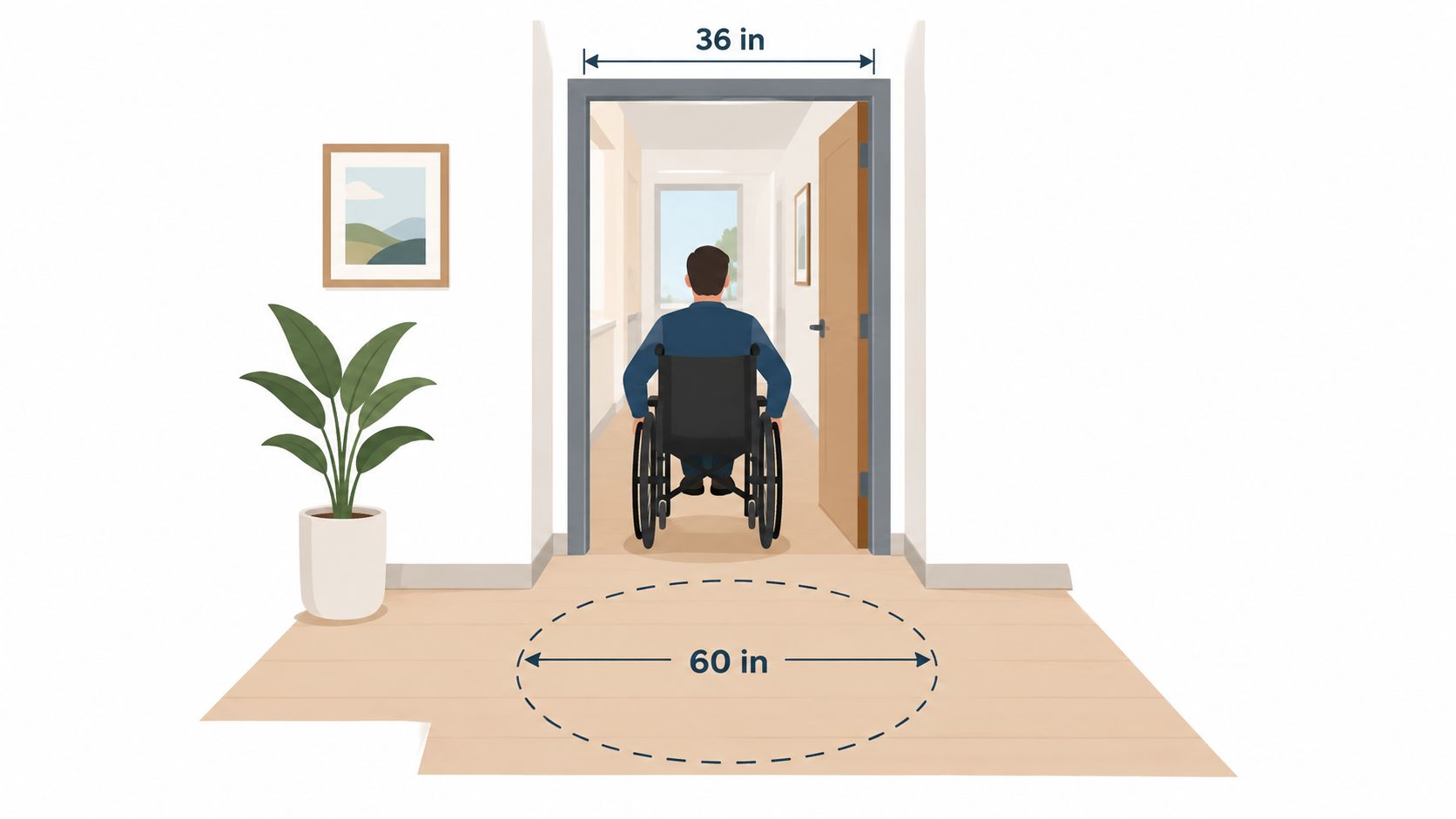
A wide doorway is useful only when the clear opening is measured correctly. The ADA 2010 Standards for Accessible Design specify a minimum clear door width of 32 inches and a minimum clear width of 36 inches for an accessible route. Those thresholds give listing teams something precise to collect and developers something precise to filter.
Store door_clear_width, accessible_route_width, and measurement_unit as separate fields. Record the doorway or route segment as well. A property may have a compliant entrance but a narrower bathroom door, or a wide hallway interrupted by furniture.
Measurements beat marketing labels
“Wide doors” and “wheelchair friendly” are weak values because users can't compare them. A measurement also needs context. Was it taken with the door open? Does the frame, hinge, or threshold reduce the usable opening? Was the route checked from the entrance to the bedroom and bathroom?
Useful fields include:
clear_width_value: Store the measured opening, not the nominal door size.unit: Accept inches or centimeters, then normalize internally.measurement_source: Distinguish inspection data from host-reported information.standard_reference: Record ADA, local code, or self-reported measurement.
Let an app filter for doorways 32 inches or wider while still displaying the actual value. A universal design home may advertise wider doors and hallways, but the API should expose the evidence behind that description.
3. Roll-In Showers and Grab Bars
A roll-in shower has no curb or threshold that blocks a wheelchair or shower chair. Grab bars provide support during transfers and standing. They often appear together in accessible bathroom renovations, but they solve different problems and must be represented separately.
Use fields such as roll_in_shower, shower_threshold_height, grab_bars_present, grab_bar_locations, and shower_seat_present. “Accessible bathroom” is not enough. A bathroom can have grab bars but still have a shower curb, or have a curbless shower without a suitable transfer position.
The ADA Standards for Accessible Design provide measurable grab-bar guidance. Typical grab bars have a diameter between 1.25 and 2 inches and are mounted between 33 and 36 inches above the floor. Store those values when they've been measured, but don't imply compliance when the listing only mentions presence.
Placement matters more than the badge
A grab bar beside the toilet serves a different purpose from one along the shower wall. Store locations as enumerated values such as shower_side_wall, shower_back_wall, and toilet_side_wall. Let developers filter on the exact combination rather than promising that every “accessible bathroom” meets every need.
A listing can also link to structured amenity data through RealtyAPI.io's amenities endpoint, then preserve the original source and verification date in its own model.
For users planning renovations, the decision may involve more than a listing filter. Details about layout, transfer space, drainage, and seat placement matter when investing in an accessible shower.
4. Accessible-Height Toilets and Beds
Toilet and bed height affects whether a person can transfer, sit, and stand without excessive strain. The ADA guidance places toilet seats between 17 and 19 inches above the floor. That value is specific enough to store, display, and use in a search filter.
Create independent fields such as toilet_seat_height, bed_mattress_height, and height_unit. A property can have an accessible-height toilet but a low bed, or an appropriate bed with a portable raised toilet seat. Combining both into accessible_height_fixtures loses information that matters during booking.
Permanent and portable features aren't equivalent
A portable raised toilet seat may be useful, but it has a different reliability profile from a permanently installed fixture. Store installation_type as permanent, portable, or unknown. The interface should show that distinction rather than presenting both as identical.
Airbnb's accessibility filters treat accessible-height beds and toilets as separate options. That separation is a sound data-modeling pattern for hotels, senior-friendly housing, assisted living units, and private rentals.
A developer response might include:
toilet_seat_height_value: The measured height.toilet_seat_height_unit: Inches or centimeters.toilet_height_source: Inspection, host report, or unknown.bed_height_includes_mattress: A value that prevents misleading comparisons.
Exact measurements help users make their own decisions. They also reduce the temptation to attach a broad “accessible” label to a listing that only satisfies one part of a transfer requirement.
5. Visual and Vibrating Alarms for Deaf and Hard-of-Hearing Occupants
A smoke alarm that only sounds an audible signal doesn't serve every occupant. Visual alarms use flashing light, while vibrating devices can alert someone who is asleep. Similar systems can support doorbells, telephones, and carbon monoxide alerts.
Separate safety events in the schema. Useful fields include fire_alarm_visual, fire_alarm_vibrating, carbon_monoxide_alarm_visual, doorbell_alert_type, and bed_shaker_available. A single accessible_alarm flag can't tell a renter whether the feature covers fire safety, entry alerts, or both.
Hotels with accessible rooms may list visual fire alarms and vibrating alarm clocks. Smart doorbells can provide flashing-light or phone-based alternatives, but a phone notification isn't necessarily equivalent to an in-room visual alarm. Store the mechanism rather than assuming equivalence.
Verification should cover the installed system
Record whether an alarm is hardwired or battery-powered when that information is available. Add last_tested_at and test_method for inspection workflows. A property onboarding process can ask the host to demonstrate the alarm, while an inspection team can record the result.
The European Union accessibility guidance treats accessibility as more than visual presentation. It includes different input and output options and interoperability with assistive technologies. Property data should follow the same principle by describing how an alert reaches the occupant, not merely calling the room accessible.
6. Alt Text for Listing Photos
For a blind or low-vision renter, a photo without an accessible description removes information that sighted users receive immediately. WCAG 2.2 Success Criterion 1.1.1, Non-text Content, requires text alternatives for images that convey information. On a property platform, that includes rooms, entrances, bathrooms, ramps, parking spaces, and other features that influence suitability.
Add alt_text to every listing photo object. Keep the description concise, identify the room or feature, and describe accessibility-relevant details when they are visible. A useful value might identify a step-free entrance, a roll-in shower, or the location of a grab bar. Avoid starting every value with “image of.”
Separate decorative and informative images
A decorative divider should return an empty alt value so a screen reader skips it. A property photograph should not. If a description hasn't been supplied, return a fallback such as “Listing photo 3 of 12: living room,” while marking alt_text_status as fallback.
A practical photo object can include:
alt_text: The description a screen reader receives.alt_text_status:verified,generated,fallback, ormissing.decorative: A boolean for non-informative imagery.photo_context: Room, exterior, bathroom, entrance, or amenity.
Use RealtyAPI.io's apartment details and photos endpoint as a source of photo records, then apply your own editorial and accessibility validation before rendering them. Automatic descriptions can help with scale, but a generated sentence may miss the step at the entrance that determines whether a listing works for a wheelchair user.
7. Color Contrast for Property Interfaces
A property interface fails when users can't read the price, address, filter state, or error message. WCAG 2.2 Success Criterion 1.4.3, Contrast Minimum, requires a contrast ratio of at least 4.5:1 for normal text and 3:1 for large text. User-interface components and meaningful graphical objects also need a minimum 3:1 contrast ratio under the relevant WCAG guidance.
Check every component state, not only the default listing card. Gray metadata on white, colored price badges, map markers, disabled controls, hover states, and focus indicators can all create failures. A high-contrast color palette doesn't fix an interface that communicates listing status through color alone.
Store contrast decisions in the design system
A property API won't solve contrast in a consuming app, but it can make accessible rendering easier. Return text labels and status values instead of requiring clients to interpret colors. For example, expose availability_status: pending and let the interface render “Pending” with an icon or pattern.
Test with a contrast checker such as the WebAIM Contrast Checker. Build high-contrast theme tokens into dashboards and listing widgets. Map-based search should show prices and selected states with text, not rely only on marker colors.
The European Accessibility Act overview describes accessible websites, information about accessibility features, and support services as part of covered service requirements from June 28, 2025. A readable interface is therefore both a usability decision and, for covered services, part of a wider compliance context.
8. Keyboard Navigation and Visible Focus Indicators
A keyboard user should be able to search, filter, inspect listing photos, operate map results, open a contact form, and submit an inquiry without a mouse. WCAG 2.2 Success Criterion 2.1.1, Keyboard, requires keyboard operation. Success Criterion 2.4.7, Focus Visible, requires a visible focus indicator, while 2.4.11, Focus Not Obscured, requires the focused control to remain visible. For a practical overview of how WCAG applies to Shopify, review the linked guidance.
Store interaction requirements with each interface component. A listing API can expose keyboard_operable: true for search controls, galleries, maps, and inquiry flows, then your application can verify that each field works with Tab, Shift+Tab, arrow keys, Enter, and Escape. A pointer-friendly custom map may fail with arrow keys. A dialog must return focus to its opening button when it closes.
Test dynamic components after JavaScript runs
Add a skip link before repeated search-page navigation. Keep the browser focus outline, or replace it with an indicator that remains clearly visible against the interface. Test focus order after filters update results, because client-side rendering can insert listing cards without announcing the change.
For map search, expose a parallel listing list with fields such as listing_id, name, address, and availability_status. This gives keyboard and screen-reader users a stable alternative to map interaction. When a modal, autocomplete menu, or gallery opens, move focus into it and keep focus contained until the task ends.
Static HTML can pass inspection while injected cards and modal layers fail after interaction. Test the rendered booking journey with JavaScript enabled.
9. Captions and Transcripts for Property Video Tours
A video tour without captions excludes people who can't hear the narration. Captions synchronize spoken words and meaningful sounds with the video. A transcript provides the complete text in a separate format and can include visual information that the narrator failed to describe.
WCAG 2.2 Success Criterion 1.2.2, Captions (Prerecorded), requires captions for prerecorded synchronized media at Level A. Success Criterion 1.2.5, Audio Description (Prerecorded), addresses audio description or an alternative for prerecorded video at Level AA. Store caption_url, transcript_url, audio_description_url, and language_code as separate media fields.
Treat automatic captions as a draft
YouTube and Vimeo can generate captions, but listing videos still need human review. Names, room labels, measurements, and accessibility terms are easy for automated speech recognition to mishear. A transcript should also describe visual facts, such as a step-free path, shower curb, or grab-bar location, when the narration doesn't make them clear.
RealtyAPI.io's tour insights endpoint can provide tour-related data for a property workflow. Your application should still validate whether the associated media has captions and a usable transcript.
A property card can show a clear warning when caption_status is missing. Don't hide the video. Offer the transcript or a text-based room summary as a fallback, and include the language so users know whether the available media matches their needs.
10. Accessible Property Filters, Forms, and Contact Flows
A property can have excellent physical features and still be impossible to book. Users need filters for step-free routes, door widths, roll-in showers, accessible-height toilets, and visual alarms. They also need labeled fields, understandable errors, and a contact flow that works with a keyboard and screen reader.
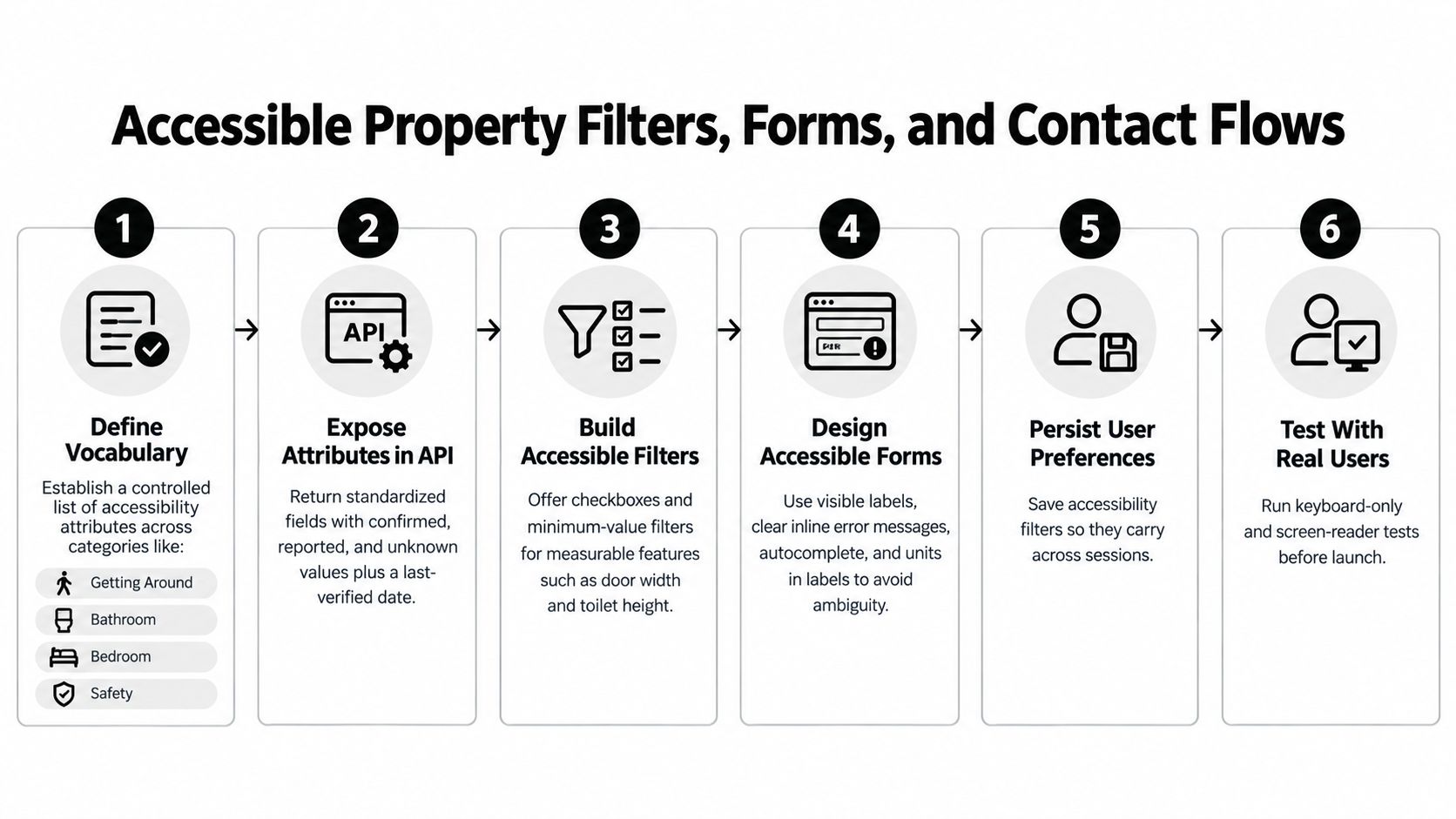
Use a controlled vocabulary across listing sources. Map source terms into fields such as entrance_step_free, door_clear_width, roll_in_shower, and visual_fire_alarm. Return both the normalized value and the evidence state. confirmed, reported_by_host, inferred, not_reported, and unknown shouldn't be merged into one public badge.
Make uncertainty visible
Show the last verification date beside safety-critical attributes. Let users save accessibility preferences so filters persist across sessions. A search result should explain whether “roll-in shower” is confirmed, host-reported, or unknown before the user commits to a booking.
Use native HTML controls for dates, times, checkboxes, and selects before adding custom widgets. Give every input a visible label. Place error messages next to the relevant field and announce them with aria-live or deliberate focus management. Include units such as USD or sq ft in labels so a number isn't ambiguous.
RealtyAPI.io's Airbnb accessibility filter endpoint returns structured accessibility-filter data in JSON for application and internal-tool integrations. A consuming product should map those fields into its own vocabulary and preserve the original source.
Test the whole path, from filter selection to listing detail to inquiry submission, with a keyboard and screen reader. A filter that works but a contact form that fails still blocks the user.
10-Point Accessibility Features Comparison
| Feature | Implementation Complexity 🔄 | Resource Requirements ⚡ | Expected Outcomes 📊⭐ | Ideal Use Cases 💡 | Key Advantages ⭐ |
|---|---|---|---|---|---|
| Step-Free Access | Moderate 🔄, ramps/elevators and route verification | Medium ⚡, construction or documented routing | High 📊⭐, broad mobility access; increases conversions | Ground-floor, rentals for wheelchair users, search filters | High-demand filter; clear user impact; verifiable when segmented |
| Wide Doorways & Accessible Routes | High 🔄, structural modifications and precise measurement | High ⚡, construction, measurement audits | High 📊⭐, objective, reduces false claims | New builds, universal-design homes, verified listings | Measurable standards for reliable filtering and comparison |
| Roll-In Showers & Grab Bars | Moderate 🔄, bathroom remodels; correct installation needed | Medium ⚡, plumbing, fixtures; grab bars low-cost if supported | High 📊⭐, reduces fall risk; enables independent bathing | Accessible renovations, rentals prioritizing bathroom access | Strong safety impact; specific, testable specs |
| Accessible-Height Toilets & Beds | Low 🔄, adjust or install raised fixtures | Low ⚡, portable aids or minor furniture changes | Medium 📊⭐, easier transfers; improves usability | Senior housing, hotels, short-term rentals | Low-cost fixes; easily stored as numeric measurements |
| Visual & Vibrating Alarms | Low–Moderate 🔄, device installation or system integration | Low–Medium ⚡, devices, wiring verification | High 📊⭐, critical safety for deaf/hard-of-hearing users | Multifamily buildings, rentals, safety-critical listings | High safety value; often code-relevant and addable via smart devices |
| Alt Text for Listing Photos | Low 🔄, content process and editorial workflow | Low ⚡, time or automated generation plus review | High 📊⭐, accessibility compliance and better SEO | All listings, photo-heavy catalogs, blind/low-vision users | WCAG-required for informative images; improves discoverability |
| Color Contrast for Interfaces | Low–Moderate 🔄, design/system updates and testing | Low ⚡, design/dev time and automated tools | Medium–High 📊⭐, better readability; fewer complaints | Search UIs, badges, map labels, dashboards | Automatable checks; reduces legal risk and improves UX |
| Keyboard Navigation & Focus Indicators | Moderate–High 🔄, keyboard support across widgets | Medium ⚡, dev effort and comprehensive testing | High 📊⭐, enables operability for motor and screen-reader users | Interactive maps, forms, galleries, power-user workflows | Essential for operability; reveals other accessibility gaps |
| Captions & Transcripts for Video Tours | Moderate 🔄, captioning workflow and review | Medium ⚡, transcription services or editing time | High 📊⭐, accessibility, SEO, and broader audience reach | Virtual tours, narrated walkthroughs, marketing videos | Searchable transcripts; WCAG-required for prerecorded media |
| Accessible Property Filters, Forms & Flows | High 🔄, data modeling, mapping, UI/UX and error handling | High ⚡, engineering, data curation, verification | Very High 📊⭐, saves time, reduces abandonment, increases conversion | Marketplaces, API-driven search, housing portals | Standardized attributes, persistent prefs, clear verification states |
Turning These Examples Into a Shippable Accessibility Roadmap
Start with the attributes that affect physical access and safety. Standardize step-free routes, door clear widths, bathroom features, toilet and bed heights, and visual alarms before adding a broad “accessible” label. These fields answer concrete questions and support meaningful filters.
Next, add evidence. Every attribute should carry a source such as inspection, host report, property manager, public record, or inference. Include verified_at, updated_at, and a confidence or evidence state. Keep “not reported,” “not applicable,” and “unknown” separate. A missing value isn't proof that a feature is absent.
This distinction matters because accessibility labels can create false confidence. The 2025 U.S. National Renter Survey findings estimate that 10.2 million adult renters either need accessibility features or live with someone who does. The same source reports unmet needs among 65.0% of households needing mobility features and 77.1% of households needing sensory features. A platform that exposes only a binary label won't capture the details behind those needs.
Then build the digital layer around the data. Listing cards need readable contrast, meaningful photo alt text, and status labels that don't depend on color. Search controls, map alternatives, galleries, dialogs, and forms need keyboard support. Video tours need caption and transcript fields. WCAG 2.2 was published in October 2023 and added 9 success criteria to the 78 criteria in WCAG 2.1, including guidance related to accessible authentication and focus visibility. Use the W3C WCAG 2.2 recommendation as the technical reference, not a marketing checklist.
Automated scans are useful, but they won't prove that a renter can complete a task. The University of Arizona Libraries accessibility success story describes a remediation in which catalog discovery time fell below two minutes, accessibility errors fell by 97%, mobile usage increased by 23%, and accessibility complaints reached zero. For a property product, track equivalent outcomes such as time to first usable listing, keyboard-only filter completion, screen-reader task success, inquiry-form errors, and abandonment by device or assistive technology.
Test rendered states, not only server HTML. Client-side listing cards, map controls, autocomplete fields, lazy-loaded images, and modal dialogs can introduce failures after JavaScript executes. A browser-based accessibility study found average detected accessibility elements increasing from roughly 10 before browser processing to 87 after processing, with failed elements rising from about 46 to 176 after client-side rendering. The study PDF explains why static scans alone are insufficient.
RealtyAPI.io returns accessibility attributes alongside listing details. Teams can start by mapping those fields into a controlled vocabulary, then expose “confirmed” and “unknown” values clearly in their own search experience. The platform's accessibility data can support REST, GraphQL, and application workflows, but the consuming interface remains responsible for labels, focus behavior, contrast, form errors, and media alternatives.
RealtyAPI.io provides structured real-estate listing data, including accessibility attributes and Airbnb accessibility-filter data, for search, booking, and internal tools. Map its fields into your schema, preserve verification states, and build a clearer property discovery workflow by visiting RealtyAPI.io.